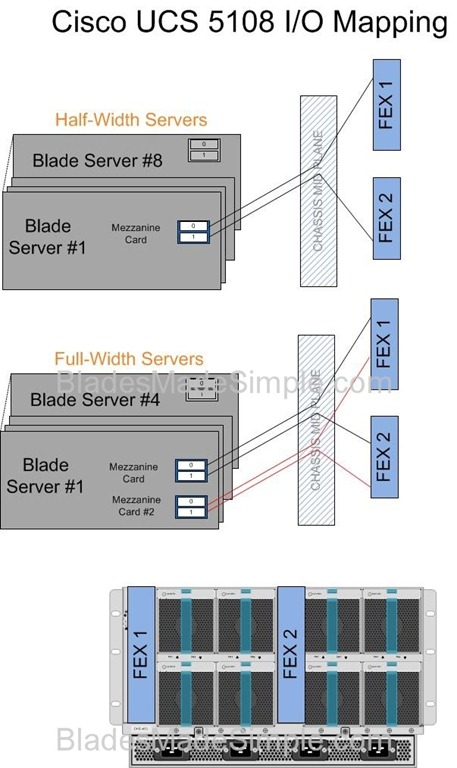
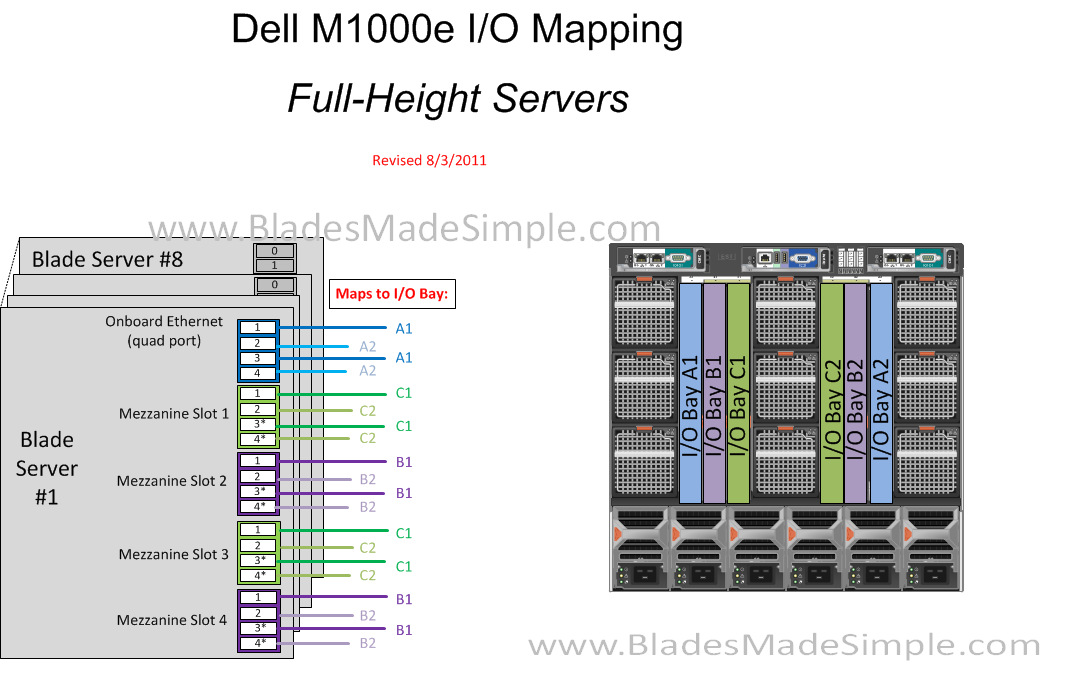
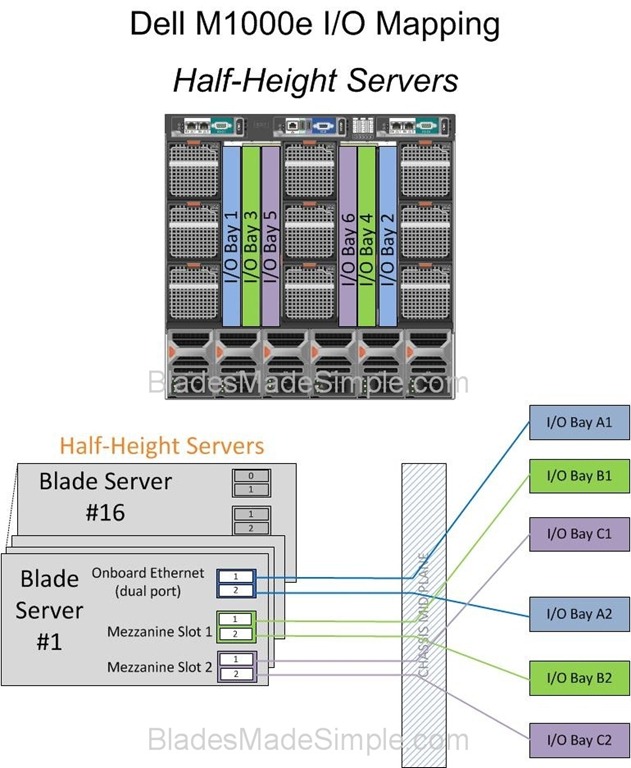
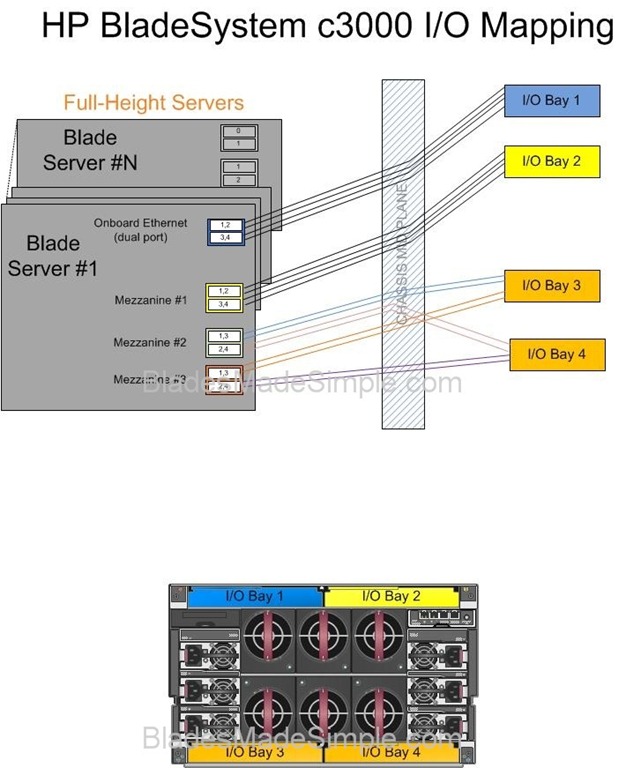
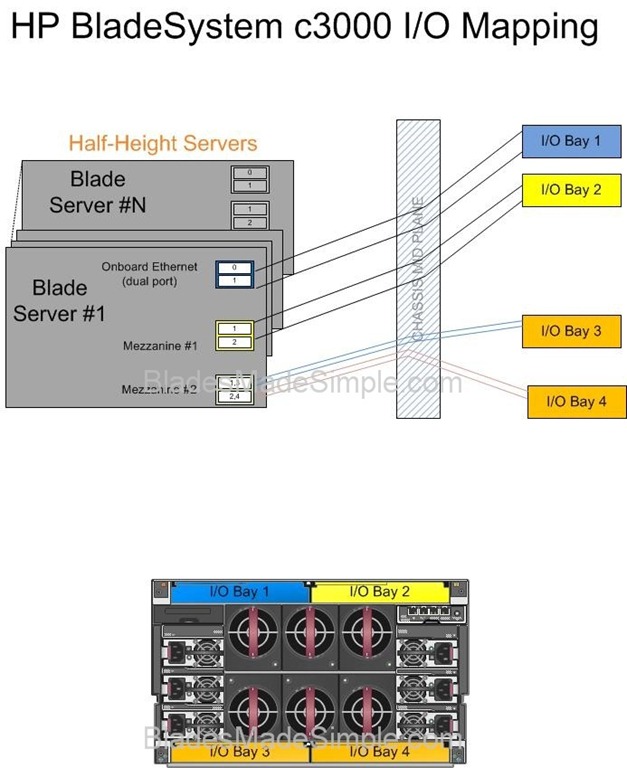
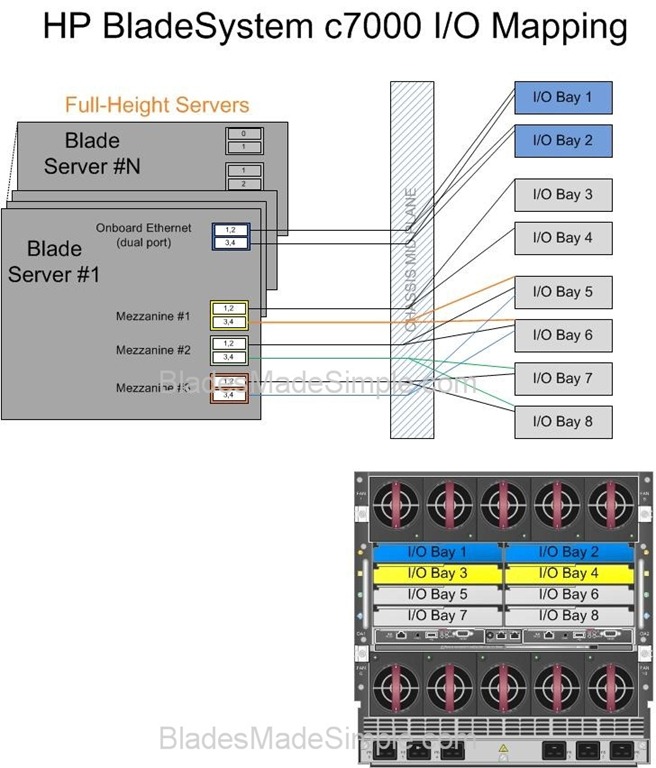
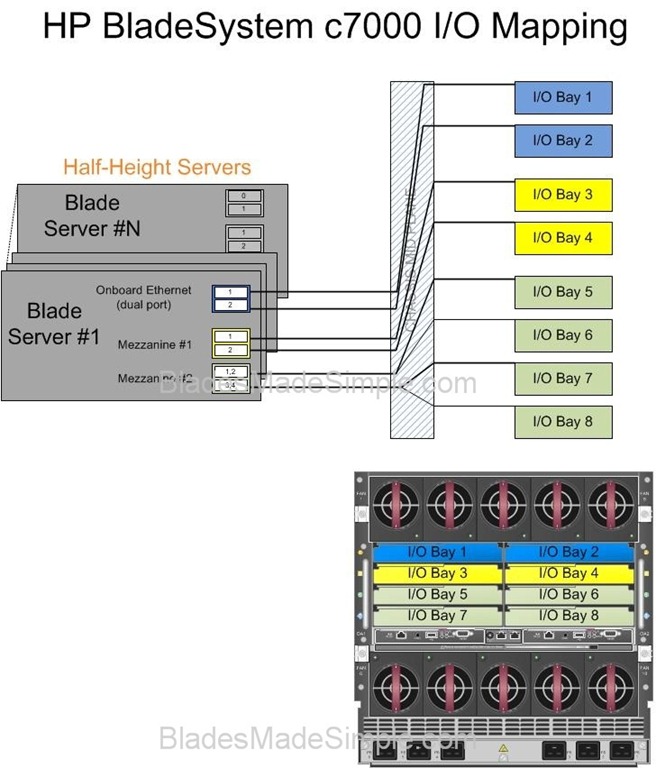
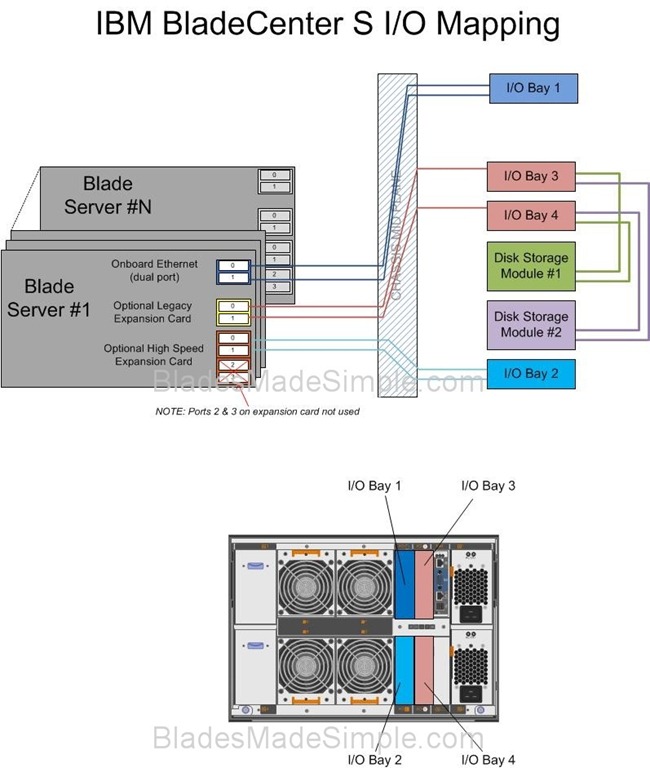
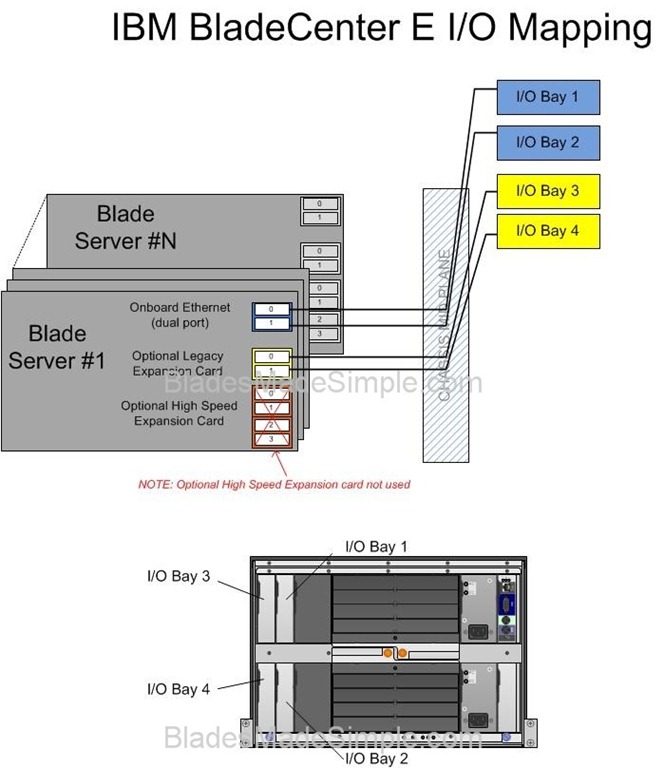
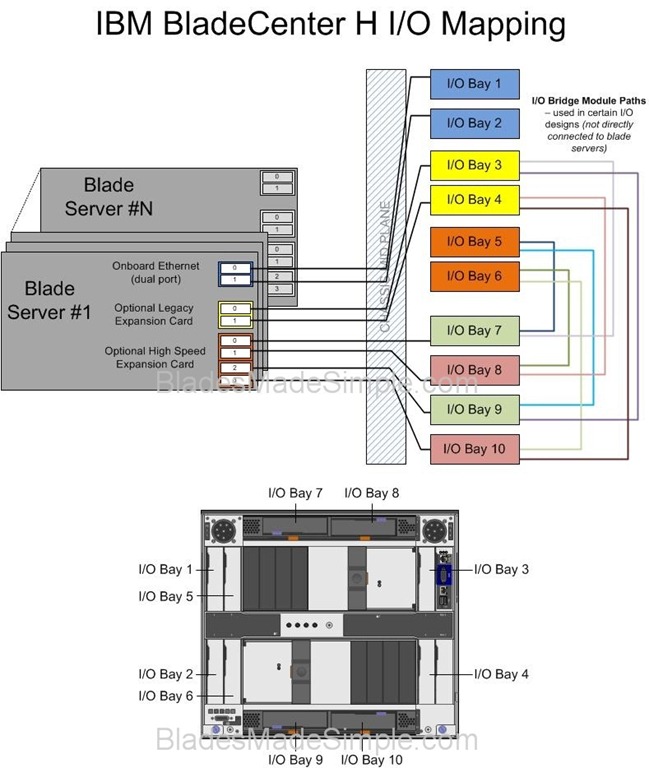
Many people get confused as to why so many I/O modules are needed within a given blade chassis. The basic concept is simple (in most cases) – for each port you need on a given blade server, you need to have a corresponding I/O module. For example, if you need 4 NICs, you’re going to need 4 Ethernet modules (in most cases.) In today’s post, I thought I would keep it simple and publish the I/O diagrams of Cisco, Dell, HP and IBM chassis. Of course, I am human and “have been known to make mistakes – from time to time” so please feel free to correct me on any errors you see. Enjoy.
(Updated 8/3/2011 – fixed Dell M1000e Full Height I/O Diagram)
Pingback: Kevin
Pingback: Kevin Houston
Pingback: Kevin Foster
Pingback: Joseph Kordish
Pingback: IBM System x
Pingback: B2BCliff
Pingback: Toru OZAKI
Pingback: David Hurst
Pingback: Joshua Smith
Pingback: Naru Tonesaku
Pingback: Manabu Ori
Pingback: Kelvin Anderson
Pingback: Emulex Links
Pingback: martinmacleod
Pingback: Chris Rowley
Hi Kevin,
Great write-up on the comparisons.
One correction on the UCS 5108 chassis – all half-width slots have 4 lanes/connections to each I/O module. So, each half-width slot would have a total of 8 connections and each full-width server would have 16.
Even though only 2 connections were usable with first generation I/O module and CNAs, the backplane still provided the lanes/connections. Once the Gen 2 hardware ships this year, the 2208XP and 1280 VIC will allow those lanes to finally be used. In other words, every 5108 chassis that’s ever shipped has a backplane that supports 8 connections to each half-width server or 16 connections to each full-width server.
Best regards,
Sean
Pingback: moritzhoefer
For the M1000e with full-height blades, the M910 blade guidebook says that mezzanine card #1 and #3 connect to fabric C, and that mezzanine card #2 and #4 connect to fabric B.
See picture on top of page 13:
http://www.dell.com/downloads/global/products/pedge/en/pedge_m910_technical_guidebook.pdf
Dan – thanks for catching my oversight. I’ve updated the #Dell I/O diagram for the full height blades to connect to the respective ports.
Sean – I drew the #Cisco UCS I/O to reflect the # ports from the half width server, not the number of lanes. To my knowledge there isn’t a 4 port mezz card yet available on the half height servers so I am showing 2 ports per mezz slot. If there is a 4 or 8 port card for the half width blades, please let me know and I’ll revise the diagram. Thanks for the feedback!
Hi Kevin,
The recently announced 1280 VIC is an 8 port mezzanine card for either half or full width UCS blade servers.
Regards,
Sean
I’ve posted diagrams focusing on midplane lane counts & styles here: http://ideasint.blogs.com/ideasinsights/2011/08/is-your-blade-chassis-obsolete.html
The word “port” might need to be understood in context. I’ve heard server guys call the 1280 VIC card a “256 port” card (# interfaces seen by an OS), an “8 port card” (# physical interfaces delivered by the silicon and routed on the midplane), or even a “2 port card” (number of upstream modules, i.e. FEXes, to which it connects).
Yeah, I definitely understand the confusion in terminology.
Just to beat the horse one last time to make sure everyone understands… Cisco UCS provides an 8 physical 10GE port CNA (1280 VIC) for half-width blade servers and UCS provides a blade chassis I/O module (2208XP) that provides 8 physical 10GBASE-KR lanes to each half-width server slot.Bottom line: each half-width UCS server has up to 8x physical 10GE ports and each full-width UCS server has up to 16x physical 10GE ports.
Pingback: M. Sean McGee
Pingback: unix player
Pingback: Scott Enicke
Pingback: raphael schitz
Pingback: Julien Mousqueton
Pingback: Blade Chassis I/O Diagrams – Making blade servers simple | HP Server Reviews
You will now need to update your diagrams for the new I/O modules and Fabric Interconnects.
The Chassis now supports up to 160Gb/s (80Gb per FEX) in a port channel configuration. The new 6248 is based on the hardware specifications of the 5548 with 4k VLAN support, 2 us latency and Universal Ports.
In addition the new 2208 I/O module (aka. FEX) module supports 32 internal facing 10Gb ports each!
Pingback: Moshe Hagshur
Pingback: Patrick Lownds
Pingback: 2015 in Review » Blades Made Simple