Tag Archives: blade server

New Cisco Blade Server: B440-M1

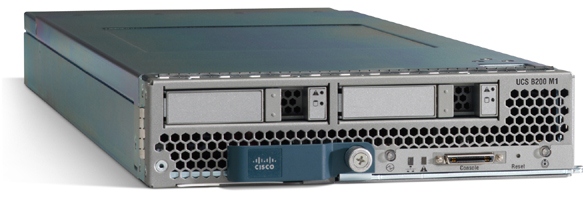
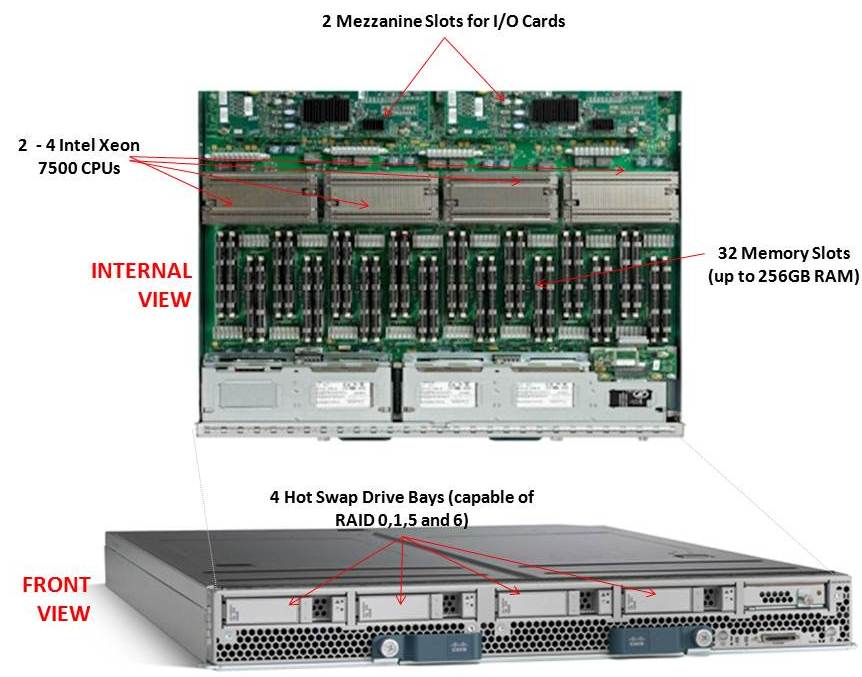
Cisco recently announced their first blade offering with the Intel Xeon 7500 processor, known as the “Cisco UCS B440-M1 High-Performance Blade Server.”  This new blade is a full-width blade that offers 2 – 4 Xeon 7500 processors and 32 memory slots, for up to 256GB RAM, as well as 4 hot-swap drive bays.  Since the server is a full-width blade, it will have the capability to handle 2 dual-port mezzanine cards for up to 40 Gbps I/O per blade. 

Each Cisco UCS 5108 Blade Server Chassis can house up to four B440 M1 servers (maximum 160 per Unified Computing System). 

How Does It Compare to the Competition?
Since I like to talk about all of the major blade server vendors, I thought I’d take a look at how the new Cisco B440 M1 compares to IBM and Dell.  (HP has not yet announced their Intel Xeon 7500 offering.)

Processor Offering
Both Cisco and Dell offer models with 2 – 4 Xeon 7500 CPUs as standard.  They each have variations on speeds – Dell has 9 processor speed offerings; Cisco hasn’t released their speeds and IBM’s BladeCenter HX5 blade server will have 5 processor speed offerings initially.  With all 3 vendors’ blades, however, IBM’s blade server is the only one that is designed to scale from 2 CPUs to 4 CPUs by connecting 2 x HX5 blade servers.  Along with this comes their “FlexNode” technology that enables users to have the 4 processor blade system to split back into 2 x 2 processor systems at specific points during the day.  Although not announced, and purely my speculation, IBM’s design also leads to a possible future capability of connecting 4 x 2 processor HX5’s for an 8-way design.  Since each of the vendors offer up to 4 x Xeon 7500’s, I’m going to give the advantage in this category to IBM.  WINNER: IBM

Memory Capacity
Both IBM and Cisco are offering 32 DIMM slots with their blade solutions, however they are not certifying the use of 16GB DIMMs – only 4GB and 8GB DIMMs, therefore their offering only scales to 256GB of RAM.  Dell claims to offers 512GB DIMM capacity on their the PowerEdge 11G M910 blade server, however that is using 16GB DIMMs.  REalistically, I think the M910 would only be used with 8GB DIMMs, so Dell’s design would equal IBM and Cisco’s.  I’m not sure who has the money to buy 16GB DIMMs, but if they do – WINNER: Dell (or a TIE)

Server Density
As previously mentioned, Cisco’s B440-M1 blade server is a “full-width” blade so 4 will fit into a 6U high UCS5100 chassis.  Theoretically, you could fit 7 x UCS5100 blade chassis into a rack, which would equal a total of 28 x B440-M1’s per 42U rack.
Overall, Cisco’s new offering is a nice addition to their existing blade portfolio.  While IBM has some interesting innovation in CPU scalability and Dell appears to have the overall advantage from a server density, Cisco leads the management front. 

Dell’s PowerEdge 11G M910 blade server is a “full-height” blade, so 8 will fit into a 10u high M1000e chassis.  This means that 4 x M1000e chassis would fit into a 42u rack, so 32 x Dell PowerEdge M910 blade servers should fit into a 42u rack.

IBM’s BladeCenter HX5 blade server is a single slot blade server, however to make it a 4 processor blade, it would take up 2 server slots.  The BladeCenter H has 14 server slots, so that makes the IBM solution capable of holding 7 x 4 processor HX5 blade servers per chassis.  Since the chassis is a 9u high chassis, you can only fit 4 into a 42u rack, therefore you would be able to fit a total of 28 IBM HX5 (4 processor) servers into a 42u rack.
WINNER: Dell

Management
The final category I’ll look at is the management.  Both Dell and IBM have management controllers built into their chassis, so management of a lot of chassis as described above in the maximum server / rack scenarios could add some additional burden.  Cisco’s design, however, allows for the management to be performed through the UCS 6100 Fabric Interconnect modules.  In fact, up to 40 chassis could be managed by 1 pair of 6100’s.  There are additional features this design offers, but for the sake of this discussion, I’m calling WINNER: Cisco.

Cisco’s UCS B440 M1 is expected to ship in the June time frame.  Pricing is not yet available.  For more information, please visit Cisco’s UCS web site at http://www.cisco.com/en/US/products/ps10921/index.html.
Technical Details on the IBM HX5 Blade Server (UPDATED)

(Updated 4/22/2010 at 2:44 p.m.)
IBM officially announced the HX5 on Tuesday, so I’m going to take the liberty to dig a little deeper in providing details on the blade server. I previously provided a high-level overview of the blade server on this post, so now I want to get a little more technical, courtesy of IBM.  It is my understanding that the “general availability” of this server will be in the mid-June time frame, however that is subject to change without notice.

Block Diagram
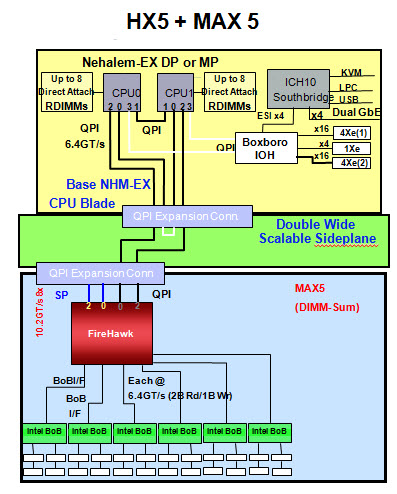
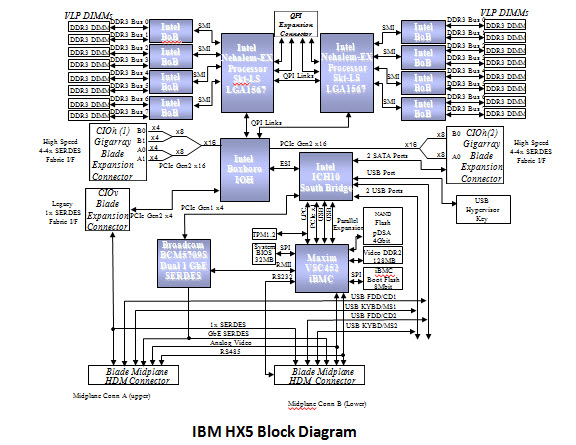
Below is the details of the actual block diagram of the HX5.  There’s no secrets here, as they’re using the Intel Xeon 6500 and 7500 chipsets that I blogged about previously.

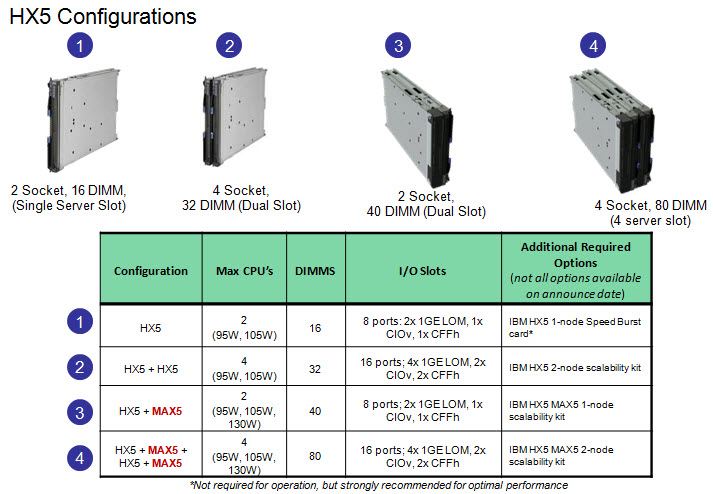
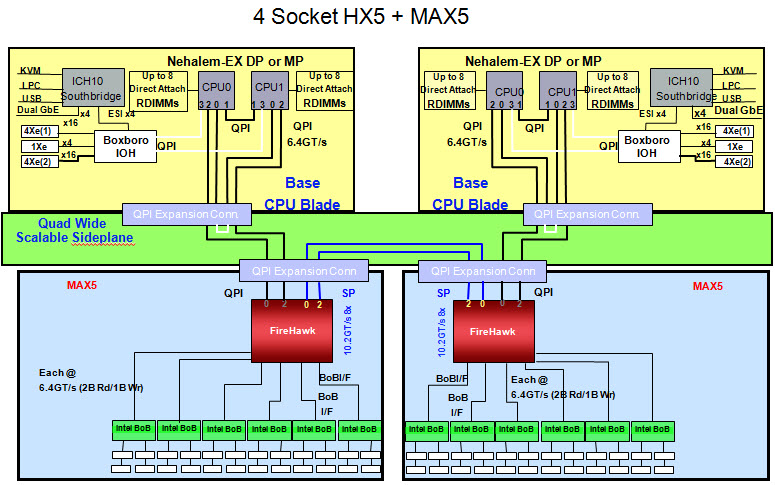
As previously mentioned, the value that the IBM HX5 blade server brings is scalability.  A user has the ability to buy a single blade server with 2 CPUs and 16 DIMMs, then expand it to 40 DIMMs with a 24 DIMM MAX 5 memory blade.  OR, in the near future, a user could combine 2 x HX5 servers to make a 4 CPU server with 32 DIMMs, or add a MAX5 memory DIMM to each server and have a 4 CPU server with 80 DIMMs. 

The diagrams below provide a more technical view of the the HX5 + MAX5 configs. Note, the “sideplanes” referenced below are actualy the “scale connector“.  As a reminder, this connector will physically connect 2 HX5 servers on the tops of the servers, allowing the internal communications to extend to each others nodes.  The easiest way to think of this is like a Lego .  It will allow a HX5 or a MAX5 to be connected together.  There will be a 2 connector, a 3 connector and a 4 connector offering. 

 (Updated) Since the original posting, IBM released the “eX5 Porfolio Technical Overview: IBM System x3850 X5 and IBM BladeCenter HX5” so I encourage you to go download it and give it a good read.  David’s Redbook team always does a great job answering all the questions you might have about an IBM server inside those documents. 

If there’s something about the IBM BladeCenter HX5 you want to know about, let me know in the comments below and I’ll see what I can do.

Thanks for reading!

Dell M910 Blade Server – Based on the Nehalem EX

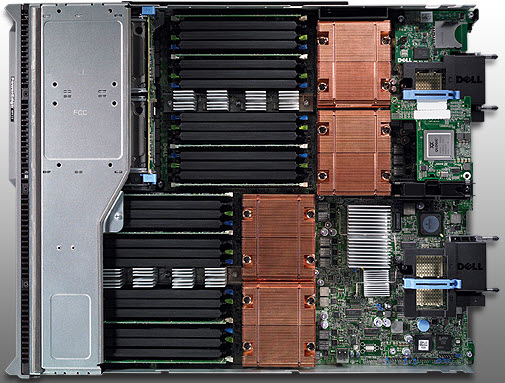
Dell appears to be first to the market today with complete details on their Nehalem EX blade server, the PowerEdge M910. Based on the Nehalem EX technology (aka Intel Xeon 7500 Chipset), the server offers quite a lot of horsepower in a small, full-height blade server footprint.

Some details about the server:

  • uses Intel Xeon 7500 or 6500 CPUs
  • has support for up to 512GB using 32 x 16 DIMMs
  • comes standard two embedded Broadcom NetExtreme II Dual Port 5709S Gigabit Ethernet NICs with failover and load balancing.
  • has two 2.5″ Hot-Swappable SAS/Solid State Drives
  • 3 4 available I/O mezzanine card slots
  • comes with a Matrox G200eW w/ 8MB memory standard
  • can function on 2 CPUs with access to all 32 DIMM slots

Dell (finally) Offers Some Innovation
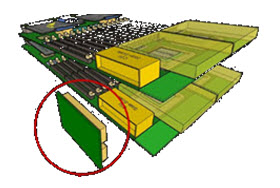
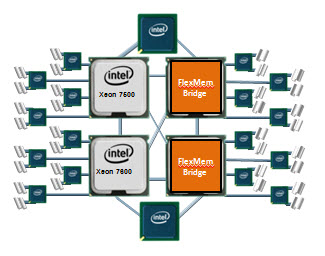
I commented a few weeks ago that Dell and innovate were rarely used in the same sentence, however with today’s announcement, I’ll have to retract that statement. Before I elaborate on what I’m referring to, let me do some quick education. The design of the Nehalem architecture allows for each processor (CPU) to have access to a dedicated bank of memory along with its own memory controller. The only downside to this is that if a CPU is not installed, the attached memory banks are not useable. THIS is where Dell is offering some innovation. Today Dell announced the “FlexMem Bridge” technology. This technology is simple in concept as it allows for the memory of a CPU socket that is not populated to still be used. In essence, Dell’s using technology that bridges the memory banks across un-populated CPU slots to the rest of the server’s populated CPUs. With this technology, a user could start of with only 2 CPUs and still have access to 32 memory DIMMs. Then, over time, if more CPUs are needed, they simply remove the FlexMem Bridge adapters from the CPU sockets then replace with CPUs – now they would have a 4 CPU x 32 DIMM blade server.

Congrats to Dell. Very cool idea. The Dell PowerEdge M910 is available to order today from the Dell.com website.

 Let me know what you guys think.

Cisco, IBM and HP Update Blade Portfolio with Westmere Processor

Intel officially announced today the Xeon 5600 processor, code named “Westmere.” Cisco, HP and IBM also announced their blade servers that have the new processor. The Intel Xeon 5600 offers:

  • 32nm process technology with 50% more threads and cache
  • Improved energy efficiency with support for 1.35V low power memory

There will be 4 core and 6 core offerings. This processor also provide the option of HyperThreading, so you could have up to 8 threads and 12 threads per processor, or 16 and 24 in a dual CPU system. This will be a huge advantage to applications that like multiple threads, like virtualization. Here’s a look at what each vendor has come out with:

Cisco
Cisco B200 blade serverThe B200 M2 provides Cisco users with the current Xeon 5600 processors. It looks like Cisco will be offering a choice of the following Xeon 5600 processors: Intel Xeon X5670, X5650, E5640, E5620, L5640, or E5506. Because Cisco’s model is a “built-to-order” design, I can’t really provide any part numbers, but knowing what speeds they have should help.

HP
HP is starting off with the Intel Xeon 5600 by bumping their existing G6 models to include the Xeon 5600 processor. The look, feel, and options of the blade servers will remain the same – the only difference will be the new processor. According to HP, “the HP ProLiant G6 platform, based on Intel Xeon 5600 processors, includes the HP ProLiant BL280c, BL2x220c, BL460c and BL490c server blades and HP ProLiant WS460c G6 workstation blade for organizations requiring high density and performance in a compact form factor. The latest HP ProLiant G6 platforms will be available worldwide on March 29.It appears that HP’s waiting until March 29 to provide details on their Westmere blade offerings, so don’t go looking for part numbers or pricing on their website.

IBM
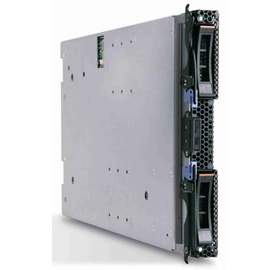
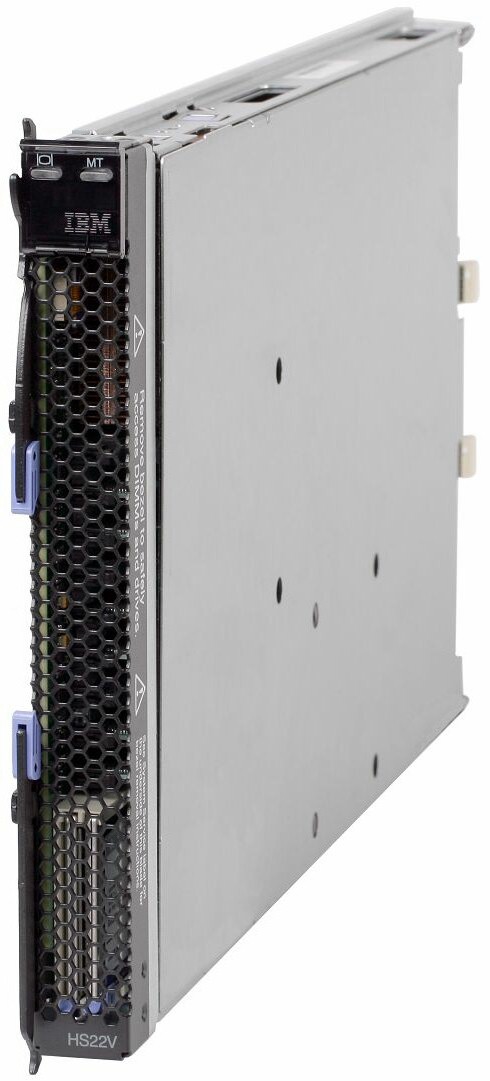
IBM is continuing to stay ahead of the game with details about their product offerings. They’ve refreshed their HS22 and HS22v blade servers:

HS22
7870ECU – Express HS22, 2x Xeon 4C X5560 95W 2.80GHz/1333MHz/8MB L2, 4x2GB, O/Bay 2.5in SAS, SR MR10ie

7870G4U – HS22, Xeon 4C E5640 80W 2.66GHz/1066MHz/12MB, 3x2GB, O/Bay 2.5in SAS

7870GCU – HS22, Xeon 4C E5640 80W 2.66GHz/1066MHz/12MB, 3x2GB, O/Bay 2.5in SAS, Broadcom 10Gb Gen2 2-port

7870H2U -HS22, Xeon 6C X5650 95W 2.66GHz/1333MHz/12MB, 3x2GB, O/Bay 2.5in SAS

7870H4U – HS22, Xeon 6C X5670 95W 2.93GHz/1333MHz/12MB, 3x2GB, O/Bay 2.5in SAS

7870H5U – HS22, Xeon 4C X5667 95W 3.06GHz/1333MHz/12MB, 3x2GB, O/Bay 2.5in SAS

7870HAU – HS22, Xeon 6C X5650 95W 2.66GHz/1333MHz/12MB, 3x2GB, O/Bay 2.5in SAS, Emulex Virtual Fabric Adapter

7870N2U – HS22, Xeon 6C L5640 60W 2.26GHz/1333MHz/12MB, 3x2GB, O/Bay 2.5in SAS

7870EGU – Express HS22, 2x Xeon 4C E5630 80W 2.53GHz/1066MHz/12MB, 6x2GB, O/Bay 2.5in SAS

IBM HS22V Blade ServerHS22V
7871G2U HS22V, Xeon 4C E5620 80W 2.40GHz/1066MHz/12MB, 3x2GB, O/Bay 1.8in SAS

7871G4U HS22V, Xeon 4C E5640 80W 2.66GHz/1066MHz/12MB, 3x2GB, O/Bay 1.8in SAS

7871GDU HS22V, Xeon 4C E5640 80W 2.66GHz/1066MHz/12MB, 3x2GB, O/Bay 1.8in SAS

7871H4U HS22V, Xeon 6C X5670 95W 2.93GHz/1333MHz/12MB, 3x2GB, O/Bay 1.8in SAS

7871H5U HS22V, Xeon 4C X5667 95W 3.06GHz/1333MHz/12MB, 3x2GB, O/Bay 1.8in SAS

7871HAU HS22V, Xeon 6C X5650 95W 2.66GHz/1333MHz/12MB, 3x2GB, O/Bay 1.8in SAS

7871N2U HS22V, Xeon 6C L5640 60W 2.26GHz/1333MHz/12MB, 3x2GB, O/Bay 1.8in SAS

7871EGU Express HS22V, 2x Xeon 4C E5640 80W 2.66GHz/1066MHz/12MB, 6x2GB, O/Bay 1.8in SAS

7871EHU Express HS22V, 2x Xeon 6C X5660 95W 2.80GHz/1333MHz/12MB, 6x4GB, O/Bay 1.8in SAS

I could not find any information on what Dell will be offering, from a blade server perspective, so if you have information (that is not confidential) feel free send it my way.

IDC Q4 2009 Report: Blade Servers STILL Growing, HP Leads STILL Leading in Shares

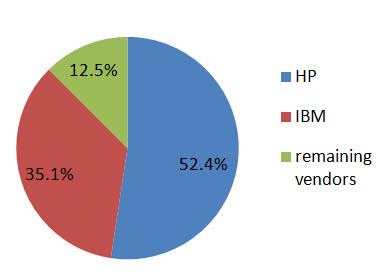
IDC reported on February 24, 2010 that blade server sales for Q4 2009 returned to quarterly revenue growth with factory revenues increasing 30.9% in Q4 2009 year over year (vs 1.2% in Q3.)  For the first time in 2009 there was an 8.3% increase in year-over-year shipments in Q4.  Overall blade servers accounted for $1.8 billion in Q4 2009 (up from $1.3 billion in Q3) which represented 13.9% of the overall server revenue.  It was also reported that more than 87% of all blade revenue in Q4 2009 was driven by x86 systems where blades now represent 21.4% of all x86 server revenue.

While the press release did not provide details of the market share for all of the top 5 blade vendors, they did provide data for the following: 

#1 market share: HP with 52.4%

#2 market share: IBM increased their marketshare from Q3 by 5.7% growth to 35.1%

q4_2009_idc

As an important note, according to IDC, IBM significantly outperformed the market with year-over-year revenue growth of 64.1%.  

According to Jed Scaramella, senior research analyst in IDC's Datacenter and Enterprise Server group,  "Blades remained a bright spot in the server vendors’ portfolios.  They were able to grow blade revenue throughout the year while maintaining their average selling prices. Customers recognize the benefits extend beyond consolidation and density, and are leveraging the platform to deliver a dynamic IT environment. Vendors consider blades strategic to their business due to the strong loyalty customers develop for their blade vendor as well as the higher level of pull-through revenue associated with blades."

Virtual I/O on IBM BladeCenter (IBM Virtual Fabric Adapter by Emulex)

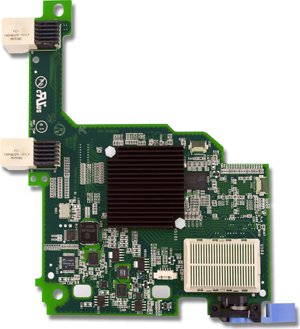
A few weeks ago, IBM and Emulex announced a new blade server adapter for the IBM BladeCenter and IBM System x line, called the “Emulex Virtual Fabric Adapter for IBM BladeCenter" (IBM part # 49Y4235). Frequent readers may recall that I had a "so what" attitude when I blogged about it in October and that was because, I didn't get it. I didn't get what the big deal was with being able to take a 10Gb pipe and allow you to carve it up into 4 "virtual NICs". HP's been doing this for a long time with their FlexNICs (check out VirtualKennth's blog for a great detail on this technology) so I didn't see the value in what IBM and Emulex was trying to do. But now I understand. Before I get into this, let me remind you of what this adapter is. The Emulex Virtual Fabric Adapter (CFFh) for IBM BladeCenter is a dual-port 10 Gb Ethernet card that supports 1 Gbps or 10 Gbps traffic, or up to eight virtual NIC devices.
This adapter hopes to address three key I/O issues:

1.Need for more than two ports per server, with 6-8 recommended for virtualization
2.Need for more than 1Gb bandwidth, but can't support full 10Gb today
3.Need to prepare for network convergence in the future

"1, 2, 3, 4"
I recently attended an IBM/Emulex partner event and Emulex presented a unique way to understand the value of the Emulex Virtual Fabric Adapter via the term, "1, 2, 3, 4" Let me explain:

"1" – Emulex uses a single chip architecture for these adapters. (As a non-I/O guy, I'm not sure of why this matters – I welcome your comments.)


"2" – Supports two platforms: rack and blade
(Easy enough to understand, but this also emphasizes that a majority of the new IBM System x servers announced this week will have the Virtual Fabric Adapter "standard")

"3" – Emulex will have three product models for IBM (one for blade servers, one for the rack servers and one intergrated into the new eX5 servers)

"4" – There are four modes of operation:

  • Legacy 1Gb Ethernet
  • 10Gb Ethernet
  • Fibre Channel over Ethernet (FCoE)…via software entitlement ($$)
  • iSCSI Hardware Acceleration…via software entitlement ($$)

This last part is the key to the reason I think this product could be of substantial value. The adapter enables a user to begin with traditional Ethernet, then grow into 10Gb, FCoE or iSCSI without any physical change – all they need to do is buy a license (for the FCoE or iSCSI).

Modes of operation

The expansion card has two modes of operation: standard physical port mode (pNIC) and virtual NIC (vNIC) mode.

In vNIC mode, each physical port appears to the blade server as four virtual NIC with a default bandwidth of 2.5 Gbps per vNIC. Bandwidth for each vNIC can be configured from 100 Mbps to 10 Gbps, up to a maximum of 10 Gb per virtual port.

In pNIC mode, the expansion card can operate as a standard 10 Gbps or 1 Gbps 2-port Ethernet expansion card.

As previously mentioned, a future entitlement purchase will allow for up to two FCoE ports or two iSCSI ports. The FCoE and iSCSI ports can be used in combination with up to six Ethernet ports in vNIC mode, up to a maximum of eight total virtual ports.

Mode IBM Switch Compatibility

vNIC – works with BNT Virtual Fabric Switch
pNIC – works with BNT, IBM Pass-Thru, Cisco Nexus
FCoE– BNT or Cisco Nexus
iSCSI Acceleration – all IBM 10GbE switches

I really think the "one card can do all" concept works really well for the IBM BladeCenter design, and I think we'll start seeing more and more customers move toward this single card concept.

Comparison to HP Flex-10
I'll be the first to admit, I'm not a network or storage guy, so I'm not really qualified to compare this offering to HP's Flex-10, however IBM has created a very clever video that does some comparisons. Take a few minutes to watch and let me know your thoughts.

7 habits of highly effective people
pet food express
cartoon network video
arnold chiari malformation
category 1 hurricane

Announcing the IBM BladeCenter HX5 Blade Server (with detailed pics)

(UPDATED 11:29 AM EST 3/2/2010)
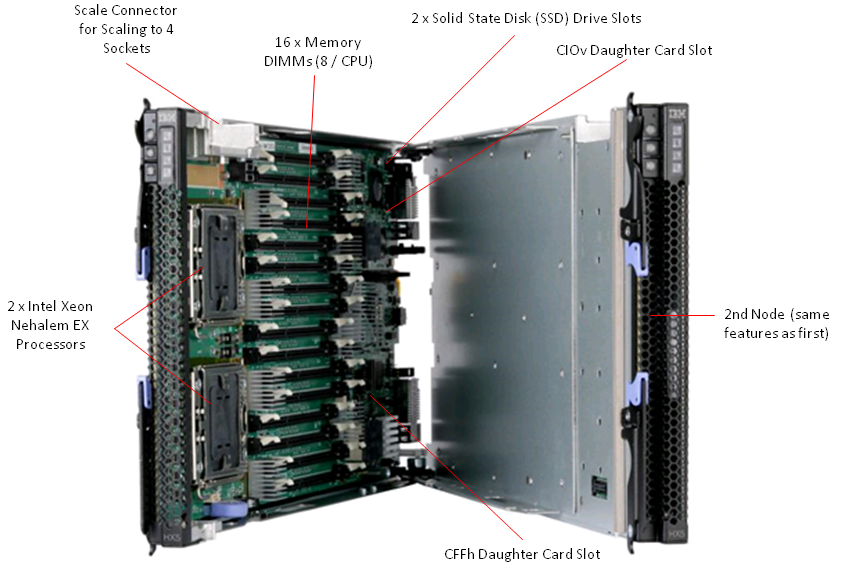
IBM announced today the BladeCenter® HX5 – their first 4 socket blade since the HS41 blade server. IBM calls the HX5 “a scalable, high-performance blade server with unprecedented compute and memory performance, and flexibility ideal for compute and memory-intensive enterprise workloads.”

The HX5 will have the ability to be coupled with a 2nd HX5 to scale to 4 CPU Sockets, grow beyond the base memory with the MAX5 memory expansion and be offer hardware partition to split a dual node server into 2 x single node servers and back again. I’ll review each of these features in more detail below, but first, let’s look at the basics of the HX5 blade server.

X5 features:

  • Up to 2 x Intel Xeon 7500 CPUs per node
  • 16 DIMMs per node
  • 2 x Solid State Disk (SSD) slots per node
  • 1 x CIOv and 1 CFFh daughter card expansion slot per node, providing up to 8 I/O ports per node
  • 1 x scale connector per node

CPU Scalability
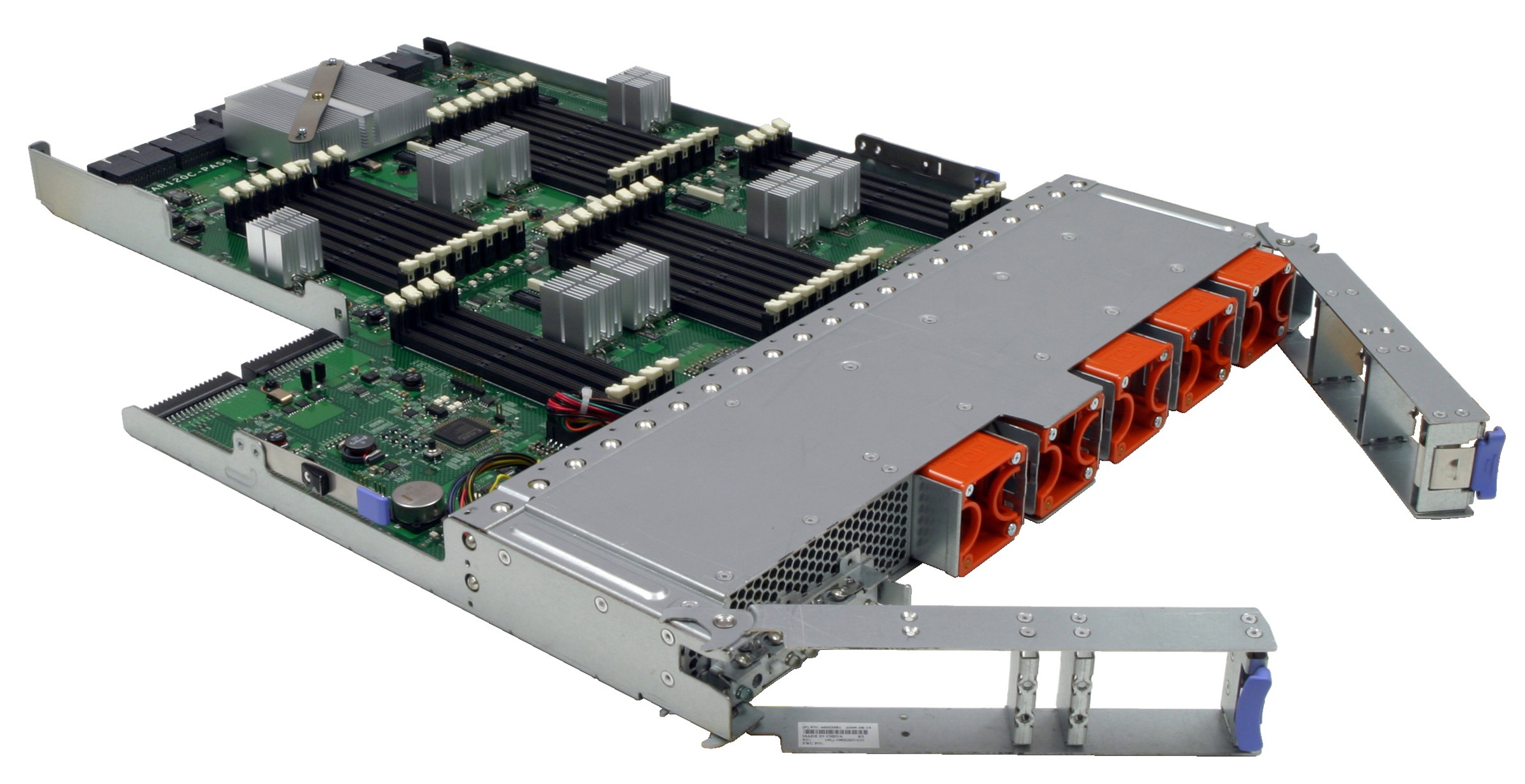
In the fashion of the eX5 architecture, IBM is enabling the HX5 blade server to grow from 2 CPUs to 4 CPUs (and theoretically more) via connecting the servers through a “scale connector“. This connector will physically connect 2 HX5 servers on the tops of the servers, allowing the internal communications to extend to each others nodes. The easiest way to think of this is like a Lego . It will allow a HX5 or a MAX5 to be connected together. There will be a 2 connector, a 3 connector and a 4 connector offering. This means you could have any number of combinations from 2 x HX5 blade servers to 2 x HX5 blade servers + a MAX5 memory blade.

Memory Scalability
With the addition of a new 24 DIMM memory blade, called the MAX5, IBM is enabling users to grow the base memory from 16 memory DIMMS to 48 40 (16+24) memory DIMMs. The MAX5 will be connected via the scale connector mentioned above, and in fact, when coupled with a 2 node, 4 socket system, could enable the entire system to have 72 80 DIMMS (16 DIMMs per HX5 plus 24 DIMMs per MAX5). Granted, this will be a 4 server wide offering, but this will be a powerful offering for database servers, or even virtualization.

Hardware Partitioning
The final feature, known as FlexNode partitioning is the ability to split up a combined server node into individual server nodes and back again as needed. Performed using IBM Software, this feature will enable a user to automatically take a 2 node HX5 system acting as a single 4 socket system and split it up into 2 x 2 socket systems then revert back to a single 4 socket system once the workload is completed.

For example, during the day, the 4 socket HX5 server is used for as a database server, but at night, the database server is not being used, so the system is partitioned off into 2 x 2 socket physical servers that can each run their own applications.

As I’ve mentioned previously, the pricing and part number info for the IBM BladeCenter HX5 blade server is not expected to show up until the Intel Xeon 7500 processor announcement on March 30, so when that info is released, you can find it here.

For more details, head over to IBM’s
RedBook
site.

Let me know your thoughts – leave your comments below.

Announcing IBM eX5 Portfolio and the HX5 Blade Server

UPDATED: 3/2/2010 at 12:58 PM EST
Author’s Note: I’m stretching outside of my “blades” theme today so I can capture the entire eX5 messaging.
 
Finally, all the hype is over.  IBM announced today the next evolution of their “Enterprise x-Architecture”, also known as eX5.  
Why eX5?  Simple:  e=Enterprise X=x-Architecture  5=fifth generation. 

IBM’s Enterprise x-Architecture has been around for quite a while providing unique Scalability, Reliability and Flexibility in the x86 4-socket platforms.  You can check out the details of the eX4 technology here. 

Today’s announcement offered up a few facts:   

a) the existing x3850 and x3950 M2 will be called x3850 and x3950 X5 signifying a trend for IBM to move toward product naming designations that reflect the purpose of the server. 

b) the x3850 and x3950 X5’s will use the Intel Nehalem EX – to be officially announced/released on March 30.  At this time we can expect full details including part numbers, pricing and technical specifications. 

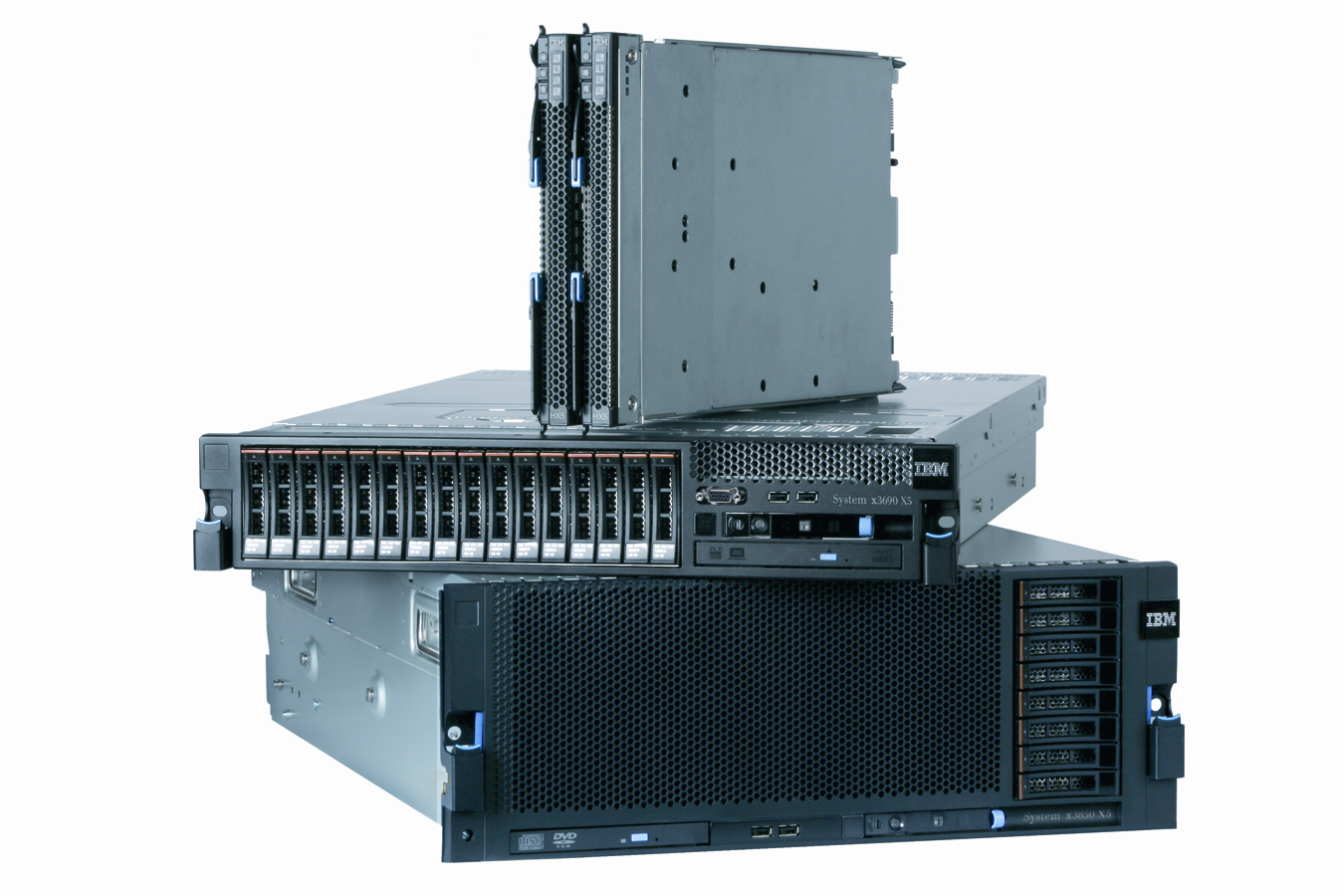
 c) a new 2u high,  2 socket server, the x3690 X5 was also announced.  This is probably the most exciting of the product announcements, as it is based on the Intel Nehalem EX processor but IBM’s innovation is going to enable the x3690 X5 to scale from 2 sockets to 4 sockets – but wait, there’s more.  There will be the ability, called MAX5 to add a memory expansion unit  to the x3690 X5 systems, enabling their system memory to be DOUBLED.d) in addition to the memory drawer, IBM will be shipping packs of solid state disks, called eXFlash that will deliver high performance to replace the limited IOPs of traditional spinning disks.  IBM is touting “significant” increases in performance for local databases with this new bundle of solid state disks.   In fact, according to IBM’s press release, eXFlash technology would eliminate the need for a client to purchase two entry-level servers and 80 JBODs to support a 240,000 IOPs database environment, saving $670,000 in server and storage acquisition costs.   The cool part is, these packs of disks will pop into the hot-swap drive bays of the x3690, x3850 and x3950 X5 servers.

e) IBM also announced a new technology, known as “FlexNode” that offers up physical partitioning capability for servers to move from being a single system to 2 different unique systems and back again. 

 
Blade Specific News
1) IBM will be releasing a new blade server, the BladeCenter HX5 next quarter that will also use the Intel Xeon 7500.  This blade server will scale, like all of the eX5 products, from 2 processors to 4 processors (and theoretically more) and will be ideal for database workloads.  Again, pricing and specs for this product will be released on the official Intel Nehalem EX launch date.  


IBM BladeCenter HX5 Blade Server


An observation from the pictures of the HX5 is that it will not have hot-swap drives, like the HS22’s do.  This means there will be internal drives – most like solid state drives (SSDs).  You may recall from my previous rumour post that the lack of hot-swap drives is pretty evident – IBM needed the real estate for the memory.  Unfortunately until memristors become available, blade vendors will need to sacrifice real estate for memory. 

2) As part of the MAX5 technology, IBM will also be launching a memory blade to increase the overall memory on the HX5 blade server.  Expect more details on this in the near future. 

Visit IBM’s website for their Live eX5 Event at 2 p.m. Eastern time at this site: 

http://www-03.ibm.com/systems/info/x86servers/ex5/events/index.html?CA=ex5launchteaser&ME=m&MET=exli&RE=ezvrm&Tactic=us0ab06w&cm_mmc=us0ab06w-_-m-_-ezvrm-_-ex5launchteaser-20100203 

As more information comes out on the new IBM eX5 portfolio, check back here and I’ll keep you posted.  I’d love to hear your thoughts in the comments below. 

MAX5 Memory Drawer (1U)


I find the x3690 X5 to be so interesting and exciting because it could quickly take over the server space that is currently occupied by the HP DL380 and the IBM x3650’s when it comes to virtualization.  We all know that VMware and other hypervisors thrive on memory, however the current 2 socket server design is limited to 12 – 16 memory sockets.  With the IBM System x3690 X5, this limitation can be overcome, as you can simply add on a memory drawer to achieve more memory capacity. 
Industry Opinions
Check out this analyst’s view of the IBM eX5 announcement here (pdf).
Here’s what VMware’s CTO, Stephen Herrod, has to say about IBM eX5:


maryland general hospital
horror movies 2010
ny gay marriage
online grocery coupons
smith goggles

Tolly Report: HP Flex-10 vs Cisco UCS (Network Bandwidth Scalability Comparison)

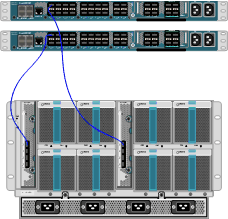
Tolly.com announced on 2/25/2010 a new Test Report that compares the network bandwidth scalability between HP BladeSystem c7000 with BL460 G6 Servers and Cisco UCS 5100 with B200 Servers, and the results were interesting.   The report simply tested 6 HP blades, with a single Flex-10 Module vs 6 Cisco blades using their Fabric Extender + a single Fabric Interconnect.  I’m not going to try and re-state what the report says (for that you can download it directly), instead, I’m going to highlight the results.  It is important to note that the report was “commissioned by Hewlett-Packard Dev. Co, L.P.”

Result #1:  HP BladeSystem C7000 with a Flex-10 Module Tested to have More Aggregate Server Throughput (Gbps) over the Cisco UCS with a Fabric Extender connected to a Fabric Interconnect in a Physical-to-Physical Comparison
>The test shows when 4 physical servers were tested, Cisco can achieve an aggregate throughput of 36.59 Gbps vs HP achieving 35.83Gbps (WINNER: Cisco)

>When 6 physical servers were tested, Cisco achieved an aggregate throughput of 27.37 Gbps vs HP achieving 53.65 Gbps – a difference of 26.28 Gbps (WINNER: HP)

Result #2:
 HP BladeSystem C7000 with a Flex-10 Module Tested to have More Aggregate Server Throughput (Gbps) over the Cisco UCS with a Fabric Extender connected to a Fabric Interconnect in a Virtual-to-Virtual Comparison
>Testing 2 servers each running 8 VMware Red Hat Linux hosts showed that HP achieved an aggregate throughput of 16.42 Gbps vs Cisco UCS achieving 16.70 Gbps (WINNER: Cisco). 

The results of the above was performed with the 2 x Cisco B200 blade servers each mapped to a dedicated 10Gb uplink port on the Fabric Extender (FEX).  When the 2 x Cisco B200 blade servers were designed to share the same 10Gb uplink port on the FEX, the achieved aggregate throughput on the Cisco UCS decreased to 9.10 Gbps.

A few points to note about these findings:
a) the HP Flex-10 Module has 8 x 10Gb uplinks whereas the Cisco Fabric Extender (FEX) has 4 x 10Gb uplinks

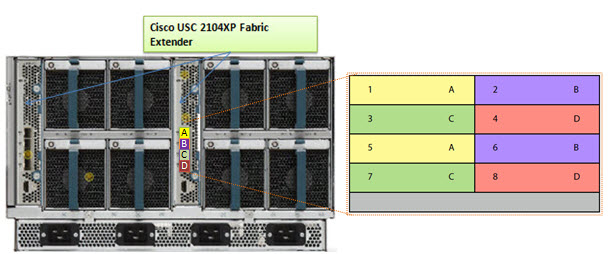
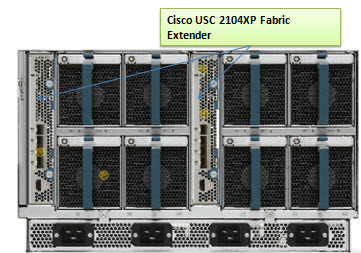
b) Cisco’s FEX Design allows for the 8 blade servers to extend out the 4 external ports in the FEX a 2:1 ratio (2 blades per external FEX port.) The current Cisco UCS design requires the servers to be “pinned”, or permanently assigned, to the respective FEX uplink. This works well when there are 4 blade servers, but when you get to more than 4 blade servers, the traffic is shared between two servers, which could cause bandwidth contention. 

 Furthermore, it’s important to understand that the design of the UCS blade infrastructure does not allow communication to go from Server 1 to Server 2 without leaving the FEX, connecting to the Fabric Interconnect (top of the picture) then returning to the FEX and connecting to the server.  This design is the potential cause of the decrease in aggregate throughput from 16.70Gbps to 9.10Gbps as shown above.


One of the “Bottom Line” conclusions from this report states, “throughput degradation on the Cisco UCS cased by bandwidth contention is a cause of concern for customers considering the use of UCS in a virtual server environment”  however I encourage you to take a few minutes, download this full report from the Tolly.com website and make your own conclusions about this report. 

Let me know your thoughts about this report – leave a comment below.

Disclaimer: This report was brought to my attention while attending the HP Tech Day event where airfare, accommodations and meals are being provided by HP, however the content being blogged is solely my opinion and does not in anyway express the opinions of HP.

HP BladeSystem Rumours

I’ve recently posted some rumours about IBM’s upcoming announcements in their blade server line, now it is time to let you know some rumours I’m hearing about HP.   NOTE: this is purely speculation, I have no definitive information from HP so this may be false info.  That being said – here we go:

Rumour #1:  Integration of “CNA” like devices on the motherboard. 
As you may be aware, with the introduction of the “G6”, or Generation 6, of HP’s blade servers, HP added “FlexNICs” onto the servers’ motherboards instead of the 2 x 1Gb NICs that are standard on most of the competition’s blades.  FlexNICs allow for the user to carve up a 10Gb NIC into 4 virtual NICs when using the Flex-10 Modules inside the chassis.  (For a detailed description of Flex-10 technology, check out this HP video.)  The idea behind Flex-10 is that you have 10Gb connectivity that allows you to do more with fewer NICs. 

SO – what’s next?  Rumour has it that the “G7” servers, expected to be announced on March 16, will have an integrated CNA or Converged Network Adapter.  With a CNA on the motherboard, both the ethernet and the fibre traffic will have a single integrated device to travel over.  This is a VERY cool idea because this announcement could lead to a blade server that can eliminate the additional daughter card or mezzanine expansion slots therefore freeing up valueable real estate for newer Intel CPU architecture.

Rumour #2: Next generation Flex-10 Modules will separate Fibre and Network traffic.

Today, HP’s Flex-10 ONLY allows handles Ethernet traffic.  There is no support for FCoE (Fibre Channel over Ethernet) so if you have a Fibre network, then you’ll also have to add a Fibre Switch into your BladeSystem chassis design. If HP does put in a CNA onto their next generation blade servers that carry Fibre and Ethernet traffic, wouldn’t it make sense there would need to be a module that would fit in the BladeSystem chassis that would allow for the storage and Ethernet traffic to exit? 

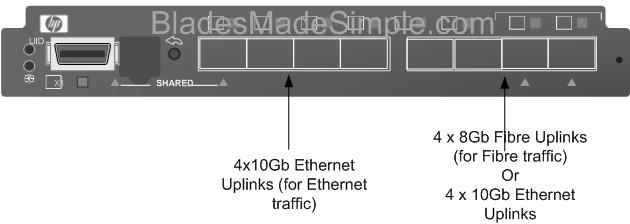
I’m hearing that a new version of the Flex-10 Module is coming, very soon, that will allow for the Ethernet AND the Fibre traffic to exit out the switch. (The image to the right shows what it could look like.)  The switch would allow for 4 of the uplink ports to go to the Ethernet fabric and the other 4 ports of the 8 port Next Generation Flex-10 switch to either be dedicated to a Fibre fabric OR used for additional 4 ports to the Ethernet fabric. 

If this rumour is accurate, it could shake up things in the blade server world.  Cisco UCS uses 10Gb Data Center Ethernet (Ethernet plus FCoE); IBM BladeCenter has the ability to do a 10Gb plus Fibre switch fabric (like HP) or it can use a 10Gb Enhanced Ethernet plus FCoE (like Cisco) however no one currently has a device to split the Ethernet and Fibre traffic at the blade chassis.  If this rumour is true, then we should see it announced around the same time as the G7 blade server (March 16).

That’s all for now.  As I come across more rumours, or information about new announcements, I’ll let you know.