Tag Archives: blade server

Introducing the IBM HS22v Blade Server

IBM officially announced today a new addition to their blade server line – the HS22v.  Modeled after the HS22 blade server, the HS22v is touted by IBM as a “high density, high performance blade optimized for virtualization.”  So what makes it so great for virtualization?  Let’s take a look.
Memory
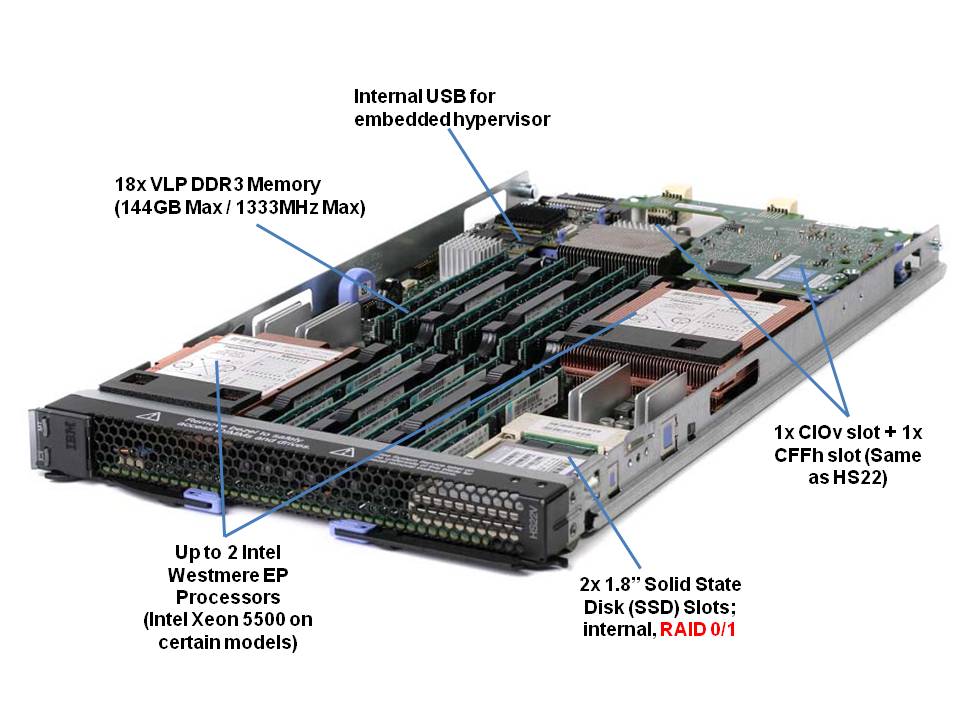
One of the big differences between the HS22v and the HS22 is more memory slots.  The HS22v comes with 18 x very low profile (VLP) DDR3 memory DIMMs for a maximum of 144GB RAM.  This is a key attribute for a server running virtualization since everyone knows that VM’s love memory.  It is important to note, though, the memory will only run at 800Mhz when all 18 slots are used.  In comparison, if you only had 6 memory DIMMs installed (3 per processor) then the memory would run at 1333Mhz and 12 DIMMs installed (6 per processor) runs at 1066Mhz.  As a final note on the memory, this server will be able to use both 1.5v and 1.35v memory.  The 1.35v will be newer memory that is introduced as the Intel Westmere EP processor becomes available.  The big deal about this is that lower voltage memory = lower overall power requirements.

Drives
The second big difference is the HS22v does not use hot-swap drives like the HS22 does.  Instead, it uses a 2 x solid state drives (SSD) for local storage. These drives have  hardware RAID 0/1 capabilities standard.  Although the picture to the right shows a 64GB SSD drive, my understanding is that only 50GB drives will be available as they start to become readlily available on March 19, with larger sizes (64GB and 128GB) becoming available in the near future.  Another thing to note is that the image shows a single SSD drive, however the 2nd drive is located directly beneath.  As mentioned above, these drives do have the ability to be set up in a RAID 0 or 1 as needed.
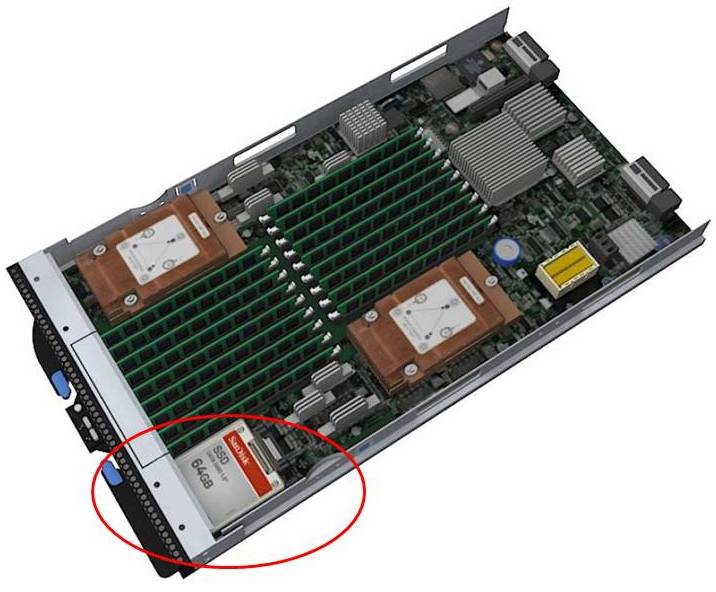
So – why did IBM go back to using internal drives?  For a few reasons:

Reason #1
: in order to get the space to add the extra memory slots, a change had to be made in the design.  IBM decided that solid state drives were the best fit.

Reason #2: the SSD design allows the server to run with lower power.  It’s well known that SSD drives run at a much lower power draw than physical spinning disks, so using SSD’s will help the HS22v be a more power efficient blade server than the HS22.

Reason #3: a common trend of virtualization hosts, especially VMware ESXi, is to run on integrated USB devices.  By using an integrated USB key for your virtualization software, you can eliminate the need for spinning disks, or even SSD’s therefore reducing your overall cost of the server.

Processors
So here’s the sticky area.  IBM will be releasing the HS22v with the Intel Xeon 5500 processor first.  Later in March, as the Intel Westmere EP (Intel Xeon 5600) is announced, IBM will have models that come with it.  IBM will have both Xeon 5500 and Xeon 5600 processor offerings.  Why is this?  I think for a couple of reasons:

a) the Xeon 5500 and the Xeon 5600 will use the same chipset (motherboard) so it will be easy for IBM to make one server board, and plop in either the Nehalem EP or the Westmere EP

b) simple – IBM wants to get this product into the marketplace sooner than later.

Questions

1) Will it fit into the BladeCenter E?
YES – however there may be certain limitations, so I’d recommend you reference the IBM BladeCenter Interoperability Guide for details.

2) Is it certified to run VMware ESX 4?
YES

3) Why didn’t IBM call it HS22XM?
According to IBM, the “XM” name is feature focused while “V” is workload focused – a marketing strategy we’ll probably see more of from IBM in the future.

That’s it for now.  If there are any questions you have about the HS22v, let me know in the comments and I’ll try to get some answers.

For more on the IBM HS22v, check out IBM’s web site here.

Check back with me in a few weeks when I’m able to give some more info on what’s coming from IBM!
Cisco Takes Top 8 Core VMware VMmark Server Position

Cisco is getting some (more) recognition with their UCS blade server product, as they recently achieved the top position for “8 Core Server” on VMware’s VMmark benchmark tool.  VMmark is the industry’s first (and only credible) virtualization benchmark for x86-based computers.  According to the VMmark website, the Cisco UCS B200 blade server reached a score of 25.06 @ 17 tiles.  A “tile” is simple a collection of virtual machines (VM’s) that are executing a set of diverse workloads designed to represent a natural work environment.   The total number of tiles that a server can handle provides a detailed measurement of that server’s consolidation capacity.

Cisco’s Winning Configuration
So – how did Cisco reach the top server spot?  Here’s the configuration:

server config:

  • 2 x Intel Xeon X5570 Processors
  • 96GB of RAM (16 x 8GB)
  • 1 x Converged Network Adapter (Cisco UCS M71KR-Q)

storage config:

  • EMC CX4-240
  • Cisco MDS 9130
  • 1154.27GB Used Disk Space
  • 1024MB Array Cache
  • 41 disks used on 4 enclosures/shelves (1 with 14 disk, 3 with 9 disks)
  • 37 LUNs used
    *17 at 38GB (file server + mail server) over 20 x 73GB SSDs
    *17 at 15GB (database) + 2 LUNs at 400GB (Misc) over 16 x 450GB 15k disks
    * 1 LUN at 20GB (boot) over 5 x 300GB 15k disks
  • RAID 0 for VMs, RAID 5 for VMware ESX 4.0 O/S

While first place on the VMmark page (8 cores) shows Fujitsu’s RX300, it’s important to note that it was reached using Intel’s W5590 processor – a processor that is designed for “workstations” – not servers.  Second place, of server processors, currently shows HP’s BL490 with 24.54 (@ 17 tiles)

Thanks to Omar Sultan (@omarsultan) for Tweeting about this and to Harris Sussman for blogging about it.

More IBM BladeCenter Rumours…

Okay, I can’t hold back any longer – I have more rumours. The next 45 days is going to be an EXTREMELY busy month with Intel announcing their Westmere EP processor, the predecessor to the Nehalem EP CPU and with the announcement of the Nehalem EX CPU, the predecessor to the Xeon 7400 CPU.  I’ll post more details on these processors in the future, as it becomes available, but for now, I want to talk on some additional rumours that I’m hearing from IBM.  As I’ve mentioned in my previous rumour post: this is purely speculation, I have no definitive information from IBM so this may be false info.  That being said, here we go:

Rumour #1:  As I previously posted, IBM has announced they will have a blade server based on their eX5 architecture  – the next generation of their eX4 architecture found in their IBM System x3850 M2 and x3950M2.  I’ve posted what I think this new blade server will look like (you can see it here) and  I had previously speculated that the server would be called  HS43 – however it appears that IBM may be changing their nomenclature for this class of blade to “HX5“.  I can see this happening – it’s a blend of “HS” and “eX5”.  It is a new class of blade server, so it makes sense.   I like the HX5 blade server name, although if you Google HX5 right now, you’ll get a lot of details about the Sony CyberShot DSC-HX5 digital camera.  (Maybe IBM should re-consider using HS43 instead of HX5 to avoid any lawsuits.)  It also makes it very clear that it is part of their eX5 architecture, so we’ll see if it gets announced that way.

Speaking of announcements…

Rumour #2:  While it is clear that Intel is waiting until March (31, I think) to announce the Nehalem EX and Westmere EP processors, I’m hearing rumours that IBM will be announcing their product offerings around the new Intel processors on March 2, 2010 in Toronto.  It will be interesting to see if this happens so soon (4 weeks away) but when it does, I’ll be sure to give you all the details!

That’s all I can talk about for now as “rumours”.  I have more information on another IBM announcement that I can not talk about, but come back to my site on Feb. 9 and you’ll find out what that new announcement is.

The IBM BladeCenter S Is Going to the Super Bowl

Unless you’ve been hiding in a cave in Eastern Europe, you know by now that the New Orleans Saints are headed to the Super Bowl.  According to IBM, this is all due to the Saints having an IBM BladeCenter S running their business.  Okay, well, I’m sure there’s other reasons, like having stellar tallent, but let’s take a look at what IBM did for the Saints.

Other than the obvious threat of having to relocate or evacuate due to the weather, the Saints’ constant travel required them to search for a portable IT solution that would make it easier to quickly set up operations in another city.  The Saints were a long-time IBM customer, so they looked at the IBM BladeCenter S for this solution, and it worked great.  (I’m going to review the BladeCenter S below, so keep reading.)  The Saints consolidated 20 physical servers onto the BladeCenter S, virtualizing the environment with VMware.   Although the specific configuration of their blade environment is not disclosed, IBM reports that the Saints are using 1 terabyte of built-in storage, which enables the Saints to go on the road with the essential files (scouting reports, financial apps, player stats, etc) and tools the coaches and the staff need.  In fact, in the IBM Case Study video, the Assistant Director of IT for the New Orleans Saints, Jody Barbier, says, “The Blade Center S definitely can make the trip with us if we go to the Super Bowl.”  I guess we’ll see.  Be looking for the IBM Marketing engine to jump on this bandwagon in the next few days.

A Look at the IBM BladeCenter S
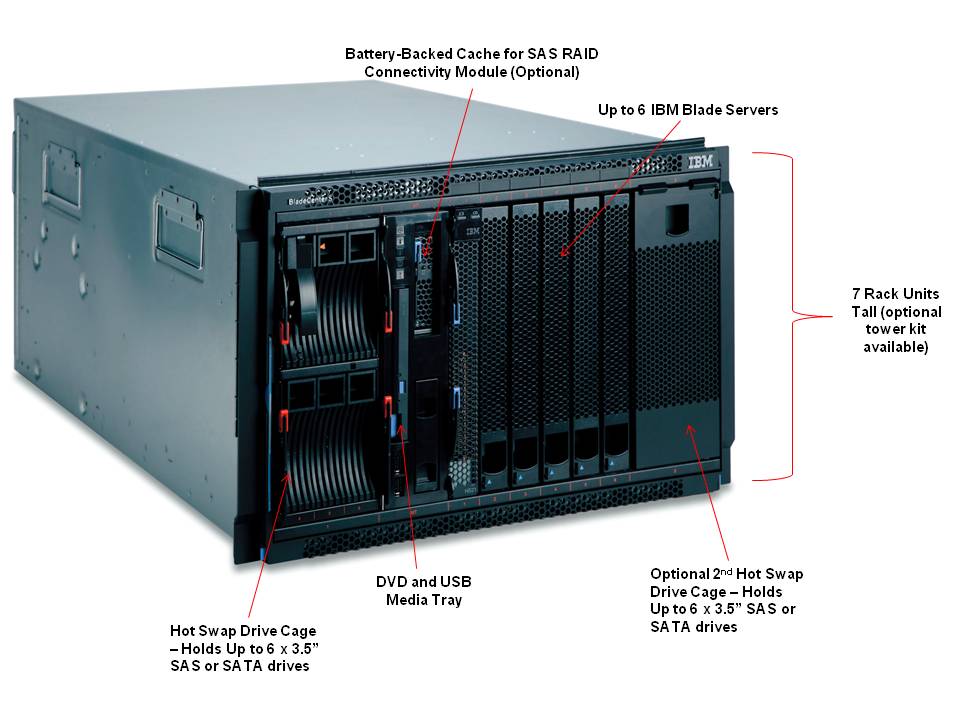
The IBM BladeCenter S is a 7u high (click image on left for larger view of details) chassis that has the ability to hold 6 blade servers and up to 12 disk drives held in Disk Storage Modules located on the left and right of the blade server bays.  The chassis has the option to either segment the disk drives to an individual blade server, or the option to create a RAID volume and allow all of the servers to access the data.  As of this writing, the drive options for the Disk Storage Module are: 146GB, 300GB, 450GB SAS, 750GB and 1TB Near-Line SAS and 750GB and 1TB SATA.  Depending on your application needs, you could have up to 12TB of local storage for 6 servers.  That’s pretty impressive, but wait, there’s more!  As I reported a few weeks ago, there’s is a substantial rumour that there is a forthcoming option to use 2.5″ drives.  This would enable the ability to have up to 24 drives (12 per Disk Storage Module.)  Although that would provide more spindles, the current capacities of 2.5″ drives aren’t quite to the capacities of the 3.5″ drives.  Again, that’s just “rumour” – IBM has not disclosed whether that option is coming (but it is…)

IBM BladeCenter – Rear View
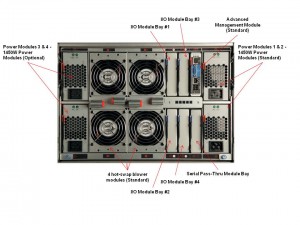
I love pictures – so I’ve attached an image of the BladeCenter S, as seen from the back.  A few key points to make note of:
110v Capable – yes, this can run on the average office power.  That’s the idea behind it.  If you have a small closet or an area near a desk, you can plug this bad boy in.   That being said, I always recommend calculating the power with IBM’s Power Configurator to make sure your design doesn’t exceed what 110v can handle.  Yes, this box will run on 220v as well.  Also, the power supplies are auto-sensing so there’s no worry about having to buy different power supplies based on your needs.

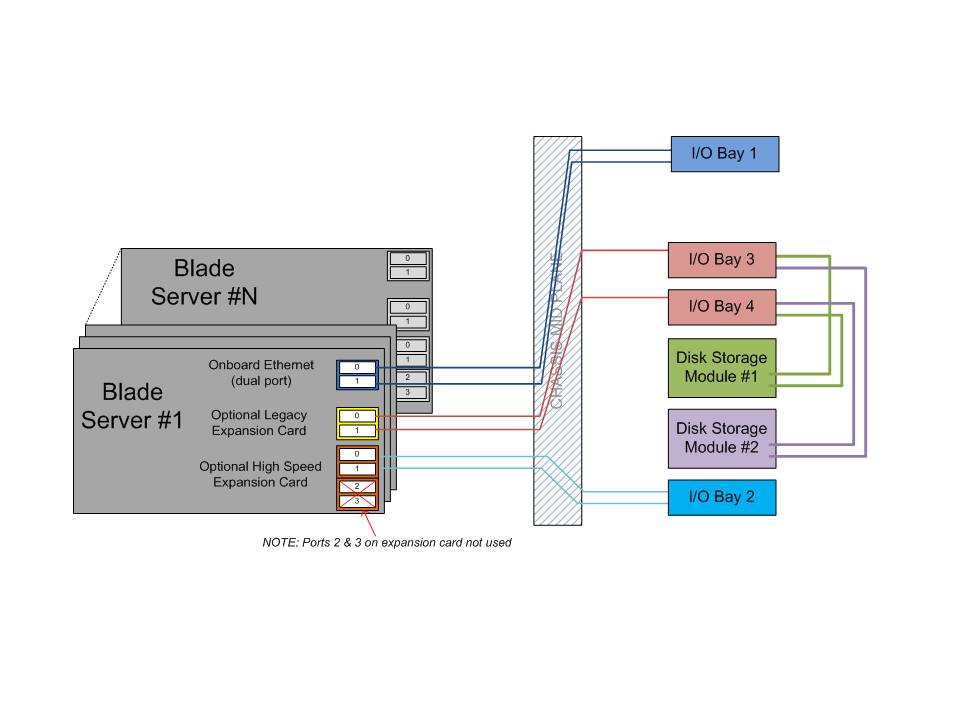
I/O Modules – if you are familar with the IBM BladeCenter or IBM BladeCenter H I/O architecture, you’ll know that the design is redundant, with dual paths.  With the IBM BladeCenter S, this isn’t the case.   As you can see below, the onboard network adapters (NICs) both are mapped to the I/O module in Bay #1.  The expansion card is mapped to Bay #3 and 4 and the high speed card slot (CFF-h) is mapped to I/O Bay 2.  Yes, this design put I/O Bays 1 and 2 as single points of failure (since both paths connect intothe module bay), however when you look at the typical small office or branch office environment that the IBM BladeCenter S is designed for, you’ll realize that very rarely do they have redundant network fabrics – so this is no different.

Another key point here is that I/O Bays 3 and 4 are connected to the Disk Storage Modules mentioned above.  In order for a blade server to access the external disks in the Disk Storage Module bays, the blade server must:

a) have a SAS Expansion or Connectivity card installed in the expansion card slot
b) have 1 or 2 SAS Connectivity or RAID modules attached in Bays 3 and 4

This means that there is currently no way to use the local drives (in the Disk Storage Modules) and have external access to a fibre storage array.

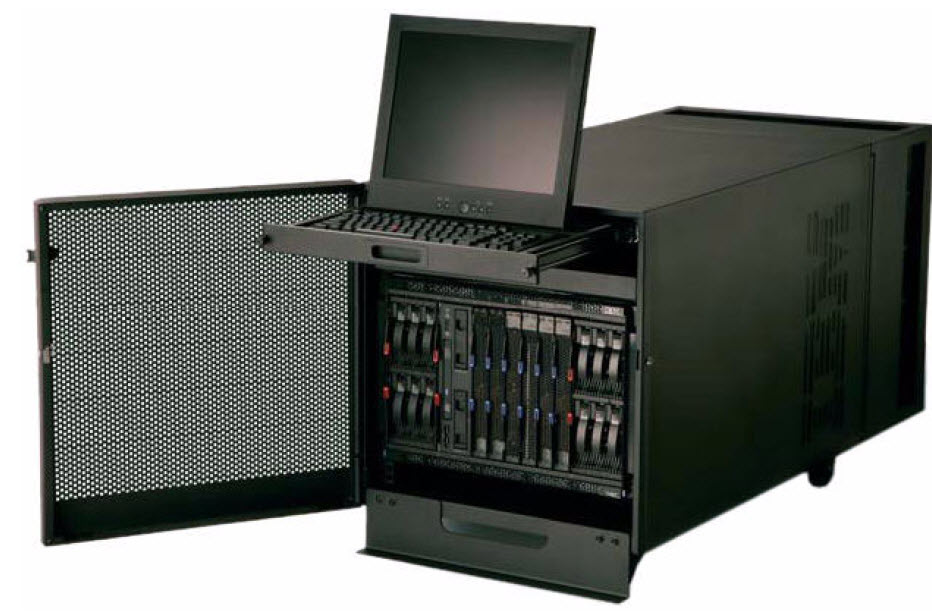
BladeCenter S Office Enablement Kit
Finally – I wanted to show you the optional Office Enablement Kit.  This is an 11U enclosure that is based on IBM’s NetBay 11.  It has security doors and special acoustics and air filtration to suit office environements.  The Kit features:
*
an acoustical module (to lower the sound of the environment)  Check out this YouTube video for details.
*
a locking door
*
4U of extra space (for other devices)
*
wheels

There is also an optional Air Contaminant Filter that is available that assists in keeping the IBM BladeCenter S functional in a dusty environment (i.e. shops or production floors) using air filters.

If the BladeCenter S is going to be used in an environment without a rack (i.e. broom closet) or in a mobile environment (i.e. going to the Super Bowl) the Office Enablement Kit is a necessary addition.

So, hopefully, you can now see the value that the New Orleans Saints saw in the IBM BladeCenter S for their flexible, mobile IT needs.  Good luck in the Super Bowl, Saints.  I know that IBM will be rooting for you.

Weta Digital, Production House for AVATAR, Donates IBM Blade Servers to Schools

Weta Digital, the digital production house that designed the hit movie AVATAR recently donated about 300 IBM HS20 blade servers to Whitireia Community Polytechnic in Porirua which will use them to help teach students how to create 3-D animations. The IBM HS20 blade servers were originally bought to produce special effects for The Lord of the Rings at a cost of more than $1 million (for more details on this, check out this November 2004 article from DigitalArtsOnline.co.uk.) Weta Digital has since replaced them with more powerful HP BL 2x220c G5 servers supplied by Hewlett-Packard, which were used for AVATAR.

According to the school, these older IBM blade servers will help the schoolexpand its graphics and information technology courses and turn out students with more experience of 3-D rendering.

Thanks to Stuff.co.nz for the information mentioned above.

UNVEILED: First Blade Server Based on Intel Nehalem EX

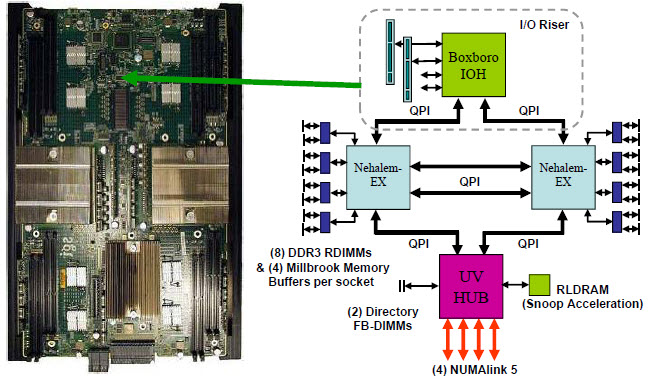
The first blade server with the upcoming Intel Nehalem EX processor has finally been unveiled.  While it is known that IBM will be releasing a 2 or 4 socket blade server with the Nehalem EX, no other vendor has revealed plans up until now.  SGI recently announced they will be offering the Nehelem EX on their Altix® UV platform. 

Touted as a “The World’s Fastest Supercomputer”, the UV line features the fifth generation of the SGI NUMAlink interconnect, which offers up a whopping 15 GB/sec transfer rate, as well as direct access up to 16 TB of shared memory. The system will have the ability to be configured with up to 2048 Nehalem-EX cores (via 256 processors, or 128 blades) in a single federation with a single global address space.

According to the SGI website, the UV will come in two flavors:

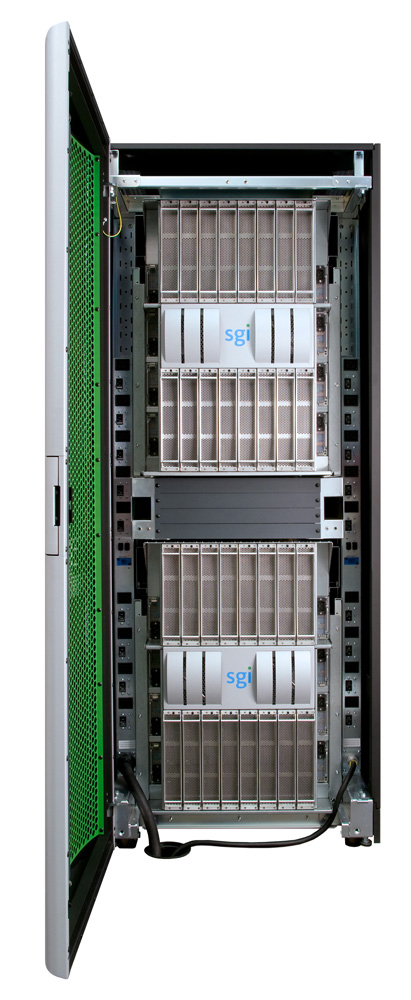
SGI Altix UV 1000

Altix UV 1000  – designed for maximum scalability, this system ships as a fully integrated cabinet-level solution with up to 256 sockets (2,048 cores) and 16TB of shared memory in four racks.

Altix UV 100 (not pictured) – same design as the UV 1000, but designed for the mid-range market;  based on an industry-standard 19″ rackmount 3U form factor. Altix UV 100 scales to 96 sockets (768 cores) and 6TB of shared memory in two racks.

SGI has given quite a bit of techinical information about these servers in this whitepaper, including details about the Nehalem EX architecture that I haven’t even seen from Intel.  SGI has also published several customer testimonials, including one from the University of Tennessee – so check it out here.

Hopefully, this is just the first of many announcements to come around the Intel Nehalem EX processor.

(UPDATED) Blade Servers with SD Slots for Virtualization

(updated 1/13/2010 – see bottom of blog for updates)

Eric Gray at www.vcritical.com blogged today about the benefits of using a flash based device, like an SD card, for loading VMware ESXi, so I thought I would take a few minutes to touch on the topic.

As Eric mentions, probably the biggest benefit of using VMware ESXi on an embedded device is that you don’t need local drives, which lowers the power and cooling of your blade server.  While he mentions HP in his blog, both HP and Dell offer SD slots in their blade servers – so let’s take a look:

HP
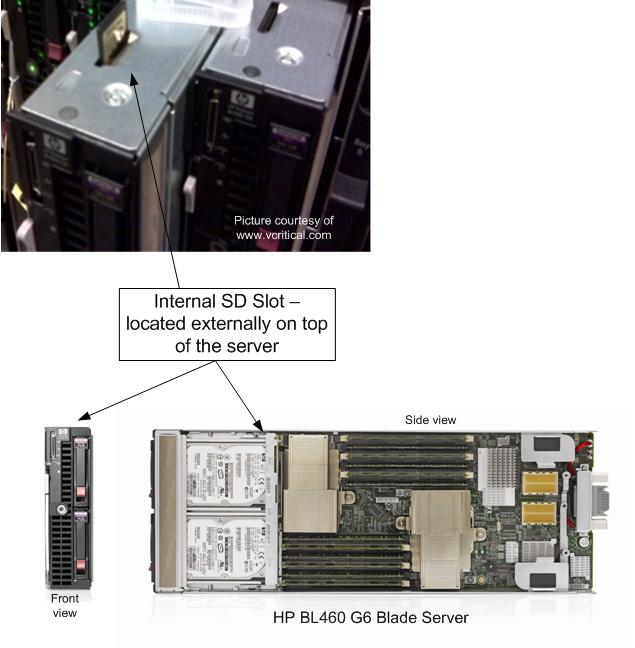
HP currently offers these SD slots in their BL460 G6 and BL490 G6 blade servers.  As you can see from the picture on the left (thanks again to Eric at vCritical.com) HP allows for you to access the SD slot from the top of the blade server.  This makes it fairly convenient to access, although once the image is installed on the SD card, it’s probably not ever coming out.  HP’s QuickSpecs for the BL460 G6 state offer up an “HP 4GB SD Flash Media” that has a current list price of $70, however I have been unable to find any documentation that says you MUST use this SD card, so if you want to try and use it with your own personal SD card first, good luck.  It is important to note that HP does not currently offer VMware ESXi, or any other virtualization vendor’s software, pre-installed on an SD card, unlike Dell.

Dell
Dell has been offering SD slots on select servers for quite a while.  In fact, I can remember seeing it at VMworld 2008.  Everyone else was showing “embedded hypervisors” on USB keys while Dell was using an SD card.  I don’t know that I have a personal preference of USB vs SD, but the point is that Dell was ahead of the game on this one.

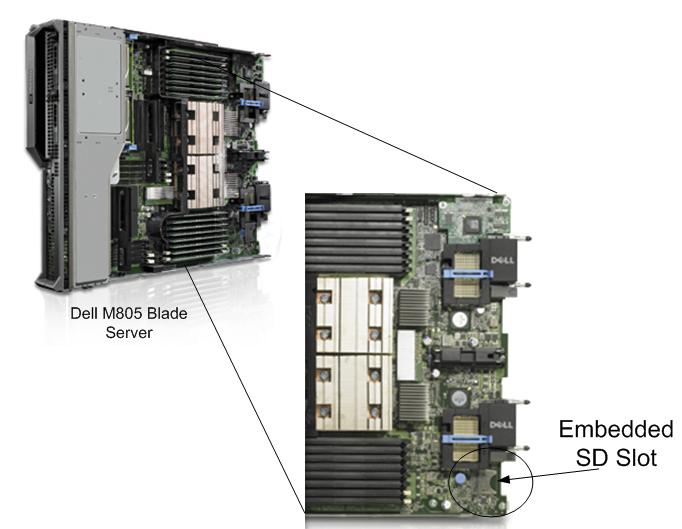
Dell currently only offers their SD slot on their M805 and M905 blade servers.  These are full-height servers, which could be considered good candidates for a virtualization server due to its redundant connectivity, high memory offering and high I/O (but that’s for another blog post.)

Dell chose to place the SD slots on the bottom rear of their blade servers.  I’m not sure I agree with the placement, because if you needed to access the card, for whatever reason, you have to pull the server completely out of the chassis to service.  It’s a small thing, but it adds time and complexity to the serviceability of the server.  

An advantage that Dell has over HP is they offer to have VMware ESXi 4 PRE-LOADED on the SD key upon delivery.  Per the Dell website, an SD card with ESXi 4 (basic, not Standard or Enterprise) is available for $99.  It’s listed as “VMware ESXi v4.0 with VI4, 4CPU, Embedded, Trial, No Subsc, SD,NoMedia“.  Yes, it’s considered a “trial” and it’s the basic version with no bells or whistles, however it is pre-loaded which equals time savings.  There are additional options to upgrade the ESXi to either Standard or Enterprise as well (for additional cost, of course.)

It is important to note that this discussion was only about SD slots.  All of the blade server vendors, including IBM, have incorporated USB slots internally to their blade servers, so whereas a specific server may not have an SD slot, there is still the ability to load the hypervisor onto an USB key (where supported.)

1/13/2010 UPDATE –SD slots are also available on the BL 280G6 and BL 685 G6.

There is also an HP Advisory discouraging use of an internal USB key for embedded virtualization.  Check it out at:

http://h20000.www2.hp.com/bizsupport/TechSupport/Document.jsp?objectID=c01957637&lang=en&cc=us&taskId=101&prodSeriesId=3948609&prodTypeId=3709945

Interesting HP Server Facts (from IDC)

As you can see from my blog title, I try to focus on “all things blade servers”, however I came across this bit of information that I thought would be fun to blog.  An upfront warning – this is an HP biased blog post, so sorry for those of you who are Cisco, Dell or IBM fans.

Market research firm, IDC released a quarterly update to their Worldwide Quarterly Server Tracker, citing market share figures for the 3rd calendar quarter of 2009 (3Q09).  From this report, there are a few fun HP server facts (thanks to HP for passing these facts along to me:)

HP is the #1 vendor in worldwide server shipments for the 30th consecutive quarter (7.5 years). HP shipped more than 1 out of every 3 servers worldwide and captured 36.5 percent total unit shipment share.

According to IDC:

  • HP shipped over 161,000 more servers than #2 Dell.
  • HP shipped 2.6 times as many servers as #3 IBM
  • 9.0 times as #4 Fujitsu
  • 12.9 times as many as #5 Sun.
  • HP ended up in a statistical tie with IBM for #1 in total server revenue market share with 30.9 percent.  This includes all server (UNIX and x86 revenues.)

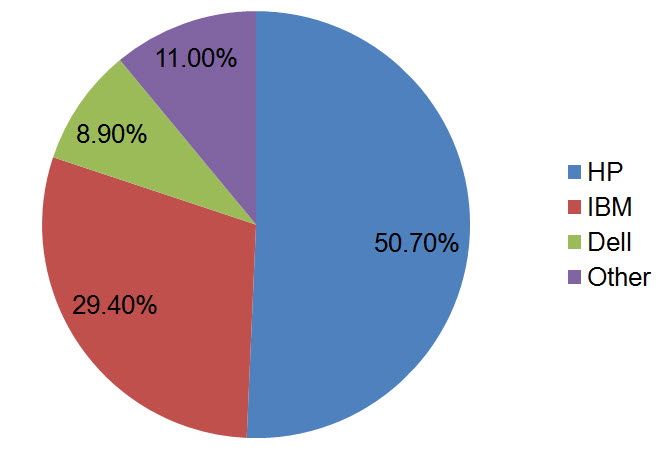
HP leads the blade server market, with a 50.7 percent revenue share, and a 47.7 percent unit share.

I blogged about this in early December (see this link for details),but it’s no surprise that HP is leading the pack in blade sales.  Their field sales team is actively promoting blades for nearly every server opportunity and they continue to make innovative additions to their blades (like 10Gb NICs standard on G6 blades.)   HP Integrity blades claimed the #1 position in revenue share for the RISC+EPIC blade segment with a 53.2 percent share gaining 1.8 points year over year.

For the 53rd consecutive quarter, more than 13 years, HP ProLiant is the x86 server market share leader in both factory revenue and units, shipping more than 1 out of every 3 servers in this market with a 36.9 percent unit share.

HP’s x86 revenue share was 14.6 points higher than its nearest competitor; Dell. HP’s x86 revenue share was 19.2 percentage points higher than IBM.

 For the 3 major operating environments UNIX®, Windows and Linux combined (representing 99.3 percent of all servers shipped worldwide), HP is number 1 worldwide in server unit shipment and revenue market share.

HP holds a 36.5 percent unit market share worldwide, which is 2.6 times more than IBM’s unit market share and 12.9 times the unit share of Sun.

HP holds a 35.4 percent revenue market share worldwide which is 2.2 times the revenue share of Dell and 4.0 times the revenue share of Sun.

FINAL NOTE:  All of the following market share figures are for the 3rd quarter (unless otherwise noted) and represent worldwide results as reported by the IDC Worldwide Quarterly Server Tracker for Q309, December 2009.

The Hit Movie, AVATAR Processed on HP Blade Servers

Since the hit movie AVATAR surpassed the $1 Billion Revenue mark this weekend I thought it would be interesting to post some information about how the movie was put together – especially since the hardware behind the magic was the HP BL2x220c.

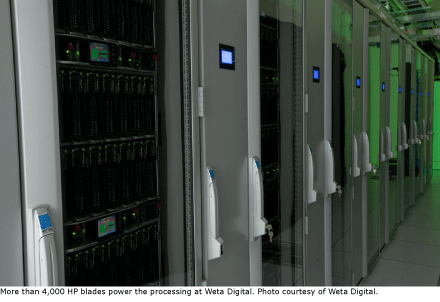
According to an article from information-management.com, AVATAR was put together at a visual effects production house called Weta Digital located in Miramar, New Zealand.  Weta’s datacenter sits in a 10,000 square foot facility however the film’s computing core ran on 2,176 HP BL 2x220c Blade Servers.  This added up to over 40,000 processors and 104 terabytes of RAM(Check out my post on the HP BL 2x220c blade server for details on this 2 in 1 server design by HP.)

The HP blades read and wrote data against 3 petabytes of fast fiber channel disk network area storage from BluArc and NetApp.  According to the article, all of the gear was  connected by multiple 10-gigabit network links. “We need to stack the gear closely to get the bandwidth we need for our visual effects, and, because the data flows are so great, the storage has to be local,” says Paul Gunn, Weta’s data center systems administrator.  

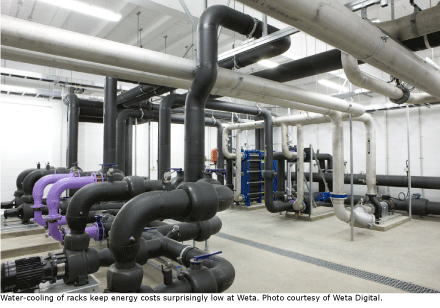
The article also highlights the fact that the datacenter uses water cooled racks to keep the racks and storage cooled.  Suprisingly, the water cooled design, along with a cool local climate, allows Weta to run their datacenter for less cost than running air conditioning (all they pay for is the cost of running water.)  In fact, they recently won an energy excellence award for building a smaller footprint that came with 40% lower cooling cost.

Summary of Hardware Used for AVATAR:

  • 34 racks – each with 4 HP BladeSystem Chassis, 32 servers (16 BL2x220c)
  • over 40,000 processors
  • 104 TB RAM

Since I don’t want to re-write the excellent article from information-management.com, I encourage you to click here to read the full article.

Happy New Year!

Happy New Year to all of my readers. As we enter a new decade, I wanted to give everyone who takes the time to read a few stats on how I’ve done since my inaugural posting on September 23, 2009. First a bit of a background. My main website is now located at BladesMadeSimple.com, however a few months prior to that I had a blog on WordPress.com at http://kevinbladeguy.wordpress.com/.  Even though I have my own site, I have kept the WordPress.com site up as a mirror site primarily since Google has the site indexed and I get a lot of traffic from Google.  SO – how’d I do?  Well, here’s the breakdown:

On http://kevinbladeguy.wordpress.com, I received 4,588 page views since Sept 23, 2009 with my article on “Cisco UCS vs IBM BladeCenter H” receiving 399 page views.

On http://BladesMadeSimple.com, I received 2,041 page views which started up on November 1, 2009 with my article on Cisco UCS vs IBM BladeCenter H receiving 238 page views.

Combined, that is 6,629 page views since September 23, 2009!  As I’m still a virgin blogger, I’m not sure if that’s a good stat for a website devoted to talking about blade servers, but I’m happy with it.  I hope that you will stay with my as I continue my voyage on keeping you informed on blade servers.

Happy New Year!!