Tag Archives: Cisco

Cisco, IBM and HP Update Blade Portfolio with Westmere Processor

Intel officially announced today the Xeon 5600 processor, code named “Westmere.” Cisco, HP and IBM also announced their blade servers that have the new processor. The Intel Xeon 5600 offers:

  • 32nm process technology with 50% more threads and cache
  • Improved energy efficiency with support for 1.35V low power memory

There will be 4 core and 6 core offerings. This processor also provide the option of HyperThreading, so you could have up to 8 threads and 12 threads per processor, or 16 and 24 in a dual CPU system. This will be a huge advantage to applications that like multiple threads, like virtualization. Here’s a look at what each vendor has come out with:

Cisco
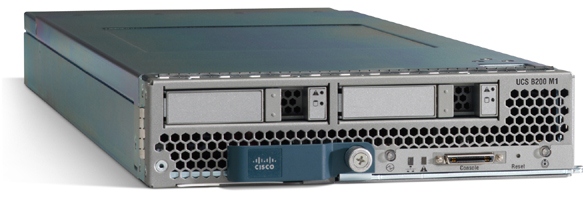
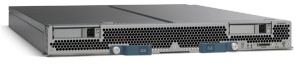
Cisco B200 blade serverThe B200 M2 provides Cisco users with the current Xeon 5600 processors. It looks like Cisco will be offering a choice of the following Xeon 5600 processors: Intel Xeon X5670, X5650, E5640, E5620, L5640, or E5506. Because Cisco’s model is a “built-to-order” design, I can’t really provide any part numbers, but knowing what speeds they have should help.

HP
HP is starting off with the Intel Xeon 5600 by bumping their existing G6 models to include the Xeon 5600 processor. The look, feel, and options of the blade servers will remain the same – the only difference will be the new processor. According to HP, “the HP ProLiant G6 platform, based on Intel Xeon 5600 processors, includes the HP ProLiant BL280c, BL2x220c, BL460c and BL490c server blades and HP ProLiant WS460c G6 workstation blade for organizations requiring high density and performance in a compact form factor. The latest HP ProLiant G6 platforms will be available worldwide on March 29.It appears that HP’s waiting until March 29 to provide details on their Westmere blade offerings, so don’t go looking for part numbers or pricing on their website.

IBM
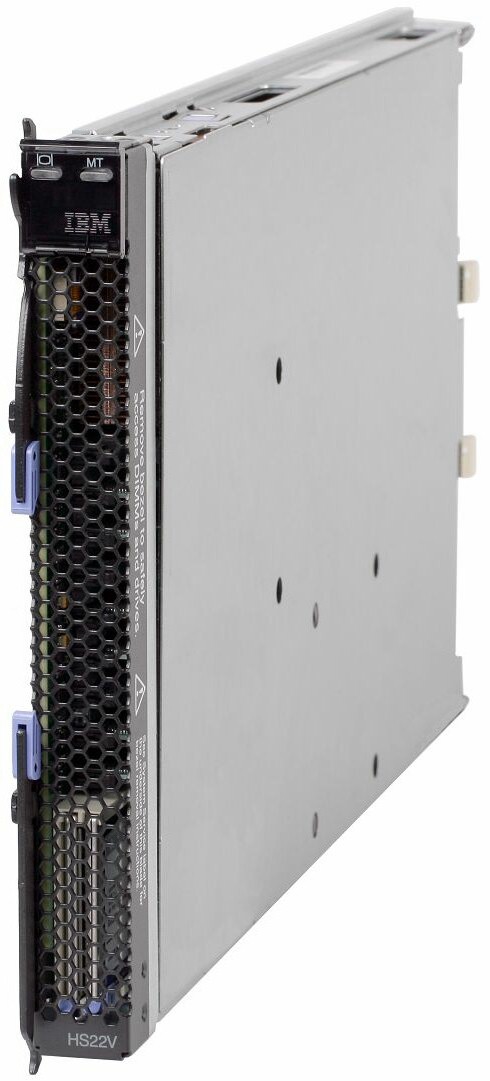
IBM is continuing to stay ahead of the game with details about their product offerings. They’ve refreshed their HS22 and HS22v blade servers:

HS22
7870ECU – Express HS22, 2x Xeon 4C X5560 95W 2.80GHz/1333MHz/8MB L2, 4x2GB, O/Bay 2.5in SAS, SR MR10ie

7870G4U – HS22, Xeon 4C E5640 80W 2.66GHz/1066MHz/12MB, 3x2GB, O/Bay 2.5in SAS

7870GCU – HS22, Xeon 4C E5640 80W 2.66GHz/1066MHz/12MB, 3x2GB, O/Bay 2.5in SAS, Broadcom 10Gb Gen2 2-port

7870H2U -HS22, Xeon 6C X5650 95W 2.66GHz/1333MHz/12MB, 3x2GB, O/Bay 2.5in SAS

7870H4U – HS22, Xeon 6C X5670 95W 2.93GHz/1333MHz/12MB, 3x2GB, O/Bay 2.5in SAS

7870H5U – HS22, Xeon 4C X5667 95W 3.06GHz/1333MHz/12MB, 3x2GB, O/Bay 2.5in SAS

7870HAU – HS22, Xeon 6C X5650 95W 2.66GHz/1333MHz/12MB, 3x2GB, O/Bay 2.5in SAS, Emulex Virtual Fabric Adapter

7870N2U – HS22, Xeon 6C L5640 60W 2.26GHz/1333MHz/12MB, 3x2GB, O/Bay 2.5in SAS

7870EGU – Express HS22, 2x Xeon 4C E5630 80W 2.53GHz/1066MHz/12MB, 6x2GB, O/Bay 2.5in SAS

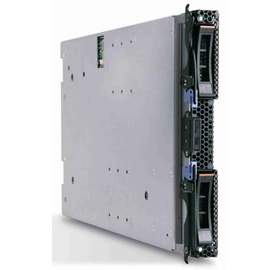
IBM HS22V Blade ServerHS22V
7871G2U HS22V, Xeon 4C E5620 80W 2.40GHz/1066MHz/12MB, 3x2GB, O/Bay 1.8in SAS

7871G4U HS22V, Xeon 4C E5640 80W 2.66GHz/1066MHz/12MB, 3x2GB, O/Bay 1.8in SAS

7871GDU HS22V, Xeon 4C E5640 80W 2.66GHz/1066MHz/12MB, 3x2GB, O/Bay 1.8in SAS

7871H4U HS22V, Xeon 6C X5670 95W 2.93GHz/1333MHz/12MB, 3x2GB, O/Bay 1.8in SAS

7871H5U HS22V, Xeon 4C X5667 95W 3.06GHz/1333MHz/12MB, 3x2GB, O/Bay 1.8in SAS

7871HAU HS22V, Xeon 6C X5650 95W 2.66GHz/1333MHz/12MB, 3x2GB, O/Bay 1.8in SAS

7871N2U HS22V, Xeon 6C L5640 60W 2.26GHz/1333MHz/12MB, 3x2GB, O/Bay 1.8in SAS

7871EGU Express HS22V, 2x Xeon 4C E5640 80W 2.66GHz/1066MHz/12MB, 6x2GB, O/Bay 1.8in SAS

7871EHU Express HS22V, 2x Xeon 6C X5660 95W 2.80GHz/1333MHz/12MB, 6x4GB, O/Bay 1.8in SAS

I could not find any information on what Dell will be offering, from a blade server perspective, so if you have information (that is not confidential) feel free send it my way.

Tolly Report: HP Flex-10 vs Cisco UCS (Network Bandwidth Scalability Comparison)

Tolly.com announced on 2/25/2010 a new Test Report that compares the network bandwidth scalability between HP BladeSystem c7000 with BL460 G6 Servers and Cisco UCS 5100 with B200 Servers, and the results were interesting.   The report simply tested 6 HP blades, with a single Flex-10 Module vs 6 Cisco blades using their Fabric Extender + a single Fabric Interconnect.  I’m not going to try and re-state what the report says (for that you can download it directly), instead, I’m going to highlight the results.  It is important to note that the report was “commissioned by Hewlett-Packard Dev. Co, L.P.”

Result #1:  HP BladeSystem C7000 with a Flex-10 Module Tested to have More Aggregate Server Throughput (Gbps) over the Cisco UCS with a Fabric Extender connected to a Fabric Interconnect in a Physical-to-Physical Comparison
>The test shows when 4 physical servers were tested, Cisco can achieve an aggregate throughput of 36.59 Gbps vs HP achieving 35.83Gbps (WINNER: Cisco)

>When 6 physical servers were tested, Cisco achieved an aggregate throughput of 27.37 Gbps vs HP achieving 53.65 Gbps – a difference of 26.28 Gbps (WINNER: HP)

Result #2:
 HP BladeSystem C7000 with a Flex-10 Module Tested to have More Aggregate Server Throughput (Gbps) over the Cisco UCS with a Fabric Extender connected to a Fabric Interconnect in a Virtual-to-Virtual Comparison
>Testing 2 servers each running 8 VMware Red Hat Linux hosts showed that HP achieved an aggregate throughput of 16.42 Gbps vs Cisco UCS achieving 16.70 Gbps (WINNER: Cisco). 

The results of the above was performed with the 2 x Cisco B200 blade servers each mapped to a dedicated 10Gb uplink port on the Fabric Extender (FEX).  When the 2 x Cisco B200 blade servers were designed to share the same 10Gb uplink port on the FEX, the achieved aggregate throughput on the Cisco UCS decreased to 9.10 Gbps.

A few points to note about these findings:
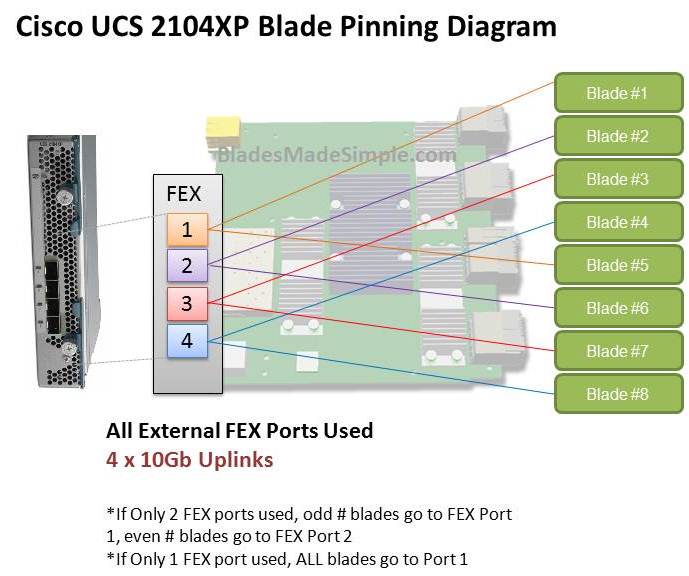
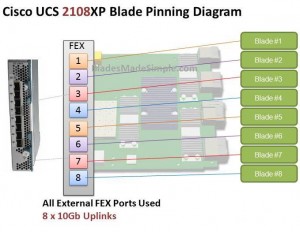
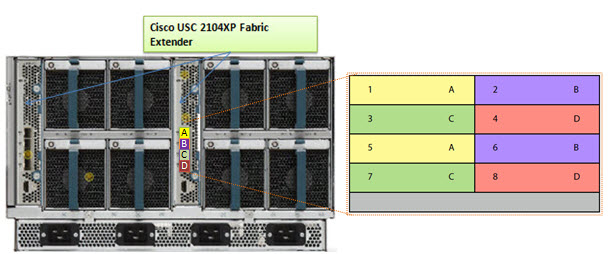
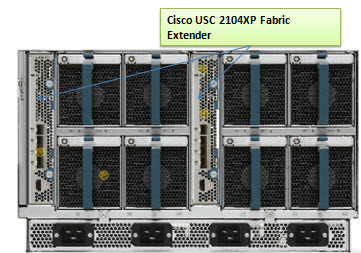
a) the HP Flex-10 Module has 8 x 10Gb uplinks whereas the Cisco Fabric Extender (FEX) has 4 x 10Gb uplinks

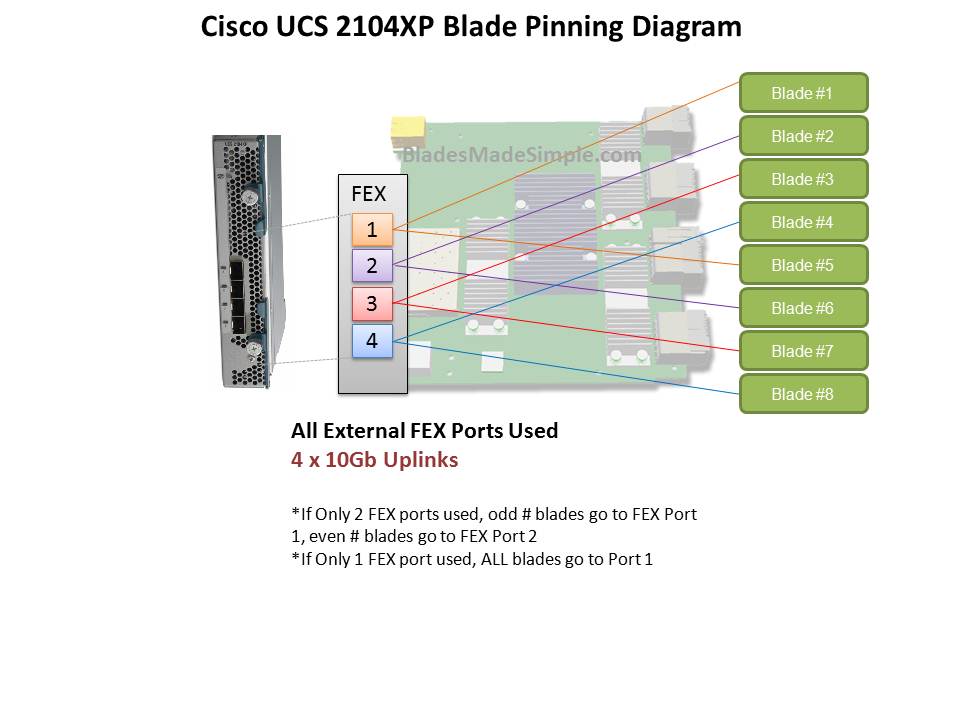
b) Cisco’s FEX Design allows for the 8 blade servers to extend out the 4 external ports in the FEX a 2:1 ratio (2 blades per external FEX port.) The current Cisco UCS design requires the servers to be “pinned”, or permanently assigned, to the respective FEX uplink. This works well when there are 4 blade servers, but when you get to more than 4 blade servers, the traffic is shared between two servers, which could cause bandwidth contention. 

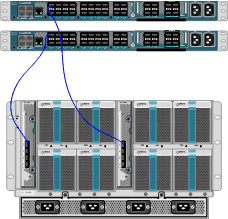
 Furthermore, it’s important to understand that the design of the UCS blade infrastructure does not allow communication to go from Server 1 to Server 2 without leaving the FEX, connecting to the Fabric Interconnect (top of the picture) then returning to the FEX and connecting to the server.  This design is the potential cause of the decrease in aggregate throughput from 16.70Gbps to 9.10Gbps as shown above.


One of the “Bottom Line” conclusions from this report states, “throughput degradation on the Cisco UCS cased by bandwidth contention is a cause of concern for customers considering the use of UCS in a virtual server environment”  however I encourage you to take a few minutes, download this full report from the Tolly.com website and make your own conclusions about this report. 

Let me know your thoughts about this report – leave a comment below.

Disclaimer: This report was brought to my attention while attending the HP Tech Day event where airfare, accommodations and meals are being provided by HP, however the content being blogged is solely my opinion and does not in anyway express the opinions of HP.

More HP and IBM Blade Rumours

I wanted to post a few more rumours before I head out to HP in Houston for “HP Blades and Infrastructure Software Tech Day 2010” so it’s not to appear that I got the info from HP. NOTE: this is purely speculation, I have no definitive information from HP so this may be false info.

First off – the HP Rumour:
I’ve caught wind of a secret that may be truth, may be fiction, but I hope to find out for sure from the HP blade team in Houston.  The rumour is that HP’s development team currently has a Cisco Nexus Blade Switch Module for the HP BladeSystem in their lab, and they are currently testing it out.

Now, this seems far fetched, especially with the news of Cisco severing partner ties with HP, however, it seems that news tidbit was talking only about products sold with the HP label, but made by Cisco (OEM.)   HP will continue to sell Cisco Catalyst switches for the HP BladeSystem and even Cisco branded Nexus switches with HP part numbers (see this HP site for details.)  I have some doubt about this rumour of a Cisco Nexus Switch that would go inside the HP BladeSystem simply because I am 99% sure that HP is announcing a Flex10 type of BladeSystem switch that will allow converged traffic to be split out, with the Ethernet traffic going to the Ethernet fabric and the Fibre traffic going to the Fibre fabric (check out this rumour blog I posted a few days ago for details.)  Guess only time will tell.

The IBM Rumour:
I posted a few days ago a rumour blog that discusses the rumour of HP’s next generation adding Converged Network Adapters (CNA) to the motherboard on the blades (in lieu of the 1GB or Flex10 NICs), well, now I’ve uncovered a rumour that IBM is planning on following later this year with blades that will also have CNA’s on the motherboard.  This is huge!  Let me explain why.

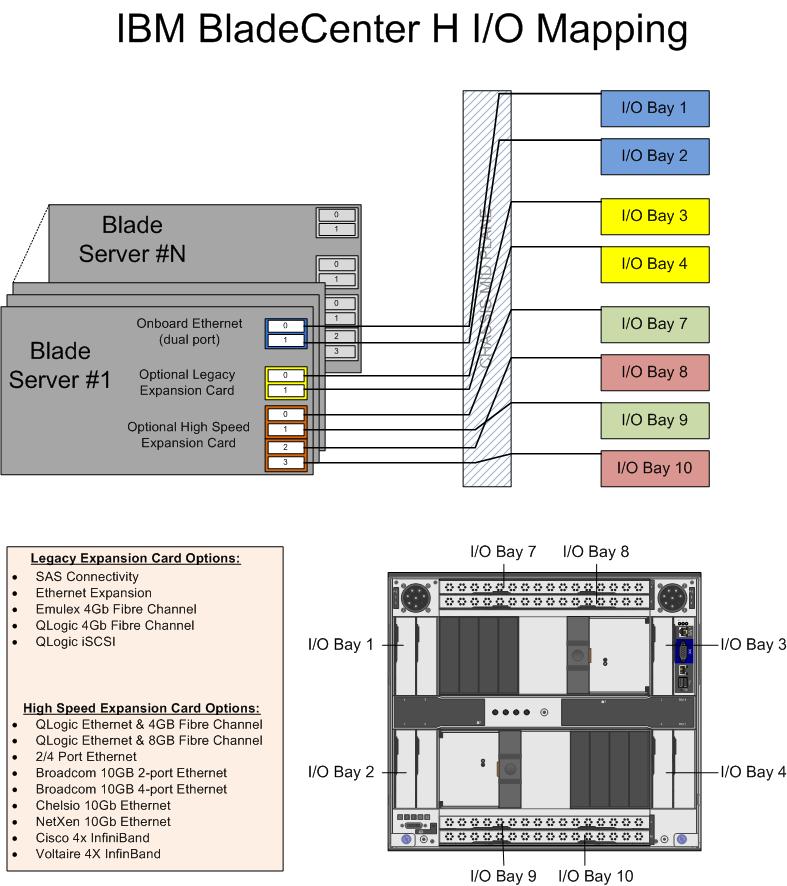
The design of IBM’s BladeCenter E and BladeCenter H have the 1Gb NICs onboard each blade server hard-wired to I/O Bays 1 and 2 – meaning only Ethernet modules can be used in these bays (see the image to the left for details.)  However, I/O Bays 1 and 2 are for “standard form factor I/O modules” while I/O Bays are for “high speed form factor I/O modules”.  This means that I/O Bays 1 and 2 can not handle “high speed” traffic, i.e. converged traffic.

This means that IF IBM comes out with a blade server that has a CNA on the motherboard, either:

a) the blade’s CNA will have to route to I/O Bays 7-10
OR
b) IBM’s going to have to come out with a new BladeCenter chassis that allows the high speed converged traffic from the CNAs to connect to a high speed switch module in Bays 1 and 2.

So let’s think about this.  If IBM (and HP for that matter) does put CNA’s on the motherboard, is there a need for additional mezzanine/daughter cards?  This means the blade servers could have more real estate for memory, or more processors.   If there’s no extra daughter cards, then there’s no need for additional I/O module bays.  This means the blade chassis could be smaller and use less power – something every customer would like to have.

I can really see the blade market moving toward this type of design (not surprising very similar to Cisco’s UCS design) – one where only a pair of redundant “modules” are needed to split converged traffic to their respective fabrics.  Maybe it’s all a pipe dream, but when it comes true in 18 months, you can say you heard it here first.

Thanks for reading.  Let me know your thoughts – leave your comments below.

Blade Networks Announces Industry’s First and Only Fully Integrated FCoE Solution Inside Blade Chassis

BLADE Network Technologies, Inc. (BLADE), “officially” announces today the delivery of the industry’s first and only fully integrated Fibre Channel over Ethernet (FCoE) solution inside a blade chassis.   This integration significantly reduces power, cost, space and complexity over external FCoE implementations.

You may recall that I blogged about this the other day (click here to read), however I left off one bit of information.  The (Blade Networks) BNT Virtual Fabric 10 Gb Switch Module does not require the QLogic Virtual Fabric Extension Module to function.  It will work with an existing Top-of-Rack (TOR) Convergence Switch from Brocade or Cisco to act as a 10Gb switch module, feeding the converged 10Gb link up to the TOR switch.  Since it is a switch module, you can connect as few as 1 uplink to your TOR switch, therefore saving connectivity costs, as opposed to a pass-thru option (click here for details on the pass-thru option.) 

Yes – this is the same architectural design as the Cisco Nexus 4001i provides as well, however there are a couple of differences:

BNT Virtual Fabric Switch Module (IBM part #46C7191) – 10 x 10Gb Uplinks, $11,199 list (U.S.)
Cisco Nexus 4001i Switch (IBM part #46M6071) – 6 x 10Gb Uplinks, $12,999 list (U.S.)

While BNT provides 4 extra 10Gb uplinks, I can’t really picture anyone using all 10 ports.  However, it does has a lower list price, but I encourage you to check your actual price with your IBM partner, as the actual pricing may be different.  Regardless of whether you choose BNT or Cisco to connect into your TOR switch, don’t forget the transceivers!  They add much more $$ to the overall cost, and without them you are hosed.

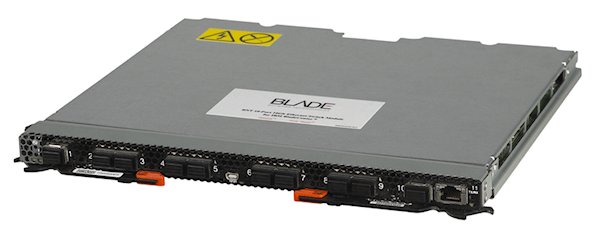
About the BNT Virtual Fabric 10Gb Switch Module
The BNT Virtual Fabric 10Gb Switch Module includes the following features and functions:

  • Form-factor
    • Single-wide high-speed switch module (fits in IBM BladeCenter H bays #7 and 9.) 
  • Internal ports
    • 14 internal auto-negotiating ports: 1 Gb or 10 Gb to the server blades
    • Two internal full-duplex 100 Mbps ports connected to the management module
  • External ports
    • Up to ten 10 Gb SFP+ ports (also designed to support 1 Gb SFP if required, flexibility of mixing 1 Gb/10 Gb)
    • One 10/100/1000 Mb copper RJ-45 used for management or data
    • An RS-232 mini-USB connector for serial port that provides an additional means to install software and configure the switch module
  • Scalability and performance
    • Autosensing 1 Gb/10 Gb internal and external Ethernet ports for bandwidth optimization

To read the extensive list of details about this switch, please visit the IBM Redbook located here.

Cisco Takes Top 8 Core VMware VMmark Server Position

Cisco is getting some (more) recognition with their UCS blade server product, as they recently achieved the top position for “8 Core Server” on VMware’s VMmark benchmark tool.  VMmark is the industry’s first (and only credible) virtualization benchmark for x86-based computers.  According to the VMmark website, the Cisco UCS B200 blade server reached a score of 25.06 @ 17 tiles.  A “tile” is simple a collection of virtual machines (VM’s) that are executing a set of diverse workloads designed to represent a natural work environment.   The total number of tiles that a server can handle provides a detailed measurement of that server’s consolidation capacity.

Cisco’s Winning Configuration
So – how did Cisco reach the top server spot?  Here’s the configuration:

server config:

  • 2 x Intel Xeon X5570 Processors
  • 96GB of RAM (16 x 8GB)
  • 1 x Converged Network Adapter (Cisco UCS M71KR-Q)

storage config:

  • EMC CX4-240
  • Cisco MDS 9130
  • 1154.27GB Used Disk Space
  • 1024MB Array Cache
  • 41 disks used on 4 enclosures/shelves (1 with 14 disk, 3 with 9 disks)
  • 37 LUNs used
    *17 at 38GB (file server + mail server) over 20 x 73GB SSDs
    *17 at 15GB (database) + 2 LUNs at 400GB (Misc) over 16 x 450GB 15k disks
    * 1 LUN at 20GB (boot) over 5 x 300GB 15k disks
  • RAID 0 for VMs, RAID 5 for VMware ESX 4.0 O/S

While first place on the VMmark page (8 cores) shows Fujitsu’s RX300, it’s important to note that it was reached using Intel’s W5590 processor – a processor that is designed for “workstations” – not servers.  Second place, of server processors, currently shows HP’s BL490 with 24.54 (@ 17 tiles)

Thanks to Omar Sultan (@omarsultan) for Tweeting about this and to Harris Sussman for blogging about it.

384GB RAM in a Single Blade Server? How Cisco Is Making it Happen (UPDATED 1-22-10)

UPDATED 1/22/2010 with new pictures 
Cisco UCS B250 M1 Extended Memory Blade Server

 Cisco’s UCS server line is already getting lots of press, but one of the biggest interests is their upcoming Cisco UCS B250 M1 Blade Server.  This server is a full-width server occupying two of the 8 server slots available in a single Cisco UCS 5108 blade chassis.  The server can hold up to 2 x Intel Xeon 5500 Series processors, 2 x dual-port mezzanine cards, but the magic is in the memory – it has 48 memory slots.  

This means it can hold 384GB of RAM using 8GB DIMMS.  This is huge for the virtualization marketplace, as everyone knows that virtual machines LOVE memory.  No other vendor in the marketplace is able to provide a blade server (or any 2 socket Intel Xeon 5500 server for that matter) that can achieve 384GB of RAM. 


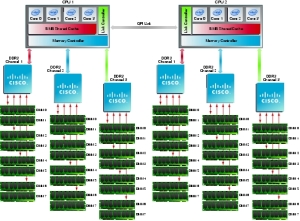
So what’s Cisco’s secret?  First, let’s look at what Intel’s Xeon 5500 architecture looks like.


intel ram


As you can see above, each Intel Xeon 5500 CPU has its own memory controller, which in turn has 3 memory channels.  Intel’s design limitation is 3 memory DIMMs (DDR3 RDIMM) per channel, so the most a traditional server can have is 18 memory slots or 144GB RAM with 8GB DDR3 RDIMM. 

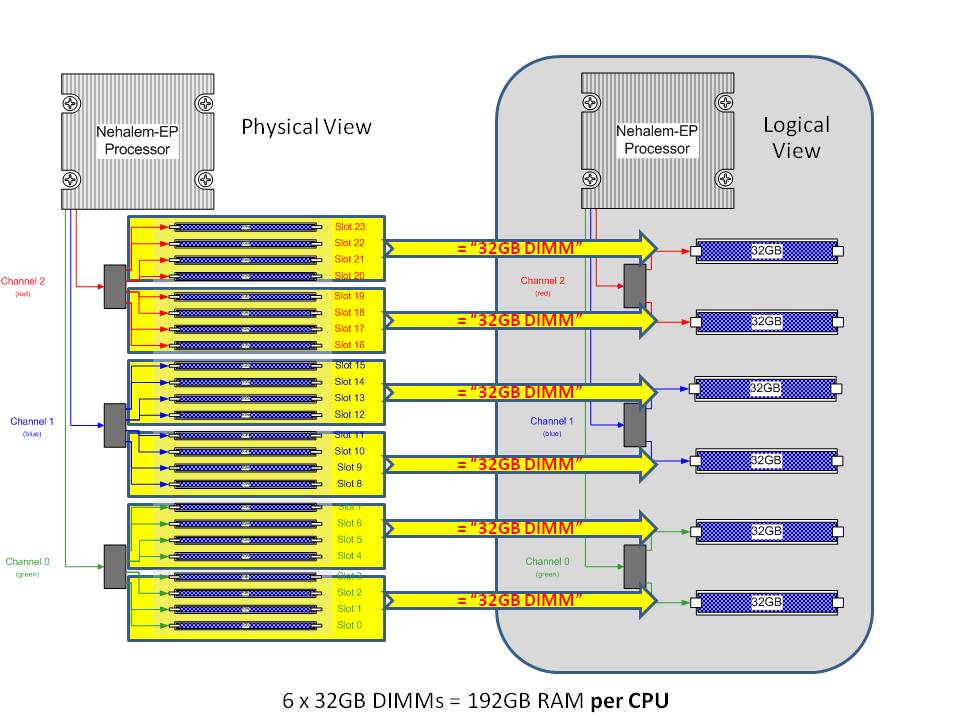
With the UCS B-250 M1 blade server, Cisco adds an additional 15 memory slots per CPU, or 30 slots per server for a total of 48 memory slots which leads to 384GB RAM with 8GB DDR3 RDIMM. 


b250-ram

How do they do it?  Simple – they put in 5 more memory DIMM slots then they present all 24 memory DIMMs across all 3 channels to an ASIC that sits between the memory controller and the memory channels.  The ASIC presents the 24 memory DIMMs as 1 x 32GB DIMM to the memory controller.  For each 8 memory DIMMs, there’s an ASIC.  3 x ASICs per CPU that represents 192GB RAM (or 384GB in a dual CPU config.) 

It’s quite an ingenious approach, but don’t get caught up in thinking about 384GB of RAM – think about 48 memory slots.  In the picture below I’ve grouped off the 8 DIMMs with each ASIC in a green square (click to enlarge.)

Cisco UCS B250 ASICS Grouped with 8 Memory DIMMs

Cisco UCS B250 ASICS Grouped with 8 Memory DIMMs

With that many slots, you can get to 192GB of RAM using 4GB DDR3 RDIMMs– which currently cost about 1/5th of the 8GB DIMMs.  That’s the real value in this server.

Cisco has published a white paper on this patented technology at http://www.cisco.com/en/US/prod/collateral/ps10265/ps10280/ps10300/white_paper_c11-525300.html so if you want to get more details, I encourage you to check it out.

Interesting HP Server Facts (from IDC)

As you can see from my blog title, I try to focus on “all things blade servers”, however I came across this bit of information that I thought would be fun to blog.  An upfront warning – this is an HP biased blog post, so sorry for those of you who are Cisco, Dell or IBM fans.

Market research firm, IDC released a quarterly update to their Worldwide Quarterly Server Tracker, citing market share figures for the 3rd calendar quarter of 2009 (3Q09).  From this report, there are a few fun HP server facts (thanks to HP for passing these facts along to me:)

HP is the #1 vendor in worldwide server shipments for the 30th consecutive quarter (7.5 years). HP shipped more than 1 out of every 3 servers worldwide and captured 36.5 percent total unit shipment share.

According to IDC:

  • HP shipped over 161,000 more servers than #2 Dell.
  • HP shipped 2.6 times as many servers as #3 IBM
  • 9.0 times as #4 Fujitsu
  • 12.9 times as many as #5 Sun.
  • HP ended up in a statistical tie with IBM for #1 in total server revenue market share with 30.9 percent.  This includes all server (UNIX and x86 revenues.)

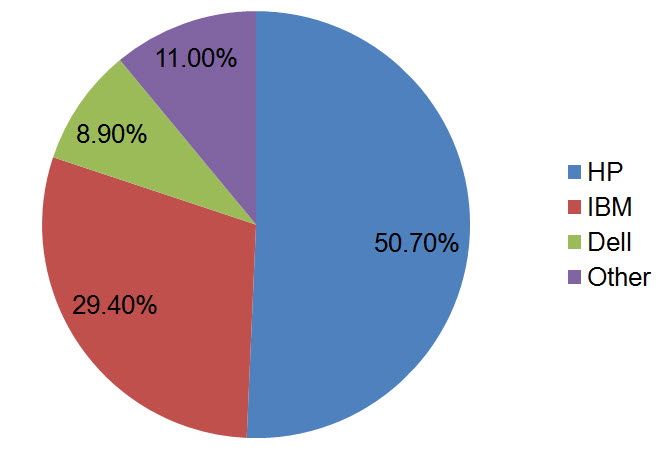
HP leads the blade server market, with a 50.7 percent revenue share, and a 47.7 percent unit share.

I blogged about this in early December (see this link for details),but it’s no surprise that HP is leading the pack in blade sales.  Their field sales team is actively promoting blades for nearly every server opportunity and they continue to make innovative additions to their blades (like 10Gb NICs standard on G6 blades.)   HP Integrity blades claimed the #1 position in revenue share for the RISC+EPIC blade segment with a 53.2 percent share gaining 1.8 points year over year.

For the 53rd consecutive quarter, more than 13 years, HP ProLiant is the x86 server market share leader in both factory revenue and units, shipping more than 1 out of every 3 servers in this market with a 36.9 percent unit share.

HP’s x86 revenue share was 14.6 points higher than its nearest competitor; Dell. HP’s x86 revenue share was 19.2 percentage points higher than IBM.

 For the 3 major operating environments UNIX®, Windows and Linux combined (representing 99.3 percent of all servers shipped worldwide), HP is number 1 worldwide in server unit shipment and revenue market share.

HP holds a 36.5 percent unit market share worldwide, which is 2.6 times more than IBM’s unit market share and 12.9 times the unit share of Sun.

HP holds a 35.4 percent revenue market share worldwide which is 2.2 times the revenue share of Dell and 4.0 times the revenue share of Sun.

FINAL NOTE:  All of the following market share figures are for the 3rd quarter (unless otherwise noted) and represent worldwide results as reported by the IDC Worldwide Quarterly Server Tracker for Q309, December 2009.

Cisco Wants IBM’s Blade Servers??

In an unusual move Tuesday, Cisco CEO, John Chambers, commented that Cisco is still open to a blade server “partnership” with IBM.  “I still firmly believe that it’s in IBM’s best interests to work with us. That door will always be open,” Chambers told the audience at the Cisco’s financial analyst conference yesterday at Cisco’s HQ in San Jose. 

John Chambers and other executives spent much of the day talking with financial analysts about Cisco’s goal to become the preeminent IT and communications vendor because of the growing importance of virtualization, collaboration and video, a move demonstrated by their recent partnership announcement with EMC and VMware.  According to reports, analysts at the event said they think Chambers is sincere about his willingness to work with IBM. The two companies have much in common, such as their enterprise customer base, and Cisco’s products could fit into IBM’s offerings, said Mark Sue of RBC Capital Markets.

So – is this just a move for Cisco to tighten their relationship with IBM in the hopes of growing to an entity that can defeat HP and their BladeSystem sales, or has Cisco decided that the server market is best left to manufacturers who have been selling servers for 20+ years?  What are your thoughts?  Please feel free to leave some comments and let me know.

Cisco, EMC and VMware Announcement – My Thoughts


By now I’m sure you’ve read, heard or seen Tweeted the announcement that Cisco, EMC and VMware have come together and created the Virtual Computing Environment coalition .   So what does this announcement really mean?  Here are my thoughts:

Greater Cooperation and Compatibility
Since these 3 top IT giants are working together, I expect to see greater cooperation between all three vendors, which will lead to understanding between what each vendor is offering.  More important, though, is we’ll be able to have reference architecturethat can be a starting point to designing a robust datacenter.  This will help to validate that an “optimized datacenter” is a solution that every customer should consider.

Technology Validation
With the introduction of the Xeon 5500 processor from Intel earlier this year and the announcement of the Nehalem EX coming early in Q1 2010, the ability to add more and more virtual machines onto a single host server is becoming more prevalent.  No longer is the processor or memory the bottleneck – now it’s the I/O.  With the introduction of Converged Network Adapters (CNAs), servers now have access to  Converged Enhanced Ethernet (CEE) or DataCenter Ethernet (DCE) providing up to 10Gb of bandwidth running at 80% efficiency with lossless packets.  With this lossless ethernet, I/O is no longer the bottleneck.

VMware offers the top selling virtualization software, so it makes sense they would be a good fit for this solution.

Cisco has a Unified Computing System that offers up the ability to combine a server running a CNA to a Interconnect switch that allows the data to be split out into ethernet and storage traffic.  It also has a building block design to allow for ease of adding new servers – a key messaging in the Coalition announcement.

EMCoffers a storage platform that will enable the storage traffic from the Cisco UCS 6120XP Interconnect Switch and they have a vested interest in VMware and Cisco, so this marriage of the 3 top IT vendors is a great fit.

Announcement of Vblock™ Infrastructure Packages
According to the announcement, the Vblock Infrastructure Package “will provide customers with a fundamentally better approach to streamlining and optimizing IT strategies around private clouds.”  The packages will be fully integrated, tested, validated, and that combine best-in-class virtualization, networking, computing, storage, security, and management technologies from Cisco, EMC and VMware with end-to-end vendor accountability.  My thought on these packages is that they are really nothing new.  Cisco’s UCS has been around, VMware vSphere has been around and EMC’s storage has been around.  The biggest message from this announcement is that there will soon be  “bundles” that will simplify customers solutions.  Will that take away from Solution Providers’ abilities to implement unique solutions?  I don’t think so.  Although this new announcement does not provide any new product, it does mark the beginning of an interesting relationship between 3 top IT giants and I think this announcement will definitely be an industry change – it will be interesting to see what follows.

UPDATE – click here check out a 3D model of the vBlocks Architecture.

Cisco’s Unified Computing System Management Software

Cisco’s own Omar Sultan and Brian Schwarz recently blogged about Cisco’s Unified Computing System (UCS) Manager software and offered up a pair of videos demonstrating its capabilities.  In my opinion, the management software of Cisco’s UCS is the magic that is going to push Cisco out of the Visionary quadrant of the Gartner Magic Quadrant for Blade Servers to the “Leaders” quadrant. 

The Cisco UCS Manager is the centralized management interface that integrates the entire set of Cisco Unified Computing System components.   The management software  not only participates in UCS blade server provisioning, but also in device discovery, inventory, configuration, diagnostics, onitoring, fault detection, auditing, and statistics collection. 

On Omar’s Cisco blog, located at http://blogs.cisco.com/datacenter, Omar and Brian created two videos.  Part 1 of their video offers a general overview of the Management software, where as in Part 2 they highlight the capabilities of profiles

I encourage you to check out the videos – they did a great job with them.