Dell announced today two new additions to their blade server family – the PowerEdge 11G M710HD and the M610x. The two new servers are just a part of Dell’s “Blade 3.0 Launch” – a campaign highlighting Dell’s ongoing effort to become the leader in blade server technology. Over the next several months, Dell will be making changes in their chassis infrastructure introducing more efficient power supplies and fans that will require Continue reading
Category Archives: Dell – Dell EMC
(UPDATED) Best Blade Server for VMware Is…
(Updated to include links to results)
I’ve had a few questions lately about “the best” blade server to use for virtualization – specifically VMware virtualization. While the obvious answer is “it depends”, I thought it would be an interesting approach to identify the blade servers that ranked in the top 5 in VMware’s VMmark benchmark. Before I begin, let me explain what the VMmark testing is about. Continue reading
(UPDATED) IDC Q1 2010 Report: Blade Servers Growing, With #1 Market Share Going To…
NOTE: IDC revised their report on May 28, 2010. This post now includes those changes.
IDC reported on May 28, 2010 that worldwide server sales for Q1 2010 factory revenues increased 4.6 4.7% year over year to $10.4 billion in the first quarter of 2010 (1Q10). They also reported the blade server market accelerated and continued its sharp growth in the quarter with factory revenue increasing 37.1% 37.2% year over year, with shipment growth increasing by 20.8% compared to 1Q09. According to IDC, nearly 90% of all blade revenue is driven by x86 systems, a segment in which blades now represent 18.8% of all x86 server revenue. Continue reading
(UPDATED) Prize Fight: IBM MAX5 vs Dell FlexMem Bridge
Updated 5/24/2010 – I’ve received some comments about expandability and I’ve received a correction about the speed of Dell’s memory, so I’ve updated this post. You’ll find the corrections / additions below in GREEN.
Since I’ve received a lot of comments from my post on the Dell FlexMem Bridge technology, I thought I would do an unbiased comparison between Dell’s FlexMem Bridge technology (via the PowerEdge 11G M910 blade server) vs IBM’s MAX5 + HX5 blade server offering. In summary both offerings provide the Intel Xeon 7500 CPU plus the ability to add “extended memory” offering value for virtualization, databases and any other workloads that benefit from large amounts of memory. Continue reading
Dell FlexMem Bridge Helps Save 50% on Virtualization Licensing
Let’s face it. Virtualization is everywhere.
Odds are there is something virtualized in your data center. If not, it soon will be. As more workloads become virtualized, chances are you are going to run out of “capacity” on your virtualization host. 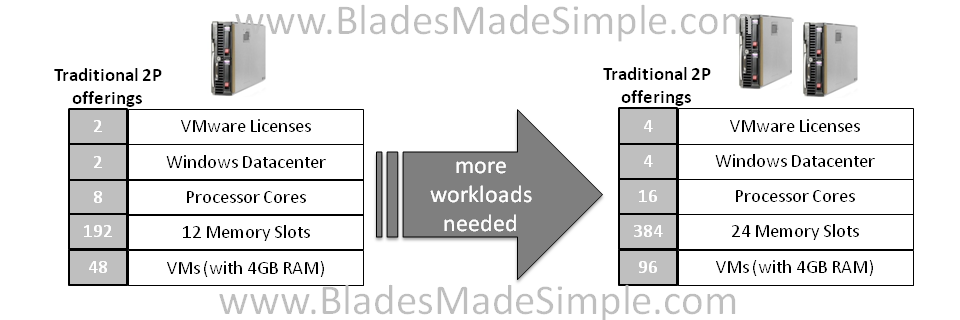 When a host’s capacity is exhausted, 99% of the time it is because the host ran out of memory, not CPU. Continue reading
Another Dell Innovation – Lifecycle Controller
Perhaps one of Dell’s best kept secrets on their 11G servers (blade, rack and tower) is something called Lifecycle Controller. This innovative offering allows a user to configure the hardware, run diagnostics and prep the server for an operating system. “SO WHAT?” you are probably thinking – “HP and IBM have this with their SmartStart and ServerGuide CD’s!” Yes, you are right, however Continue reading
Yet Another Win for HP Blades, but Why?
I heard a rumour on Friday that HP has been chosen by another animated movie studio to provide the blade servers to render an upcoming movie. To recount the movies that have used / are using HP blades: Continue reading
New Cisco Blade Server: B440-M1
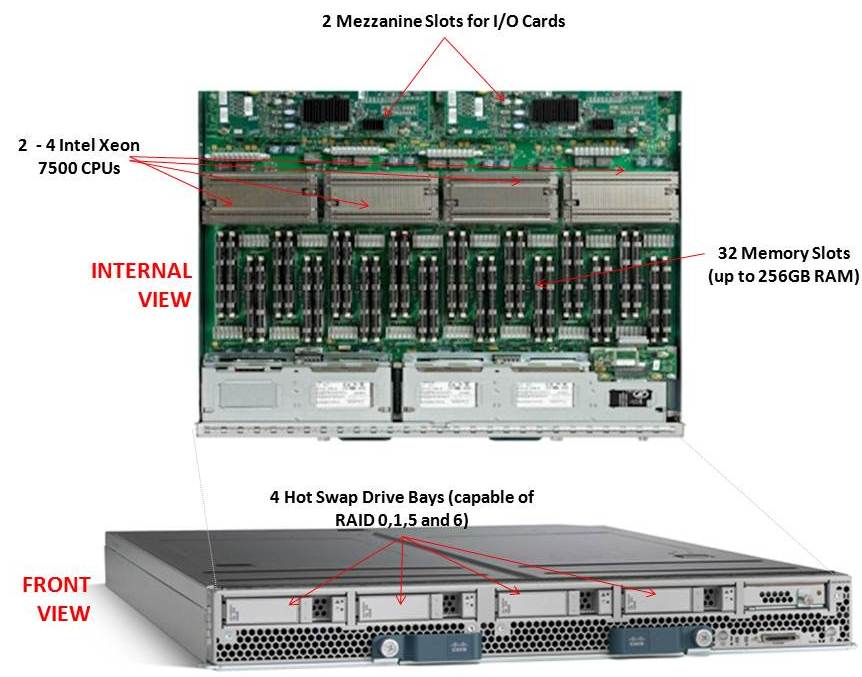 Cisco recently announced their first blade offering with the Intel Xeon 7500 processor, known as the “Cisco UCS B440-M1 High-Performance Blade Server.” This new blade is a full-width blade that offers 2 – 4 Xeon 7500 processors and 32 memory slots, for up to 256GB RAM, as well as 4 hot-swap drive bays. Since the server is a full-width blade, it will have the capability to handle 2 dual-port mezzanine cards for up to 40 Gbps I/O per blade.
Each Cisco UCS 5108 Blade Server Chassis can house up to four B440 M1 servers (maximum 160 per Unified Computing System).
How Does It Compare to the Competition?
Since I like to talk about all of the major blade server vendors, I thought I’d take a look at how the new Cisco B440 M1 compares to IBM and Dell. (HP has not yet announced their Intel Xeon 7500 offering.)
Processor Offering
Both Cisco and Dell offer models with 2 – 4 Xeon 7500 CPUs as standard. They each have variations on speeds – Dell has 9 processor speed offerings; Cisco hasn’t released their speeds and IBM’s BladeCenter HX5 blade server will have 5 processor speed offerings initially. With all 3 vendors’ blades, however, IBM’s blade server is the only one that is designed to scale from 2 CPUs to 4 CPUs by connecting 2 x HX5 blade servers. Along with this comes their “FlexNode” technology that enables users to have the 4 processor blade system to split back into 2 x 2 processor systems at specific points during the day. Although not announced, and purely my speculation, IBM’s design also leads to a possible future capability of connecting 4 x 2 processor HX5’s for an 8-way design. Since each of the vendors offer up to 4 x Xeon 7500’s, I’m going to give the advantage in this category to IBM. WINNER: IBM
Memory Capacity
Both IBM and Cisco are offering 32 DIMM slots with their blade solutions, however they are not certifying the use of 16GB DIMMs – only 4GB and 8GB DIMMs, therefore their offering only scales to 256GB of RAM. Dell claims to offers 512GB DIMM capacity on their the PowerEdge 11G M910 blade server, however that is using 16GB DIMMs. REalistically, I think the M910 would only be used with 8GB DIMMs, so Dell’s design would equal IBM and Cisco’s. I’m not sure who has the money to buy 16GB DIMMs, but if they do – WINNER: Dell (or a TIE)
Server Density
As previously mentioned, Cisco’s B440-M1 blade server is a “full-width” blade so 4 will fit into a 6U high UCS5100 chassis. Theoretically, you could fit 7 x UCS5100 blade chassis into a rack, which would equal a total of 28 x B440-M1’s per 42U rack.Overall, Cisco’s new offering is a nice addition to their existing blade portfolio. While IBM has some interesting innovation in CPU scalability and Dell appears to have the overall advantage from a server density, Cisco leads the management front.
Dell’s PowerEdge 11G M910 blade server is a “full-height” blade, so 8 will fit into a 10u high M1000e chassis. This means that 4 x M1000e chassis would fit into a 42u rack, so 32 x Dell PowerEdge M910 blade servers should fit into a 42u rack.
IBM’s BladeCenter HX5 blade server is a single slot blade server, however to make it a 4 processor blade, it would take up 2 server slots. The BladeCenter H has 14 server slots, so that makes the IBM solution capable of holding 7 x 4 processor HX5 blade servers per chassis. Since the chassis is a 9u high chassis, you can only fit 4 into a 42u rack, therefore you would be able to fit a total of 28 IBM HX5 (4 processor) servers into a 42u rack.
WINNER: Dell
Management
The final category I’ll look at is the management. Both Dell and IBM have management controllers built into their chassis, so management of a lot of chassis as described above in the maximum server / rack scenarios could add some additional burden. Cisco’s design, however, allows for the management to be performed through the UCS 6100 Fabric Interconnect modules. In fact, up to 40 chassis could be managed by 1 pair of 6100’s. There are additional features this design offers, but for the sake of this discussion, I’m calling WINNER: Cisco.
Cisco’s UCS B440 M1 is expected to ship in the June time frame. Pricing is not yet available. For more information, please visit Cisco’s UCS web site at http://www.cisco.com/en/US/products/ps10921/index.html.
Dell M910 Blade Server – Based on the Nehalem EX
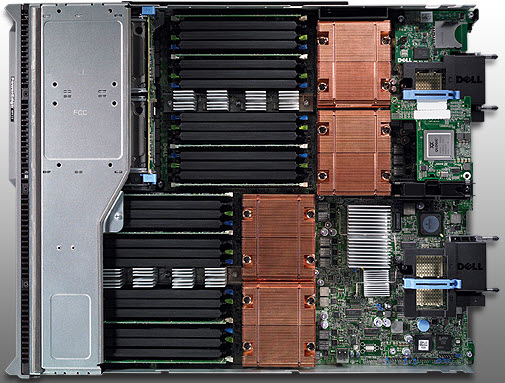 Dell appears to be first to the market today with complete details on their Nehalem EX blade server, the PowerEdge M910. Based on the Nehalem EX technology (aka Intel Xeon 7500 Chipset), the server offers quite a lot of horsepower in a small, full-height blade server footprint.
Some details about the server:
- uses Intel Xeon 7500 or 6500 CPUs
- has support for up to 512GB using 32 x 16 DIMMs
- comes standard two embedded Broadcom NetExtreme II Dual Port 5709S Gigabit Ethernet NICs with failover and load balancing.
- has two 2.5″ Hot-Swappable SAS/Solid State Drives
- 3 4 available I/O mezzanine card slots
- comes with a Matrox G200eW w/ 8MB memory standard
- can function on 2 CPUs with access to all 32 DIMM slots
Dell (finally) Offers Some Innovation
I commented a few weeks ago that Dell and innovate were rarely used in the same sentence, however with today’s announcement, I’ll have to retract that statement. Before I elaborate on what I’m referring to, let me do some quick education. The design of the Nehalem architecture allows for each processor (CPU) to have access to a dedicated bank of memory along with its own memory controller. The only downside to this is that if a CPU is not installed, the attached memory banks are not useable. THIS is where Dell is offering some innovation. Today Dell announced the “FlexMem Bridge” technology. This technology is simple in concept as it allows for the memory of a CPU socket that is not populated to still be used. In essence, Dell’s using technology that bridges the memory banks across un-populated CPU slots to the rest of the server’s populated CPUs. 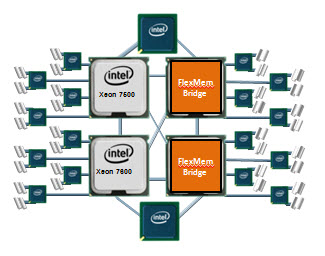 With this technology, a user could start of with only 2 CPUs and still have access to 32 memory DIMMs. Then, over time, if more CPUs are needed, they simply remove the FlexMem Bridge adapters from the CPU sockets then replace with CPUs – now they would have a 4 CPU x 32 DIMM blade server.

Congrats to Dell. Very cool idea. The Dell PowerEdge M910 is available to order today from the Dell.com website.
Let me know what you guys think.
Blade Server Shoot-Out (Dell/HP/IBM) – InfoWorld.com
InfoWorld.com posted on 3/22/2010 the results of a blade server shoot-out between Dell, HP, IBM and Super Micro. I’ll save you some time and help summarize the results of Dell, HP and IBM.
The Contenders
Dell, HP and IBM each provided blade servers with the Intel Xeon X5670 2.93GHz CPUs and at least 24GB of RAM in each blade.
The Tests
InfoWorld designed a custom suite VMware tests as well as several real-world performance metric tests. The VMware tests were composed of:
- a single large-scale custom LAMP application
- a load-balancer running Nginx
- four Apache Web servers
- two MySQL servers
InfoWorld designed the VMware workloads to mimic a real-world Web app usage model that included a weighted mix of static and dynamic content, randomized database updates, inserts, and deletes with the load generated at specific concurrency levels, starting at 50 concurrent connections and ramping up to 200. InfoWorld’s started off with the VMware tests first on one blade server, then across two blades. Each blade being tested were running VMware ESX 4 and controlled by a dedicated vCenter instance.
The other real-world tests included serveral tests of common single-threaded tasks run simultaneously at levels that met and eclipsed the logical CPU count on each blade, running all the way up to an 8x oversubscription of physical cores. These tests included:
- LAME MP3 conversions of 155MB WAV files
- MP4-to-FLV video conversions of 155MB video files
- gzip and bzip2 compression tests
- MD5 sum tests
The ResultsDell
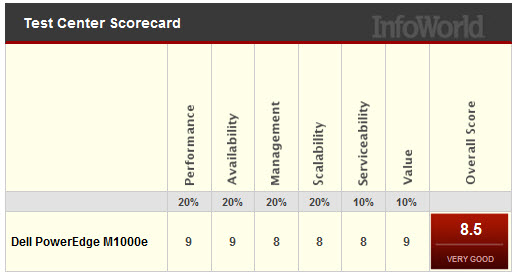 Dell did very well, coming in at 2nd in overall scoring. The blades used in this test were Dell PowerEdge M610 units, each with two 2.93GHz Intel Westmere X5670 CPUs, 24GB of DDR3 RAM, and two Intel 10G interfaces to two Dell PowerConnect 8024 10G switches in the I/O slots on the back of the chassis
Some key points made in the article about Dell:
- Dell does not offer a lot of “blade options.” There are several models available, but they are the same type of blades with different CPUs. Dell does not currently offer any storage blades or virtualization-centric blades.
- Dell’s 10Gb design does not offer any virtualized network I/O. The 10G pipe to each blade is just that, a raw 10G interface. No virtual NICs.
- The new CMC (chassis management controller) is a highly functional and attractive management tool offering new tasks like pusing actions to multiple blades at once such as BIOS updates and RAID controller firmware updates.
- Dell has implemented more efficient dynamic power and cooling features in the M1000e chassis. Such features include the ability to shut down power supplies when the power isn’t needed, or ramping the fans up and down depending on load and the location of that load.
According to the article, “Dell offers lots of punch in the M1000e and has really brushed up the embedded management tools. As the lowest-priced solution…the M1000e has the best price/performance ratio and is a great value.”
HP
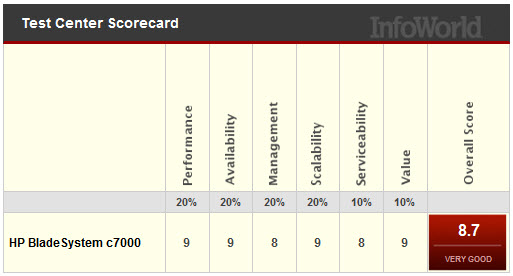 Coming in at 1st place, HP continues to shine in blade leadership. HP’s testing equipment consisted of a c7000 nine BL460c blades, each running two 2.93GHz Intel Xeon X5670 (Westmere-EP) CPUs and 96GB of RAM as well as embedded 10G NICs with a dual 1G mezzanine card. As an important note, HP was the only server vendor with 10G NICs on the motherboard. Some key points made in the article about HP:
- With the 10G NICs standard on the newest blade server models, InfoWorld says “it’s clear that HP sees 10G as the rule now, not the exception.”
- HP’s embedded Onboard Administrator offers detailed information on all chassis components from end to end. For example, HP’s management console can provide exact temperatures of every chassis or blade component.
- HP’s console can not offer global BIOS and firmware updates (unlike Dell’s CMC) or the ability to powering up or down more than one blade at a time.
- HP offers “multichassis management” – the ability to daisy-chain several chassis together and log into any of them from the same screen as well as manage them. This appears to be a unique feature to HP.
- The HP c7000 chassis also has power controlling features like dynamic power saving options that will automatically turn off power supplies when the system energy requirements are low or increasing the fan airflow to only those blades that need it.
InfoWorld’s final thoughts on HP: “the HP c7000 isn’t perfect, but it is a strong mix of reasonable price and high performance, and it easily has the most options among the blade system we reviewed.”
IBM
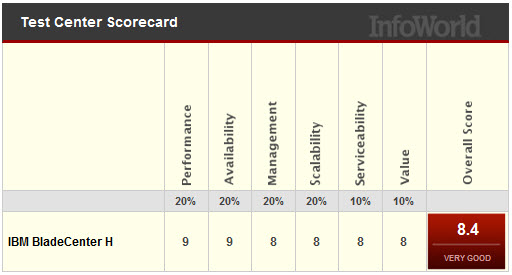 Finally, IBM’s came in at 3rd place, missing a tie with Dell by a small fraction. Surprisingly, I was unable to find the details on what the configuration was for IBM’s testing. Not sure if I’m just missing it, or if InfoWorld left out the information, but I know IBM’s blade server had the same Intel Xeon X5670 CPUs as Dell and HP used. Some of the points that InfoWorld mentioned about IBM’s BladeCenter H offering:
- IBM’s pricing is higher.
- IBM’s chassis only holds 14 servers whereas HP can hold 32 servers (using BL2x220c servers) and Dell holds 16 servers.
- IBM’s chassis doesn’t offer a heads-up display (like HP and Dell.)
- IBM had the only redundant internal power and I/O connectors on each blade. It is important to note the lack of redundant power and I/O connectors is why HP and Dell’s densities are higher. If you want redundant connections on each blade with HP and Dell, you’ll need to use their “full-height” servers, which decrease HP and Dell’s overall capacity to 8.
- IBM’s Management Module is lacking graphical features – there’s no graphical representation of the chassis or any images. From personal experience, IBM’s management module looks like it’s stuck in the ’90s – very text based.
- The IBM BladeCenter H lacks dynamic power and cooling capabilities. Instead of using smaller independent regional fans for cooling, IBM uses two blowers. Because of this, the ability to reduce cooling in specific areas, like Dell and HP offer are lacking.
InfoWorld summarizes the IBM results saying, ” if you don’t mind losing two blade slots per chassis but need some extra redundancy, then the IBM BladeCenter H might be just the ticket.”
Overall, each vendor has their own pro’s and con’s. InfoWorld does a great job summarizing the benefits of each offering below. Please make sure to visit the InfoWorld article and read all of the details of their blade server shoot-out.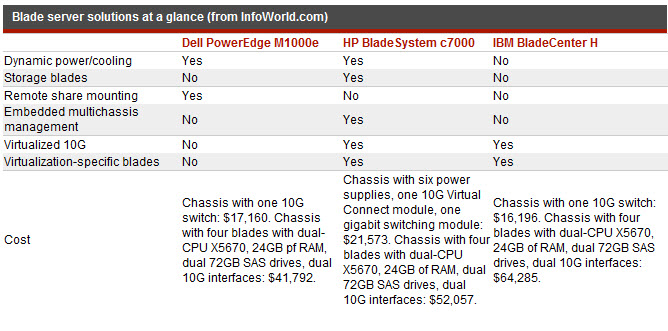
ibs symptoms
dish network careers
fort jackson sc
escape the car
navy seals training