Category Archives: HP-HPE

HP Tech Day (#hpbladesday) – Final Thoughts (REVISED)

(revised 5/4/2010)

First, I’d like to thank HP for inviting me to HP Tech Day in Houston. I’m honored that I was chosen and hope that I’m invited back – event after my challenging questions about the Tolly Report. It was a fun packed day and a half, and while it was a great event, I won’t miss having to hashtag (#hpbladesday) all my tweets. I figured I’d use this last day to offer up my final thoughts – for what they are worth.

Blogger AttendeesShare photos on twitter with Twitpic
As some of you may know, I’m still the rookie of this blogging community – especially in the group of invitees, so I didn’t have a history with anyone in the group, except Rich Brambley of http://vmetc.com .  However, this did not matter, as they all welcomed me as if I were one of their own.  In fact, they even treated me to a practical joke, letting me walk around HP’s Factory Express tour for hal an hour with a Proliant DL180 G6 sticker on my back (thanks to Stephen and Greg for that one.) Yes, that’s me in the picture.

All jokes aside, these bloggers were top class, and they offer up some great blogs, so if you don’t check them out daily, please make sure to visit them.  Here’s the list of attendees and their sites:

Rich Brambley: http://vmetc.com

Greg Knieriemen: http://www.storagemonkeys.com/  and http://iKnerd.com
Also check out Greg’s notorious podcast, “Infosmack” (if you like it, make sure to subscribe via iTunes)

Chris Evans: http://thestoragearchitect.com

Simon Seagrave: http://techhead.co.uk

John Obeto: http://absolutelywindows.com 
(don’t mention VMware or Linux to him, he’s all Microsoft)

Frank Owen: http://techvirtuoso.com

Martin Macleod: http://www.bladewatch.com/

Stephen Foskett: http://gestaltit.com/ and http://blog.fosketts.net/

Devang Panchigar: http://www.storagenerve.com

A special thanks to the extensive HP team who participated in the blogging efforts as well. 

HP Demos and Factory Express Tour
I think I got the most out of this event from the live demos and the Factory Express tour.  These are things that you can read about, but until you see them in person, you can’t appreciate the value that HP brings to the table, through their product design and through their services.

The image on the left shows the MDS6000 MDS600 storage shelf – something that I’ve read about many times, but until I saw it, I didn’t realize how cool, and useful, it was.  70 drives in a 5u space.  That’s huge.  Seeing things like this, live and in person, is what these HP Tech Days need to be about.  Hands-on, live demos. and tours of what makes HP tick.
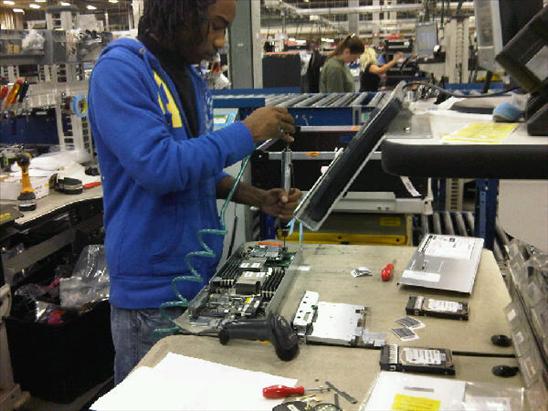
The Factory Express Tour was really cool.  I think we should have been allowed to work the line for an hour along with the HP employees.  On this tour we saw how customized HP Server builds go from being an order, to being a solution.  Workers like the one in the picture on the right typically do 30 servers a day, depending on the type of server.  The entire process involves testing and 100% audits to insure accuracy.

My words won’t do HP Factory Express justice, so check out this video from YouTube:

For a full list of my pictures taken during this event, please check out:
http://tweetphoto.com/user/kevin_houston

http://picasaweb.google.com/101667790492270812102/HPTechDay2010#

Feedback to the HP team for future events:
1) Keep the blogger group small
2) Keep it to HP demos and presentations (no partners, please)
3) More time on hands-on, live demos and tours.  This is where the magic is.
4) Try and do this at least once a quarter.  HP’s doing a great job building their social media teams, and this event goes a long way in creating that buzz.

Thanks again, HP, and to Ivy Worldwide (http://www.ivyworldwide.com) for doing a great job.  I hope to attend again!

Disclaimer: airfare, accommodations and meals are being provided by HP, however the content being blogged is solely my opinion and does not in anyway express the opinions of HP.
Tolly Report: HP Flex-10 vs Cisco UCS (Network Bandwidth Scalability Comparison)

Tolly.com announced on 2/25/2010 a new Test Report that compares the network bandwidth scalability between HP BladeSystem c7000 with BL460 G6 Servers and Cisco UCS 5100 with B200 Servers, and the results were interesting.   The report simply tested 6 HP blades, with a single Flex-10 Module vs 6 Cisco blades using their Fabric Extender + a single Fabric Interconnect.  I’m not going to try and re-state what the report says (for that you can download it directly), instead, I’m going to highlight the results.  It is important to note that the report was “commissioned by Hewlett-Packard Dev. Co, L.P.”

Result #1:  HP BladeSystem C7000 with a Flex-10 Module Tested to have More Aggregate Server Throughput (Gbps) over the Cisco UCS with a Fabric Extender connected to a Fabric Interconnect in a Physical-to-Physical Comparison
>The test shows when 4 physical servers were tested, Cisco can achieve an aggregate throughput of 36.59 Gbps vs HP achieving 35.83Gbps (WINNER: Cisco)

>When 6 physical servers were tested, Cisco achieved an aggregate throughput of 27.37 Gbps vs HP achieving 53.65 Gbps – a difference of 26.28 Gbps (WINNER: HP)

Result #2:
 HP BladeSystem C7000 with a Flex-10 Module Tested to have More Aggregate Server Throughput (Gbps) over the Cisco UCS with a Fabric Extender connected to a Fabric Interconnect in a Virtual-to-Virtual Comparison
>Testing 2 servers each running 8 VMware Red Hat Linux hosts showed that HP achieved an aggregate throughput of 16.42 Gbps vs Cisco UCS achieving 16.70 Gbps (WINNER: Cisco). 

The results of the above was performed with the 2 x Cisco B200 blade servers each mapped to a dedicated 10Gb uplink port on the Fabric Extender (FEX).  When the 2 x Cisco B200 blade servers were designed to share the same 10Gb uplink port on the FEX, the achieved aggregate throughput on the Cisco UCS decreased to 9.10 Gbps.

A few points to note about these findings:
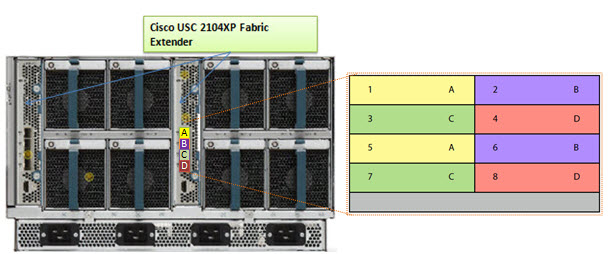
a) the HP Flex-10 Module has 8 x 10Gb uplinks whereas the Cisco Fabric Extender (FEX) has 4 x 10Gb uplinks

b) Cisco’s FEX Design allows for the 8 blade servers to extend out the 4 external ports in the FEX a 2:1 ratio (2 blades per external FEX port.) The current Cisco UCS design requires the servers to be “pinned”, or permanently assigned, to the respective FEX uplink. This works well when there are 4 blade servers, but when you get to more than 4 blade servers, the traffic is shared between two servers, which could cause bandwidth contention. 

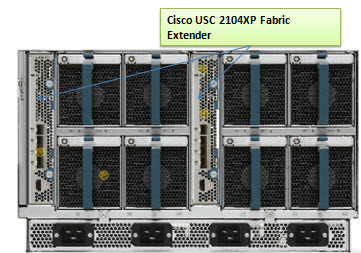
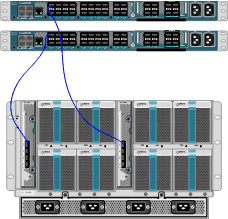
 Furthermore, it’s important to understand that the design of the UCS blade infrastructure does not allow communication to go from Server 1 to Server 2 without leaving the FEX, connecting to the Fabric Interconnect (top of the picture) then returning to the FEX and connecting to the server.  This design is the potential cause of the decrease in aggregate throughput from 16.70Gbps to 9.10Gbps as shown above.


One of the “Bottom Line” conclusions from this report states, “throughput degradation on the Cisco UCS cased by bandwidth contention is a cause of concern for customers considering the use of UCS in a virtual server environment”  however I encourage you to take a few minutes, download this full report from the Tolly.com website and make your own conclusions about this report. 

Let me know your thoughts about this report – leave a comment below.

Disclaimer: This report was brought to my attention while attending the HP Tech Day event where airfare, accommodations and meals are being provided by HP, however the content being blogged is solely my opinion and does not in anyway express the opinions of HP.
HP Tech Day – Day 1 Recap

Wow – the first day of HP Tech Day 2010 was jammed pack full of meetings, presentations and good information.  Unfortunately, it appears there won’t be any confidential, earth shattering news to report on, but it has still been a great event to attend.

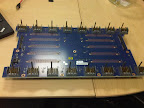
My favorite part of the day was going to the HP BladeSystem demo, where we not only got to get our hands on the blade servers, but we got to see what the mid-plane and power bus looks like outside the chassis. 

From HP Tech Day 2010

Kudos to James Singer, HP Blade engineer, who did a great job talking about the HP BladeSystem and all it offers.  My only advice to the HP events team is to double the time we get with the blades next time.  (Isn’t that why were were here?)

Since I spent most of the day Tweeting what was going on, I figured it would be easiest to just list my tweets throughout the day.  If you have any questions about any of this, let me know.

My tweets from 2/25/2010 (latest to earliest):

Q&A from HP StorageWorks CTO, Paul Perez

  • “the era of spindles for IOPS will be over soon.” Paul Perez, CTO HP StorageWorks
  • CTO Perez said Memristors (http://tinyurl.com/39f6br) are the next major evolution in storage – in next 2 or 3 years
  • CTO Perez views Solid State (Drives) as an extension of main memory.
  • HP StorageWorks CTO, Paul Perez, now discussing HP StorageWorks X9000 Network Storage System (formerly known as IBRIX)
  • @SFoskett is grilling the CTO of HP StorageWorks
  • Paul Perez – CTO of StorageWorks is now in the room

Competitive Discussion

  • Kudos to Gary Thome , Chief Architect at HP, for not wanting to bash any vendor during the competitive blade session
  • Cool – we have a first look at a Tolly report comparing HP BladeSystem Flex-10 vs Cisco UCS…
  • @fowen Yes – a 10Gb, a CNA and a virtual adapter. Cisco doesn’t have anything “on the motherboard” though.
  • RT @fowen: HP is the only vendor (currently) who can embed 10GB nics in Blades @hpbladeday AND Cisco…
  • Wish HP allowed more time for deep dive into their blades at #hpbladesday. We’re rushing through in 20 min content that needs an hour.
  • Dell’s M1000 blade chassis has the blade connector pins on the server side. This causes a lot of issues as pins bend
  • I’m going to have to bite my tongue on this competitive discussion between blade vendors…
  • Mentioning HP’s presence in Gartner’s Magic Quadrant (see my previous post on this here) –> http://tinyurl.com/ydbsnan
  • Fun – now we get to hear how HP blades are better than IBM, Cisco and Dell

HP BladeSystem Matrix Demo

Insight Software Demo

  • Whoops – previous picture was “Tom Turicchi” not John Schmitz
  • John Schmitz, HP, demonstrates HP Insight Software http://tinyurl.com/yjnu3o9
  • HP Insight Control comes with “Data Center Power Control” which allows you to define rules for power control inside your DC
  • HP Insight Control = “Essential Management”; HP Insight Dynamics = “Advanced Management”
  • Live #hpBladesday Tweet Feed can be seen at http://tinyurl.com/ygcaq2a

BladeSystem in the Lab

  • c7000 Power Bus (rear) http://tinyurl.com/yjy3kwy #hpbladesday complete list of pics can be found @ http://tinyurl.com/yl465v9
  • HP c7000 Power Bus (front) http://tinyurl.com/yfwg88t #hpbladesday (one more pic coming…)
  • HP c7000 Midplane (rear) http://tinyurl.com/yhozte6
  • HP BladeSystem C7000 Midplane (front) http://tinyurl.com/ylbr9rd
  • BladeSystem lab was friggin awesome. Pics to follow
  • 23 power “steppings” on each BladeSystem fan
  • 4 fan zones in a HP BladeSystem allows for fans to spin at different rates. – controlled by the Onboard Administrator
  • The designs of the HP BladeSystem cooling fans came from Ducted Electric Jet Fans from hobby planes) http://tinyurl.com/yhug94w
  • Check out the HP SB40c Storage Blade with the cover off : http://tinyurl.com/yj6xode
  • James Singer – talking about HP BladeSystem power (http://tinyurl.com/ykfhbb2)
  • DPS takes total loads and pushes on fewer supplies which maximizes the power efficiency
  • DPS – Dynamic Power Saver dynamically turns power supplies off based on the server loads (HP exclusive technology)
  • HP BladeSystem power supplies are 94% efficient
  • HP’s hot-pluggable equipment is not purple, it’s “port wine”
  • Here’s the HP BladeSystem C3500 (1/2 of a C7000) http://tinyurl.com/yhbpddt
  • In BladeSystem demo with James Singer (HP). Very cool. They’ve got a C3500 (C7000 cut in half.) Picture will come later.

 Lunch

  • Having lunch with Dan Bowers (HP marketing) and Gary Thome – talking about enhancements need for Proliant support materials

 Virtual Connect

ISB Overview and Data Center Trends 2010

  • check out all my previous HP posts at http://tinyurl.com/yzx3hx6
  • BladeSystem midplane doesn’t require transceivers, so it’s easy to run 10Gb at same cost as 1Gb
  • BladeSystem was designed for 10Gb (with even higher in mind.)
  • RT @SFoskett: Spot the secret “G” (for @GestaltIT?) in this #HPBladesDay Nth Generation slide! http://twitpic.com/159q23 
  • If Cisco wants to be like HP, they’d have to buy Lenovo, Canon and Dunder Mifflon
  • discussed how HP blades were used in Avatar (see my post on this here )–> http://tinyurl.com/yl32xud
  • HP’s Virtual Client Infra. Solutions design allows you to build “bricks” of servers and storage to serve 1000’s of virtual PCs
  • Power capping is built into HP hardware (it’s not in the software.)
  • Power Capping is a key technology in the HP Thermal Logic design.
  • HP’s Thermal Logic technology allows you to actively manage power overtime.

HP Tech Day – Day 1 Agenda and Attendees

Today kicks off the HP Blades and Infrastructure Software Tech Day 2010 (aka HP Blades Day). I’ll be updating this site frequently throughout the day, so be sure to check back. You can quickly view all of the HP Tech Day info by clicking on the “Category” tab on the left and choose “HPTechDay2010.” For live updates, follow me on Twitter @Kevin_Houston.

Here’s our agenda for today (Day 1):

9:10 – 10:00 ISB Overview and Key Data Center Trends 2010
10:00 – 10:30 Nth Generation Computing Presentation
10:45 – 11:45 Virtual Connect
1:00 – 3:00 BladeSystem in the Lab (Overview and Demo) and Insight Software (Overview and Demo)
3:15 – 4:15 Matrix
4:15 – 4:45 Competitive Discussion
5:00 – 5:45 Podcast roundtable with Storage Monkeys

Note: gaps in the times above indicate a break or lunch.

For extensive coverage, make sure you check in on the rest of the attendees’ blogs:

Rich Brambley: http://vmetc.com
Greg Knieremen: http://www.storagemonkeys.com/
Chris Evans: http://thestoragearchitect.com
Simon Seagrave: http://techhead.co.uk
John Obeto: http://absolutelywindows.com
Frank Owen: http://techvirtuoso.com
Martin Macleod: http://www.bladewatch.com/
Steven Foskett: http://blog.fosketts.net/
Devang Panchigar: http://www.storagenerve.com

Disclaimer: airfare, accommodations and meals are being provided by HP, however the content being blogged is solely my opinion and does not in anyway express the opinions of HP.
More HP and IBM Blade Rumours

I wanted to post a few more rumours before I head out to HP in Houston for “HP Blades and Infrastructure Software Tech Day 2010” so it’s not to appear that I got the info from HP. NOTE: this is purely speculation, I have no definitive information from HP so this may be false info.

First off – the HP Rumour:
I’ve caught wind of a secret that may be truth, may be fiction, but I hope to find out for sure from the HP blade team in Houston.  The rumour is that HP’s development team currently has a Cisco Nexus Blade Switch Module for the HP BladeSystem in their lab, and they are currently testing it out.

Now, this seems far fetched, especially with the news of Cisco severing partner ties with HP, however, it seems that news tidbit was talking only about products sold with the HP label, but made by Cisco (OEM.)   HP will continue to sell Cisco Catalyst switches for the HP BladeSystem and even Cisco branded Nexus switches with HP part numbers (see this HP site for details.)  I have some doubt about this rumour of a Cisco Nexus Switch that would go inside the HP BladeSystem simply because I am 99% sure that HP is announcing a Flex10 type of BladeSystem switch that will allow converged traffic to be split out, with the Ethernet traffic going to the Ethernet fabric and the Fibre traffic going to the Fibre fabric (check out this rumour blog I posted a few days ago for details.)  Guess only time will tell.

The IBM Rumour:
I posted a few days ago a rumour blog that discusses the rumour of HP’s next generation adding Converged Network Adapters (CNA) to the motherboard on the blades (in lieu of the 1GB or Flex10 NICs), well, now I’ve uncovered a rumour that IBM is planning on following later this year with blades that will also have CNA’s on the motherboard.  This is huge!  Let me explain why.

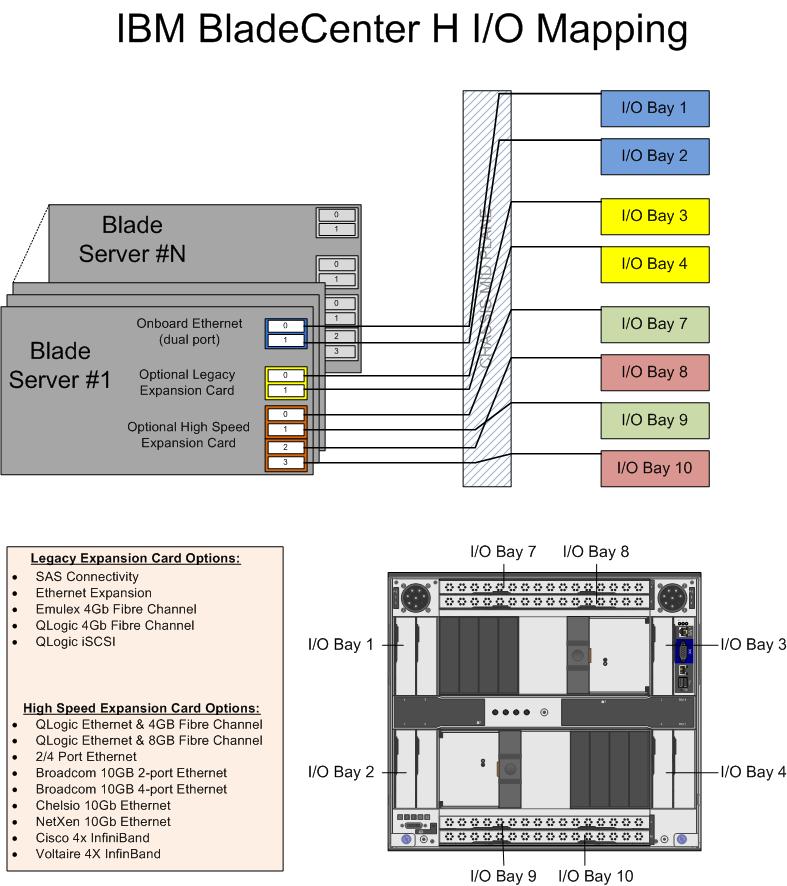
The design of IBM’s BladeCenter E and BladeCenter H have the 1Gb NICs onboard each blade server hard-wired to I/O Bays 1 and 2 – meaning only Ethernet modules can be used in these bays (see the image to the left for details.)  However, I/O Bays 1 and 2 are for “standard form factor I/O modules” while I/O Bays are for “high speed form factor I/O modules”.  This means that I/O Bays 1 and 2 can not handle “high speed” traffic, i.e. converged traffic.

This means that IF IBM comes out with a blade server that has a CNA on the motherboard, either:

a) the blade’s CNA will have to route to I/O Bays 7-10
OR
b) IBM’s going to have to come out with a new BladeCenter chassis that allows the high speed converged traffic from the CNAs to connect to a high speed switch module in Bays 1 and 2.

So let’s think about this.  If IBM (and HP for that matter) does put CNA’s on the motherboard, is there a need for additional mezzanine/daughter cards?  This means the blade servers could have more real estate for memory, or more processors.   If there’s no extra daughter cards, then there’s no need for additional I/O module bays.  This means the blade chassis could be smaller and use less power – something every customer would like to have.

I can really see the blade market moving toward this type of design (not surprising very similar to Cisco’s UCS design) – one where only a pair of redundant “modules” are needed to split converged traffic to their respective fabrics.  Maybe it’s all a pipe dream, but when it comes true in 18 months, you can say you heard it here first.

Thanks for reading.  Let me know your thoughts – leave your comments below.

HP Blades and Infrastructure Software Tech Day 2010 (UPDATED)

On Wednesday I will be headed to the 2010 HP Infrastructure Software & Blades Tech Day, an invitation only blogger event at the HP Campus in Houston, TX.  This event is a day and a half deep dive about the blade server market, key data center trends and client virtualization.  We will be with HP technology leaders and business executives who will discuss the company’s business advantages and technical advances.  The event will also include customers’ and their own key insights and experiences and provide demos of the products including an insider’s tour of HP’s Lab facilities.

I’m extremely excited to attend this event and can’t wait to blog about it.  (Hopefully HP will not NDA the entire event.)  I’m also excited to meet some of the world’s top bloggers.  Check out this list of attendees:

Rich Brambley: http://vmetc.com

Greg Knieremen: http://www.storagemonkeys.com/

Chris Evans: http://thestoragearchitect.com

Simon Seagrave: http://techhead.co.uk

John Obeto: http://absolutelywindows.com

Frank Owen: http://techvirtuoso.com

Martin Macleod: http://www.bladewatch.com/

Plus a couple that I left off originally (sorry guys):

Steven Foskett: http://blog.fosketts.net/

Devang Panchigar: http://www.storagenerve.com

Be sure to check back with me on Thursday and Friday for updates to the event, and also follow me on Twitter @kevin_houston (twitter hashcode for this event is #hpbladesday.)

Disclaimer: airfare, accommodations and some meals are being provided by HP, however the content being blogged is solely my opinion and does not in anyway express the opinions of HP.
HP BladeSystem Rumours

I’ve recently posted some rumours about IBM’s upcoming announcements in their blade server line, now it is time to let you know some rumours I’m hearing about HP.   NOTE: this is purely speculation, I have no definitive information from HP so this may be false info.  That being said – here we go:

Rumour #1:  Integration of “CNA” like devices on the motherboard. 
As you may be aware, with the introduction of the “G6”, or Generation 6, of HP’s blade servers, HP added “FlexNICs” onto the servers’ motherboards instead of the 2 x 1Gb NICs that are standard on most of the competition’s blades.  FlexNICs allow for the user to carve up a 10Gb NIC into 4 virtual NICs when using the Flex-10 Modules inside the chassis.  (For a detailed description of Flex-10 technology, check out this HP video.)  The idea behind Flex-10 is that you have 10Gb connectivity that allows you to do more with fewer NICs. 

SO – what’s next?  Rumour has it that the “G7” servers, expected to be announced on March 16, will have an integrated CNA or Converged Network Adapter.  With a CNA on the motherboard, both the ethernet and the fibre traffic will have a single integrated device to travel over.  This is a VERY cool idea because this announcement could lead to a blade server that can eliminate the additional daughter card or mezzanine expansion slots therefore freeing up valueable real estate for newer Intel CPU architecture.

Rumour #2: Next generation Flex-10 Modules will separate Fibre and Network traffic.

Today, HP’s Flex-10 ONLY allows handles Ethernet traffic.  There is no support for FCoE (Fibre Channel over Ethernet) so if you have a Fibre network, then you’ll also have to add a Fibre Switch into your BladeSystem chassis design. If HP does put in a CNA onto their next generation blade servers that carry Fibre and Ethernet traffic, wouldn’t it make sense there would need to be a module that would fit in the BladeSystem chassis that would allow for the storage and Ethernet traffic to exit? 

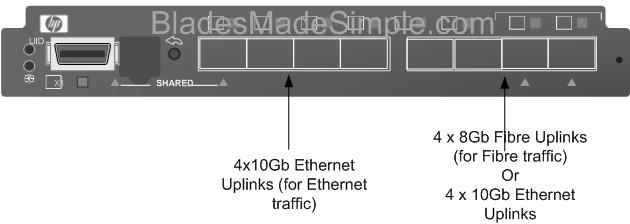
I’m hearing that a new version of the Flex-10 Module is coming, very soon, that will allow for the Ethernet AND the Fibre traffic to exit out the switch. (The image to the right shows what it could look like.)  The switch would allow for 4 of the uplink ports to go to the Ethernet fabric and the other 4 ports of the 8 port Next Generation Flex-10 switch to either be dedicated to a Fibre fabric OR used for additional 4 ports to the Ethernet fabric. 

If this rumour is accurate, it could shake up things in the blade server world.  Cisco UCS uses 10Gb Data Center Ethernet (Ethernet plus FCoE); IBM BladeCenter has the ability to do a 10Gb plus Fibre switch fabric (like HP) or it can use a 10Gb Enhanced Ethernet plus FCoE (like Cisco) however no one currently has a device to split the Ethernet and Fibre traffic at the blade chassis.  If this rumour is true, then we should see it announced around the same time as the G7 blade server (March 16).

That’s all for now.  As I come across more rumours, or information about new announcements, I’ll let you know.

Cisco Takes Top 8 Core VMware VMmark Server Position

Cisco is getting some (more) recognition with their UCS blade server product, as they recently achieved the top position for “8 Core Server” on VMware’s VMmark benchmark tool.  VMmark is the industry’s first (and only credible) virtualization benchmark for x86-based computers.  According to the VMmark website, the Cisco UCS B200 blade server reached a score of 25.06 @ 17 tiles.  A “tile” is simple a collection of virtual machines (VM’s) that are executing a set of diverse workloads designed to represent a natural work environment.   The total number of tiles that a server can handle provides a detailed measurement of that server’s consolidation capacity.

Cisco’s Winning Configuration
So – how did Cisco reach the top server spot?  Here’s the configuration:

server config:

  • 2 x Intel Xeon X5570 Processors
  • 96GB of RAM (16 x 8GB)
  • 1 x Converged Network Adapter (Cisco UCS M71KR-Q)

storage config:

  • EMC CX4-240
  • Cisco MDS 9130
  • 1154.27GB Used Disk Space
  • 1024MB Array Cache
  • 41 disks used on 4 enclosures/shelves (1 with 14 disk, 3 with 9 disks)
  • 37 LUNs used
    *17 at 38GB (file server + mail server) over 20 x 73GB SSDs
    *17 at 15GB (database) + 2 LUNs at 400GB (Misc) over 16 x 450GB 15k disks
    * 1 LUN at 20GB (boot) over 5 x 300GB 15k disks
  • RAID 0 for VMs, RAID 5 for VMware ESX 4.0 O/S

While first place on the VMmark page (8 cores) shows Fujitsu’s RX300, it’s important to note that it was reached using Intel’s W5590 processor – a processor that is designed for “workstations” – not servers.  Second place, of server processors, currently shows HP’s BL490 with 24.54 (@ 17 tiles)

Thanks to Omar Sultan (@omarsultan) for Tweeting about this and to Harris Sussman for blogging about it.

Weta Digital, Production House for AVATAR, Donates IBM Blade Servers to Schools

Weta Digital, the digital production house that designed the hit movie AVATAR recently donated about 300 IBM HS20 blade servers to Whitireia Community Polytechnic in Porirua which will use them to help teach students how to create 3-D animations. The IBM HS20 blade servers were originally bought to produce special effects for The Lord of the Rings at a cost of more than $1 million (for more details on this, check out this November 2004 article from DigitalArtsOnline.co.uk.) Weta Digital has since replaced them with more powerful HP BL 2x220c G5 servers supplied by Hewlett-Packard, which were used for AVATAR.

According to the school, these older IBM blade servers will help the schoolexpand its graphics and information technology courses and turn out students with more experience of 3-D rendering.

Thanks to Stuff.co.nz for the information mentioned above.

(UPDATED) Blade Servers with SD Slots for Virtualization

(updated 1/13/2010 – see bottom of blog for updates)

Eric Gray at www.vcritical.com blogged today about the benefits of using a flash based device, like an SD card, for loading VMware ESXi, so I thought I would take a few minutes to touch on the topic.

As Eric mentions, probably the biggest benefit of using VMware ESXi on an embedded device is that you don’t need local drives, which lowers the power and cooling of your blade server.  While he mentions HP in his blog, both HP and Dell offer SD slots in their blade servers – so let’s take a look:

HP
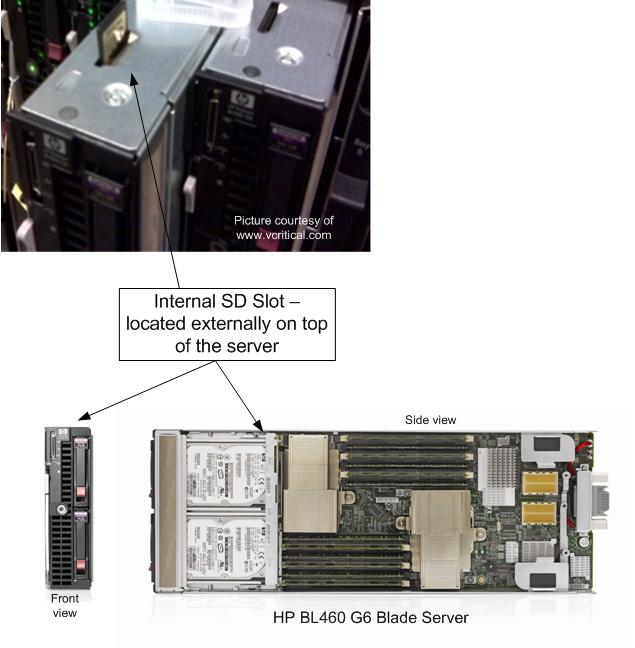
HP currently offers these SD slots in their BL460 G6 and BL490 G6 blade servers.  As you can see from the picture on the left (thanks again to Eric at vCritical.com) HP allows for you to access the SD slot from the top of the blade server.  This makes it fairly convenient to access, although once the image is installed on the SD card, it’s probably not ever coming out.  HP’s QuickSpecs for the BL460 G6 state offer up an “HP 4GB SD Flash Media” that has a current list price of $70, however I have been unable to find any documentation that says you MUST use this SD card, so if you want to try and use it with your own personal SD card first, good luck.  It is important to note that HP does not currently offer VMware ESXi, or any other virtualization vendor’s software, pre-installed on an SD card, unlike Dell.

Dell
Dell has been offering SD slots on select servers for quite a while.  In fact, I can remember seeing it at VMworld 2008.  Everyone else was showing “embedded hypervisors” on USB keys while Dell was using an SD card.  I don’t know that I have a personal preference of USB vs SD, but the point is that Dell was ahead of the game on this one.

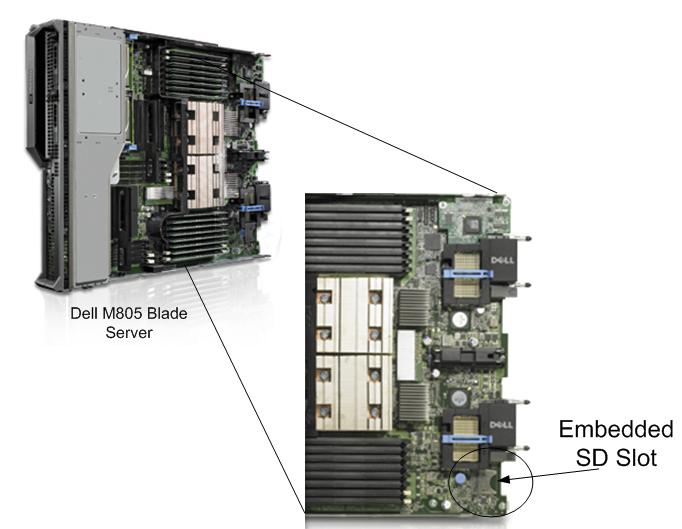
Dell currently only offers their SD slot on their M805 and M905 blade servers.  These are full-height servers, which could be considered good candidates for a virtualization server due to its redundant connectivity, high memory offering and high I/O (but that’s for another blog post.)

Dell chose to place the SD slots on the bottom rear of their blade servers.  I’m not sure I agree with the placement, because if you needed to access the card, for whatever reason, you have to pull the server completely out of the chassis to service.  It’s a small thing, but it adds time and complexity to the serviceability of the server.  

An advantage that Dell has over HP is they offer to have VMware ESXi 4 PRE-LOADED on the SD key upon delivery.  Per the Dell website, an SD card with ESXi 4 (basic, not Standard or Enterprise) is available for $99.  It’s listed as “VMware ESXi v4.0 with VI4, 4CPU, Embedded, Trial, No Subsc, SD,NoMedia“.  Yes, it’s considered a “trial” and it’s the basic version with no bells or whistles, however it is pre-loaded which equals time savings.  There are additional options to upgrade the ESXi to either Standard or Enterprise as well (for additional cost, of course.)

It is important to note that this discussion was only about SD slots.  All of the blade server vendors, including IBM, have incorporated USB slots internally to their blade servers, so whereas a specific server may not have an SD slot, there is still the ability to load the hypervisor onto an USB key (where supported.)

1/13/2010 UPDATE –SD slots are also available on the BL 280G6 and BL 685 G6.

There is also an HP Advisory discouraging use of an internal USB key for embedded virtualization.  Check it out at:

http://h20000.www2.hp.com/bizsupport/TechSupport/Document.jsp?objectID=c01957637&lang=en&cc=us&taskId=101&prodSeriesId=3948609&prodTypeId=3709945