Tag Archives: blade servers

HP Blades Helping Make Happy Feet 2 and Mad Max 4

Chalk yet another win up for HP. 

It was reported last week on www.itnews.com.au that Digital production house Dr. D. Studios is in the early stages of building a supercomputer grid cluster for the rendering of the animated feature film Happy Feet 2 and visual effects in Fury Road the long-anticipated fourth film in the Mad Max series.  The super computer grid is based on HP BL490 G6 blade servers housed within an APC HACS pod, is already running in excess of 1000 cores and is expected to reach over 6000 cores during peak rendering by mid-2011.

This cluster boasted 4096 cores, taking it into the top 100 on the list of Top 500 supercomputers in the world in 2007 (it now sits at 447).

According to Doctor D infrastructure engineering manager James Bourne, “High density compute clusters provide an interesting engineering exercise for all parties involved. Over the last few years the drive to virtualise is causing data centres to move down a medium density path.”

Check out the full article, including video at:
http://www.itnews.com.au/News/169048,video-building-a-supercomputer-for-happy-feet-2-mad-max-4.aspx

Blade Server Shoot-Out (Dell/HP/IBM) – InfoWorld.com

InfoWorld.com posted on 3/22/2010 the results of a blade server shoot-out between Dell, HP, IBM and Super Micro. I’ll save you some time and help summarize the results of Dell, HP and IBM.

The Contenders
Dell, HP and IBM each provided blade servers with the Intel Xeon X5670 2.93GHz CPUs and at least 24GB of RAM in each blade.

The Tests
InfoWorld designed a custom suite VMware tests as well as several real-world performance metric tests. The VMware tests were composed of:

  • a single large-scale custom LAMP application
  • a load-balancer running Nginx
  • four Apache Web servers
  • two MySQL servers

InfoWorld designed the VMware workloads to mimic a real-world Web app usage model that included a weighted mix of static and dynamic content, randomized database updates, inserts, and deletes with the load generated at specific concurrency levels, starting at 50 concurrent connections and ramping up to 200.  InfoWorld’s started off with the VMware tests first on one blade server, then across two blades. Each blade being tested were running VMware ESX 4 and controlled by a dedicated vCenter instance.

The other real-world tests included serveral tests of common single-threaded tasks run simultaneously at levels that met and eclipsed the logical CPU count on each blade, running all the way up to an 8x oversubscription of physical cores. These tests included:

  • LAME MP3 conversions of 155MB WAV files
  • MP4-to-FLV video conversions of 155MB video files
  • gzip and bzip2 compression tests
  • MD5 sum tests

The ResultsDell
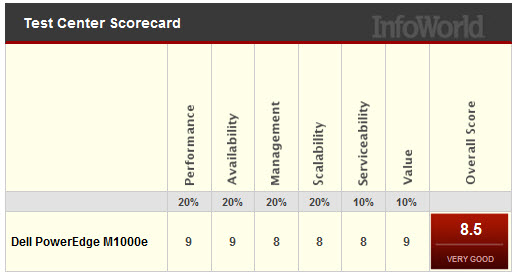
Dell did very well, coming in at 2nd in overall scoring.  The blades used in this test were Dell PowerEdge M610 units, each with two 2.93GHz Intel Westmere X5670 CPUs, 24GB of DDR3 RAM, and two Intel 10G interfaces to two Dell PowerConnect 8024 10G switches in the I/O slots on the back of the chassis

Some key points made in the article about Dell:

  • Dell does not offer a lot of “blade options.”  There are several models available, but they are the same type of blades with different CPUs.  Dell does not currently offer any storage blades or virtualization-centric blades.
  • Dell’s 10Gb design does not offer any virtualized network I/O. The 10G pipe to each blade is just that, a raw 10G interface.  No virtual NICs.
  • The new CMC (chassis management controller) is a highly functional and attractive management tool offering new tasks like pusing actions to multiple blades at once such as BIOS updates and RAID controller firmware updates.
  • Dell has implemented more efficient dynamic power and cooling features in the M1000e chassis. Such features include the ability to shut down power supplies when the power isn’t needed, or ramping the fans up and down depending on load and the location of that load.

According to the article, “Dell offers lots of punch in the M1000e and has really brushed up the embedded management tools. As the lowest-priced solution…the M1000e has the best price/performance ratio and is a great value.”

HP
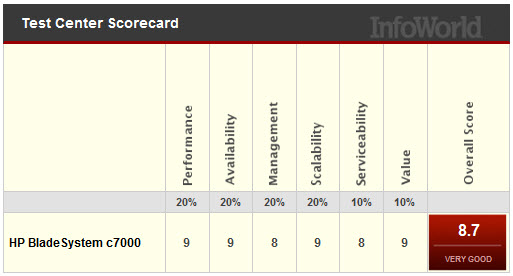
Coming in at 1st place, HP continues to shine in blade leadership.  HP’s testing equipment consisted of a c7000 nine BL460c blades, each running two 2.93GHz Intel Xeon X5670 (Westmere-EP) CPUs and 96GB of RAM as well as embedded 10G NICs with a dual 1G mezzanine card.  As an important note, HP was the only server vendor with 10G NICs on the motherboard.  Some key points made in the article about HP:

  •  With the 10G NICs standard on the newest blade server models, InfoWorld says “it’s clear that HP sees 10G as the rule now, not the exception.”
  • HP’s embedded Onboard Administrator offers detailed information on all chassis components from end to end.  For example, HP’s management console can provide exact temperatures of every chassis or blade component.
  • HP’s console can not offer  global BIOS and firmware updates (unlike Dell’s CMC) or the ability to powering up or down more than one blade at a time.
  • HP offers “multichassis management” – the ability to daisy-chain several chassis together and log into any of them from the same screen as well as manage them.  This appears to be a unique feature to HP.
  • The HP c7000 chassis also has power controlling features like dynamic power saving options that will automatically turn off power supplies when the system energy requirements are low or increasing the fan airflow to only those blades that need it.

InfoWorld’s final thoughts on HP: “the HP c7000 isn’t perfect, but it is a strong mix of reasonable price and high performance, and it easily has the most options among the blade system we reviewed.”

IBM
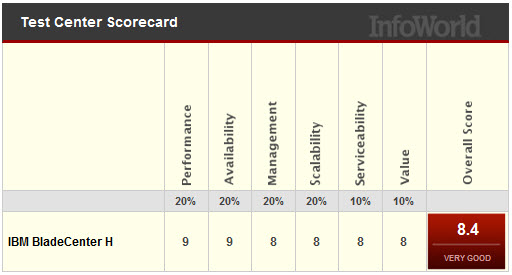
Finally, IBM’s came in at 3rd place, missing a tie with Dell by a small fraction.  Surprisingly, I was unable to find the details on what the configuration was for IBM’s testing.  Not sure if I’m just missing it, or if InfoWorld left out the information, but I know IBM’s blade server had the same Intel Xeon X5670 CPUs as Dell and HP used.   Some of the points that InfoWorld mentioned about IBM’s BladeCenter H offering:

  • IBM’s pricing is higher.
  • IBM’s chassis only holds 14 servers whereas HP can hold 32 servers (using BL2x220c servers) and Dell holds 16 servers.
  • IBM’s chassis doesn’t offer a heads-up display (like HP and Dell.)
  • IBM had the only redundant internal power and I/O connectors on each blade.  It is important to note the lack of redundant power and I/O connectors is why HP and Dell’s densities are higher.  If you want redundant connections on each blade with HP and Dell, you’ll need to use their “full-height” servers, which decrease HP and Dell’s overall capacity to 8.
  • IBM’s Management Module is lacking graphical features – there’s no graphical representation of the chassis or any images.  From personal experience, IBM’s management module looks like it’s stuck in the ’90s – very text based.
  • The IBM BladeCenter H lacks dynamic power and cooling capabilities.  Instead of using smaller independent regional fans for cooling, IBM uses two blowers.  Because of this, the ability to reduce cooling in specific areas, like Dell and HP offer are lacking.

InfoWorld summarizes the IBM results saying, ” if you don’t mind losing two blade slots per chassis but need some extra redundancy, then the IBM BladeCenter H might be just the ticket.”

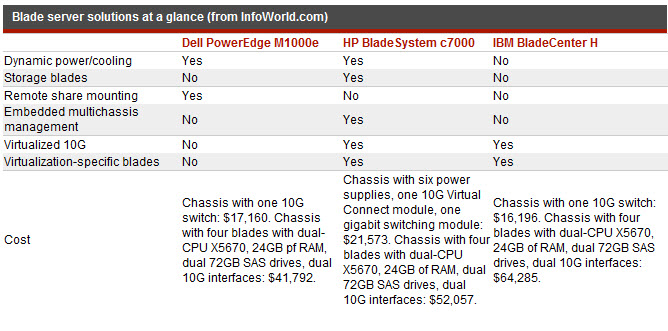
Overall, each vendor has their own pro’s and con’s.  InfoWorld does a great job summarizing the benefits of each offering below.  Please make sure to visit the InfoWorld article and read all of the details of their blade server shoot-out.

ibs symptoms
dish network careers
fort jackson sc
escape the car
navy seals training

IBM BladeCenter H vs Cisco UCS

(From the Archives – September 2009)

News Flash: Cisco is now selling servers!

Okay – perhaps this isn’t news anymore, but the reality is Cisco has been getting a lot of press lately – from their overwhelming presence at VMworld 2009 to their ongoing cat fight with HP. Since I work for a Solutions Provider that sells HP, IBM and now Cisco blade servers, I figured it might be good to “try” and put together a comparison between the Cisco and IBM. Why IBM? Simply because at this time, they are the only blade vendor who offers a Converged Network Adapter (CNA) that will work with the Cisco Nexus 5000 line. At this time Dell and HP do not offer a CNA for their blade server line so IBM is the closest we can come to Cisco’s offering. I don’t plan on spending time educating you on blades, because if you are interested in this topic, you’ve probably already done your homework. My goal with this post is to show the pros (+) and cons (-) that each vendor has with their blade offering – based on my personal, neutral observation

Chassis Variety / Choice: winner in this category is IBM.
IBM currently offers 5 types of blade chassis: BladeCenter S, BladeCenter E, BladeCenter H, BladeCenter T and BladeCenter HT. Each of the IBM blade chassis have unique offerings, such as the BladeCenter S is designed for small or remote offices with local storage capabilities, whereas the BladeCenter HT is designed for Telco environments with options for NEBS compliant features including DC power. At this time, Cisco only offers a single blade chassis offering (the 5808).

IBM BladeCenter H
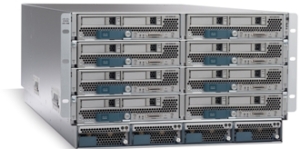
IBM BladeCenter H

Cisco UCS 5108

Cisco UCS 5108

Server Density and Server Offerings: winner in this category is IBM. IBM’s BladeCenter E and BladeCenter H chassis offer up to 14 blade servers with servers using Intel, AMD and Power PC processors. In comparison, Cisco’s 5808 chassis offers up to 8 server slots and currently offers servers with Intel Xeon processors. As an honorable mention Cisco does offer a “full width” blade (Cisco UCS B250 server) that provides up to 384Gb of RAM in a single blade server across 48 memory slots offering up the ability to get to higher memory at a lower price point.

 Management / Scalability: winner in this category is Cisco.
This is where Cisco is changing the blade server game. The traditional blade server infrastructure calls for each blade chassis to have its own dedicated management module to gain access to the chassis’ environmentals and to remote control the blade servers. As you grow your blade chassis environment, you begin to manage multiple servers.
Beyond the ease of managing , the management software that the Cisco 6100 series offers provides users with the ability to manage server service profiles that consists of things like MAC Addresses, NIC Firmware, BIOS Firmware, WWN Addresses, HBA Firmware (just to name a few.)
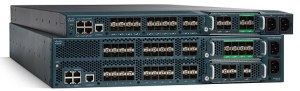
Cisco UCS 6100 Series Fabric Interconnect

Cisco UCS 6100 Series Fabric Interconnect

With Cisco’s UCS 6100 Series Fabric Interconnects, you are able to manage up to 40 blade chassis with a single pair of redundant UCS 6140XP (consisting of 40 ports.)

If you are familiar with the Cisco Nexus 5000 product, then understanding the role of the Cisco UCS 6100 Fabric Interconnect should be easy. The UCS 6100 Series Fabric Interconnect do for the Cisco UCS servers what Nexus does for other servers: unifies the fabric. HOWEVER, it’s important to note the UCS 6100 Series Fabric Interconnect is NOT a Cisco Nexus 5000. The UCS 6100 Series Fabric Interconnect is only compatible with the UCS servers.

UCS Diagram

Cisco UCS I/O Connectivity Diagram (UCS 5108 Chassis with 2 x 6120 Fabric Interconnects)

If you have other servers, with CNAs, then you’ll need to use the Cisco Nexus 5000.

The diagram on the right shows a single connection from the FEX to the UCS 6120XP, however the FEX has 4 uplinks, so if you want (need) more throughput, you can have it. This design provides each half-wide Cisco B200 server with the ability to have 2

CNA ports with redundant pathways. If you are satisified with using a single FEX connection per chassis, then you have the ability to scale up to 20 x blade chassis with a Cisco UCS 6120 Fabric Interconnect, or 40 chassis with the Cisco UCS 6140 Fabric Interconnect. As hinted in the previous section, the management software for the all connected UCS chassis resides in the redundant Cisco UCS 6100 Series Fabric Interconnects. This design offers a highly scaleable infrastructure that enables you to scale simply by dropping in a chassis and connecting the FEX to the 6100 switch. (Kind of like Lego blocks.)

On the flip side, while this architecture is simple, it’s also limited. There is currently no way to add additional I/O to an individual server. You get 2 x CNA ports per Cisco B200 server or 4 x CNA ports per Cisco B250 server.

As previously mentioned, IBM has a strategy that is VERY similar to the Cisco UCS strategy using the Cisco Nexus 5000 product line with pass-thru modules. IBM’s solution consists of:

  • IBM BladeCenter H Chassis
  • 10Gb Pass-Thru Module
  • CNA’s on the blade servers

Even though IBM and Cisco designed the Cisco Nexus 4001i  switch that integrates into the IBM BladeCenter H chassis, using a 10Gb pass-thru module “may” be the best option to get true DataCenter Ethernet (or Converged Enhanced Ethernet) from the server to the Nexus switch – especially for users looking for the lowest cost. The performance for the IBM solution should equal the Cisco UCS design, since it’s just passing the signal through, however the connectivity is going to be more with the IBM solution. Passing signals through means NO cable

BladeCenter H Diagram with Nexus 5010 (using 10Gb Passthru Modules)

BladeCenter H Diagram with Nexus 5010 (using 10Gb Passthru Modules)

consolidation – for every server you’re going to need a connection to the Nexus 5000. For a fully populated IBM BladeCenter H chassis, you’ll need 14 connections to the Cisco Nexus 5000. If you are using the Cisco 5010 (20 ports) you’ll eat up all but 6 ports. Add a 2nd IBM BladeCenter chassis and you’re buying more Cisco Nexus switches. Not quite the scaleable design that the Cisco UCS offers.

IBM also offers a 10Gb Ethernet Switch Option from BNT (Blade Networks) that will work with converged switches like the Nexus 5000, but at this time that upgrade is not available. Once it does become available, it would reduce the connectivity requirements down to a single cable, but, adding a switch between the blade chassis and the Nexus switch could bring additional management complications. Let me know your thoughts on this.

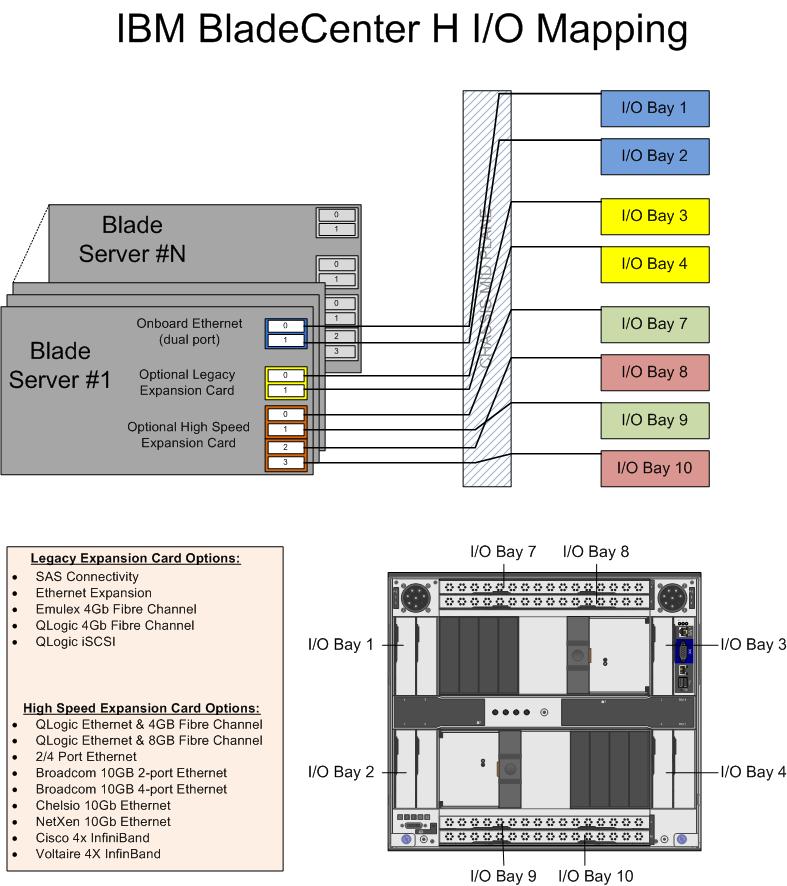
IBM’s BladeCenter H (BCH) does offer something that Cisco doesn’t – additional I/O expansion. Since this solution uses two of the high speed bays in the BCH, bays 1, 2, 3 & 4 remain available. Bays 1 & 2 are mapped to the onboard NICs on each server, and bays 3&4 are mapped to the 1st expansion card on each server. This means that 2 additional NICs and 2 additional HBAs (or NICs) could be added in conjunction with the 2 CNAs on each server. Based on this, IBM potentially offers more I/O scalability.

And the Winner Is…

It depends. I love the concept of the Cisco UCS platform. Servers are seen as processors and memory – building blocks that are centrally managed. Easy to scale, easy to size. However, is it for the average datacenter who only needs 5 servers with high I/O? Probably not. I see the Cisco UCS as a great platform for datacenters with more than 14 servers needing high I/O bandwidth (like a virtualization server or database server.) If your datacenter doesn’t need that type of scalability, then perhaps going with IBM’s BladeCenter solution is the choice for you. Going the IBM route gives you flexibility to choose from multiple processor types and gives you the ability to scale into a unified solution in the future. While ideal for scalability, the IBM solution is currently more complex and potentially more expensive than the Cisco UCS solution.

Let me know what you think. I welcome any comments.

maple grove community center
world population clock
isp speed test
breast cancer symptoms
home decorators coupon
HP Tech Day – Day 1 Recap

Wow – the first day of HP Tech Day 2010 was jammed pack full of meetings, presentations and good information.  Unfortunately, it appears there won’t be any confidential, earth shattering news to report on, but it has still been a great event to attend.

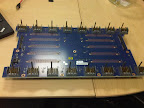
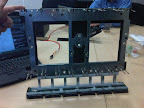
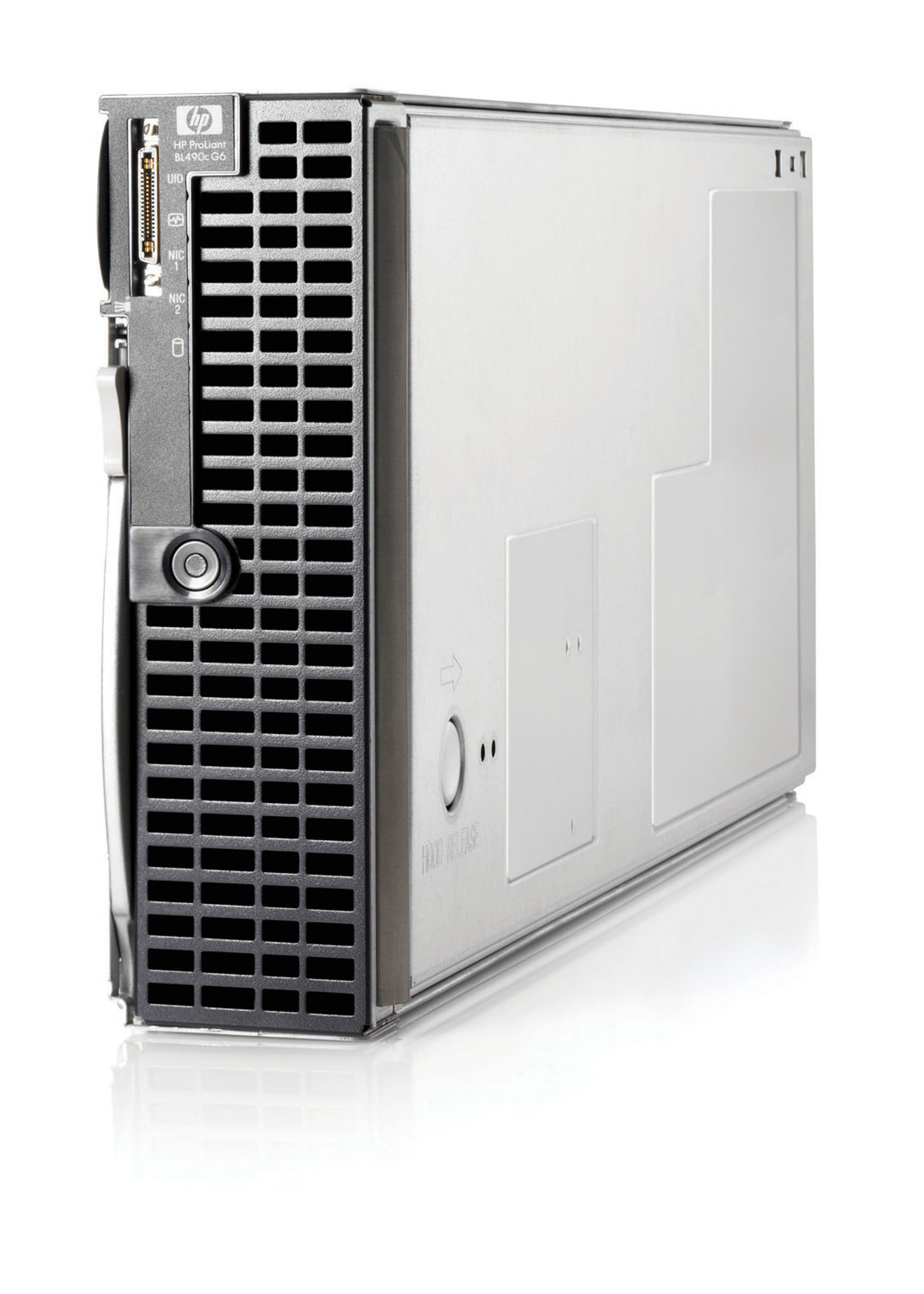
My favorite part of the day was going to the HP BladeSystem demo, where we not only got to get our hands on the blade servers, but we got to see what the mid-plane and power bus looks like outside the chassis. 

From HP Tech Day 2010

Kudos to James Singer, HP Blade engineer, who did a great job talking about the HP BladeSystem and all it offers.  My only advice to the HP events team is to double the time we get with the blades next time.  (Isn’t that why were were here?)

Since I spent most of the day Tweeting what was going on, I figured it would be easiest to just list my tweets throughout the day.  If you have any questions about any of this, let me know.

My tweets from 2/25/2010 (latest to earliest):

Q&A from HP StorageWorks CTO, Paul Perez

  • “the era of spindles for IOPS will be over soon.” Paul Perez, CTO HP StorageWorks
  • CTO Perez said Memristors (http://tinyurl.com/39f6br) are the next major evolution in storage – in next 2 or 3 years
  • CTO Perez views Solid State (Drives) as an extension of main memory.
  • HP StorageWorks CTO, Paul Perez, now discussing HP StorageWorks X9000 Network Storage System (formerly known as IBRIX)
  • @SFoskett is grilling the CTO of HP StorageWorks
  • Paul Perez – CTO of StorageWorks is now in the room

Competitive Discussion

  • Kudos to Gary Thome , Chief Architect at HP, for not wanting to bash any vendor during the competitive blade session
  • Cool – we have a first look at a Tolly report comparing HP BladeSystem Flex-10 vs Cisco UCS…
  • @fowen Yes – a 10Gb, a CNA and a virtual adapter. Cisco doesn’t have anything “on the motherboard” though.
  • RT @fowen: HP is the only vendor (currently) who can embed 10GB nics in Blades @hpbladeday AND Cisco…
  • Wish HP allowed more time for deep dive into their blades at #hpbladesday. We’re rushing through in 20 min content that needs an hour.
  • Dell’s M1000 blade chassis has the blade connector pins on the server side. This causes a lot of issues as pins bend
  • I’m going to have to bite my tongue on this competitive discussion between blade vendors…
  • Mentioning HP’s presence in Gartner’s Magic Quadrant (see my previous post on this here) –> http://tinyurl.com/ydbsnan
  • Fun – now we get to hear how HP blades are better than IBM, Cisco and Dell

HP BladeSystem Matrix Demo

Insight Software Demo

  • Whoops – previous picture was “Tom Turicchi” not John Schmitz
  • John Schmitz, HP, demonstrates HP Insight Software http://tinyurl.com/yjnu3o9
  • HP Insight Control comes with “Data Center Power Control” which allows you to define rules for power control inside your DC
  • HP Insight Control = “Essential Management”; HP Insight Dynamics = “Advanced Management”
  • Live #hpBladesday Tweet Feed can be seen at http://tinyurl.com/ygcaq2a

BladeSystem in the Lab

  • c7000 Power Bus (rear) http://tinyurl.com/yjy3kwy #hpbladesday complete list of pics can be found @ http://tinyurl.com/yl465v9
  • HP c7000 Power Bus (front) http://tinyurl.com/yfwg88t #hpbladesday (one more pic coming…)
  • HP c7000 Midplane (rear) http://tinyurl.com/yhozte6
  • HP BladeSystem C7000 Midplane (front) http://tinyurl.com/ylbr9rd
  • BladeSystem lab was friggin awesome. Pics to follow
  • 23 power “steppings” on each BladeSystem fan
  • 4 fan zones in a HP BladeSystem allows for fans to spin at different rates. – controlled by the Onboard Administrator
  • The designs of the HP BladeSystem cooling fans came from Ducted Electric Jet Fans from hobby planes) http://tinyurl.com/yhug94w
  • Check out the HP SB40c Storage Blade with the cover off : http://tinyurl.com/yj6xode
  • James Singer – talking about HP BladeSystem power (http://tinyurl.com/ykfhbb2)
  • DPS takes total loads and pushes on fewer supplies which maximizes the power efficiency
  • DPS – Dynamic Power Saver dynamically turns power supplies off based on the server loads (HP exclusive technology)
  • HP BladeSystem power supplies are 94% efficient
  • HP’s hot-pluggable equipment is not purple, it’s “port wine”
  • Here’s the HP BladeSystem C3500 (1/2 of a C7000) http://tinyurl.com/yhbpddt
  • In BladeSystem demo with James Singer (HP). Very cool. They’ve got a C3500 (C7000 cut in half.) Picture will come later.

 Lunch

  • Having lunch with Dan Bowers (HP marketing) and Gary Thome – talking about enhancements need for Proliant support materials

 Virtual Connect

ISB Overview and Data Center Trends 2010

  • check out all my previous HP posts at http://tinyurl.com/yzx3hx6
  • BladeSystem midplane doesn’t require transceivers, so it’s easy to run 10Gb at same cost as 1Gb
  • BladeSystem was designed for 10Gb (with even higher in mind.)
  • RT @SFoskett: Spot the secret “G” (for @GestaltIT?) in this #HPBladesDay Nth Generation slide! http://twitpic.com/159q23 
  • If Cisco wants to be like HP, they’d have to buy Lenovo, Canon and Dunder Mifflon
  • discussed how HP blades were used in Avatar (see my post on this here )–> http://tinyurl.com/yl32xud
  • HP’s Virtual Client Infra. Solutions design allows you to build “bricks” of servers and storage to serve 1000’s of virtual PCs
  • Power capping is built into HP hardware (it’s not in the software.)
  • Power Capping is a key technology in the HP Thermal Logic design.
  • HP’s Thermal Logic technology allows you to actively manage power overtime.

More HP and IBM Blade Rumours

I wanted to post a few more rumours before I head out to HP in Houston for “HP Blades and Infrastructure Software Tech Day 2010” so it’s not to appear that I got the info from HP. NOTE: this is purely speculation, I have no definitive information from HP so this may be false info.

First off – the HP Rumour:
I’ve caught wind of a secret that may be truth, may be fiction, but I hope to find out for sure from the HP blade team in Houston.  The rumour is that HP’s development team currently has a Cisco Nexus Blade Switch Module for the HP BladeSystem in their lab, and they are currently testing it out.

Now, this seems far fetched, especially with the news of Cisco severing partner ties with HP, however, it seems that news tidbit was talking only about products sold with the HP label, but made by Cisco (OEM.)   HP will continue to sell Cisco Catalyst switches for the HP BladeSystem and even Cisco branded Nexus switches with HP part numbers (see this HP site for details.)  I have some doubt about this rumour of a Cisco Nexus Switch that would go inside the HP BladeSystem simply because I am 99% sure that HP is announcing a Flex10 type of BladeSystem switch that will allow converged traffic to be split out, with the Ethernet traffic going to the Ethernet fabric and the Fibre traffic going to the Fibre fabric (check out this rumour blog I posted a few days ago for details.)  Guess only time will tell.

The IBM Rumour:
I posted a few days ago a rumour blog that discusses the rumour of HP’s next generation adding Converged Network Adapters (CNA) to the motherboard on the blades (in lieu of the 1GB or Flex10 NICs), well, now I’ve uncovered a rumour that IBM is planning on following later this year with blades that will also have CNA’s on the motherboard.  This is huge!  Let me explain why.

The design of IBM’s BladeCenter E and BladeCenter H have the 1Gb NICs onboard each blade server hard-wired to I/O Bays 1 and 2 – meaning only Ethernet modules can be used in these bays (see the image to the left for details.)  However, I/O Bays 1 and 2 are for “standard form factor I/O modules” while I/O Bays are for “high speed form factor I/O modules”.  This means that I/O Bays 1 and 2 can not handle “high speed” traffic, i.e. converged traffic.

This means that IF IBM comes out with a blade server that has a CNA on the motherboard, either:

a) the blade’s CNA will have to route to I/O Bays 7-10
OR
b) IBM’s going to have to come out with a new BladeCenter chassis that allows the high speed converged traffic from the CNAs to connect to a high speed switch module in Bays 1 and 2.

So let’s think about this.  If IBM (and HP for that matter) does put CNA’s on the motherboard, is there a need for additional mezzanine/daughter cards?  This means the blade servers could have more real estate for memory, or more processors.   If there’s no extra daughter cards, then there’s no need for additional I/O module bays.  This means the blade chassis could be smaller and use less power – something every customer would like to have.

I can really see the blade market moving toward this type of design (not surprising very similar to Cisco’s UCS design) – one where only a pair of redundant “modules” are needed to split converged traffic to their respective fabrics.  Maybe it’s all a pipe dream, but when it comes true in 18 months, you can say you heard it here first.

Thanks for reading.  Let me know your thoughts – leave your comments below.

Blade Networks Announces Industry’s First and Only Fully Integrated FCoE Solution Inside Blade Chassis

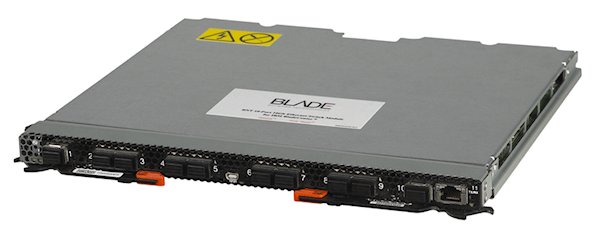
BLADE Network Technologies, Inc. (BLADE), “officially” announces today the delivery of the industry’s first and only fully integrated Fibre Channel over Ethernet (FCoE) solution inside a blade chassis.   This integration significantly reduces power, cost, space and complexity over external FCoE implementations.

You may recall that I blogged about this the other day (click here to read), however I left off one bit of information.  The (Blade Networks) BNT Virtual Fabric 10 Gb Switch Module does not require the QLogic Virtual Fabric Extension Module to function.  It will work with an existing Top-of-Rack (TOR) Convergence Switch from Brocade or Cisco to act as a 10Gb switch module, feeding the converged 10Gb link up to the TOR switch.  Since it is a switch module, you can connect as few as 1 uplink to your TOR switch, therefore saving connectivity costs, as opposed to a pass-thru option (click here for details on the pass-thru option.) 

Yes – this is the same architectural design as the Cisco Nexus 4001i provides as well, however there are a couple of differences:

BNT Virtual Fabric Switch Module (IBM part #46C7191) – 10 x 10Gb Uplinks, $11,199 list (U.S.)
Cisco Nexus 4001i Switch (IBM part #46M6071) – 6 x 10Gb Uplinks, $12,999 list (U.S.)

While BNT provides 4 extra 10Gb uplinks, I can’t really picture anyone using all 10 ports.  However, it does has a lower list price, but I encourage you to check your actual price with your IBM partner, as the actual pricing may be different.  Regardless of whether you choose BNT or Cisco to connect into your TOR switch, don’t forget the transceivers!  They add much more $$ to the overall cost, and without them you are hosed.

About the BNT Virtual Fabric 10Gb Switch Module
The BNT Virtual Fabric 10Gb Switch Module includes the following features and functions:

  • Form-factor
    • Single-wide high-speed switch module (fits in IBM BladeCenter H bays #7 and 9.) 
  • Internal ports
    • 14 internal auto-negotiating ports: 1 Gb or 10 Gb to the server blades
    • Two internal full-duplex 100 Mbps ports connected to the management module
  • External ports
    • Up to ten 10 Gb SFP+ ports (also designed to support 1 Gb SFP if required, flexibility of mixing 1 Gb/10 Gb)
    • One 10/100/1000 Mb copper RJ-45 used for management or data
    • An RS-232 mini-USB connector for serial port that provides an additional means to install software and configure the switch module
  • Scalability and performance
    • Autosensing 1 Gb/10 Gb internal and external Ethernet ports for bandwidth optimization

To read the extensive list of details about this switch, please visit the IBM Redbook located here.

Cisco Wants IBM’s Blade Servers??

In an unusual move Tuesday, Cisco CEO, John Chambers, commented that Cisco is still open to a blade server “partnership” with IBM.  “I still firmly believe that it’s in IBM’s best interests to work with us. That door will always be open,” Chambers told the audience at the Cisco’s financial analyst conference yesterday at Cisco’s HQ in San Jose. 

John Chambers and other executives spent much of the day talking with financial analysts about Cisco’s goal to become the preeminent IT and communications vendor because of the growing importance of virtualization, collaboration and video, a move demonstrated by their recent partnership announcement with EMC and VMware.  According to reports, analysts at the event said they think Chambers is sincere about his willingness to work with IBM. The two companies have much in common, such as their enterprise customer base, and Cisco’s products could fit into IBM’s offerings, said Mark Sue of RBC Capital Markets.

So – is this just a move for Cisco to tighten their relationship with IBM in the hopes of growing to an entity that can defeat HP and their BladeSystem sales, or has Cisco decided that the server market is best left to manufacturers who have been selling servers for 20+ years?  What are your thoughts?  Please feel free to leave some comments and let me know.

IDC Q3 2009 Report: Blade Servers are Growing, HP Leads in Shares

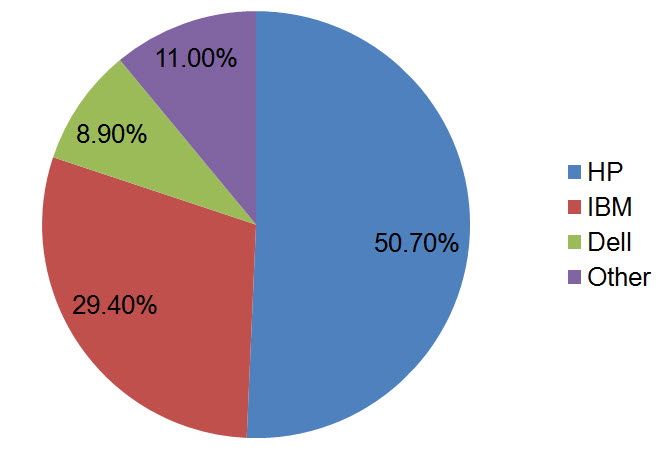
IDC reported on Wednesday that blade server sales for Q3 2009 returned to quarterly revenue growth with factory revenues increasing 1.2% year over year.  However there was a 14.0% year-over-year shipment decline.  Overall blade servers accounted for $1.4 billion in Q3 2009 which represented 13.6% of the overall server revenue.  Of the top 5 OEM blade manufacturers, IBM experienced the strongest blade growth gaining 6.0 points of market share.  However, overall market share for Q3 2009 still belongs to HP with 50.7%, with IBM following up with 29.4% and Dell in 3rd place with a lowly 8.9% revenue share.Q3_2009_Blades According to Jed Scaramella, senior research analyst in IDC's Datacenter and Enterprise Server group,  "Customers are leveraging blade technologies to optimize their environments in response to the pressure of the economic downturn and tighter budgets. Blade technologies provide IT organizations the capability to simplify their IT while improving asset utilization, IT flexibility, and energy efficiency.  For the second consecutive quarter, the blade segment increased in revenue on a quarter-to-quarter basis, while simultaneously increasing their average sales value (ASV). This was driven by next generation processors (Intel Nehalem) and a greater amount of memory, which customers are utilizing for more virtualization deployments. IDC sees virtualization and blades are closely associated technologies that drive dynamic IT for the future datacenter."

IBM Helps Use Blade Servers to Fight Fires

WildfiresOn Thursday, IBM plans to announce its work with university researchers to instantly process data for wildfire prediction — changing the delay time from every six hours to real-time. This will not only help firefighters control the blaze more efficiently, but deliver more informed decisions on public evacuations and health warnings.

The new joint project with the University of Maryland, Baltimore County allows for researches to analyze smoke patterns during wildfires by instantly processing the massive amounts of data available from drone aircraft, high-resolution satellite imagery and air-quality sensors, to develop more effective models for smoke dissipation using a cluster of IBM BladeCenters and IBM InfoSphere Streamsanalytics.   Today analysis of smoke patterns is limited to weather forecasting data, observations from front line workers and low resolution satellite imagery.  This new ability will provide fire and public safety officials with a real-time assessment of smoke patterns during a fire, which will allow them to make more informed decisions on public evacuations and health warnings.

Researchers expect to have a prototype of this new system available by next year.

What Gartner Thinks of Cisco, HP, IBM and Dell (UPDATED)

(UPDATED 10/28/09 with new links to full article)

I received a Tweet from @HPITOps linked to Gartner’s first ever “Magic Quadrant” for blade servers.  Gartner Magic Quadrant - October 2009The Magic Quadrant is a tool that Gartner put together to help people easily where manufacturers rank, based on certain criteria.  As the success of blade servers continues to grow, the demand for blades increases.  You can read the complete Gartner paper at http://h20195.www2.hp.com/v2/getdocument.aspx?docname=4AA3-0100ENW.pdf, but I wanted to touch on a few highlights.

Key Points

  • *Blades are less than 15% of the server marketplace today.
  • *HP and IBM make up 70% of the blade market share
  • *HP, IBM and Dell are classified as “Leaders” in the blade market place and Cisco is listed as a “Visionary” 

What Gartner Says About Cisco, Dell, HP and IBM

Cisco
Cisco announced their entry into the blade server market place in early 2009 and as of the past few weeks began shipping their first product.  Gartner’s report says, “Cisco’s Unified Computing System (UCS) is highly innovative and is particularly targeted at highly integrated and virtualized enterprise requirements.”  Gartner currently views Cisco as being in the “visionaries” quadrant.  The report comments that Cisco’s strengths are:

  • they have a  global presence in “most data centers”
  • differentiated blade design
  • they have a cross-selling opportunity across their huge install base
  • they have strong relationships with virtualization and integration vendors

As part of the report, Gartner also mentions some negative points (aka “Cautions”) about Cisco to consider:

  • Lack of blade server install base
  • limited blade portfolio
  • limited hardware certification by operating system and application software vendors

Obviously these Cautions are based on Cisco’s newness to the marketplace, so let’s wait 6 months and check back on what Gartner thinks.

Dell
No stranger to the blade marketplace, Dell continues to produce new servers and new designs.  While Dell has a fantastic marketing department, they still are not anywhere close to the market share that IBM and HP split.  In spite of this, Gartner still classifies Dell in the “leaders” quadrant.  According to the report, “Dell offers Intel and AMD Opteron blade servers that are well-engineered, enterprise-class platforms that fit well alongside the rest of DelI’s x86 server portfolio, which has seen the company grow its market share steadily through the past 18 months.

The report views that Dell’s strengths are:

  • having a cross-selling opportunity to sell blades to their existing server, desktop and notebook customers
  • aggressive pricing policies
  • focused in innovating areas like cooling and virtual I/O

Dell’s “cautions” are reported as:

  • having a limited portfolio that is targeted toward enterprise needs
  • bad history of “patchy committment” to their blade platforms

It will be interesting to see where Dell takes their blade model.  It’s easy to have a low price model on entry level rack servers, but in a blade server infrastructure where standardization is key and integrated switches are a necessity having the lowest pricing may get tough.

IBM
Since 2002, IBM has ventured into the blade server marketplace with an wide variety of server and chassis offerings.  Gartner placed IBM in the “leaders” quadrant as well, although they place IBM much higher and to the right signifying a “greater ability to execute” and a “more complete vision.”  While IBM once had the lead in blade server market share, they’ve since handed that over to HP.  Gartner reports, “IBM is putting new initiatives in place to regain market share, including supply chain enhancements, dedicated sales resources and new channel programs. 

The report views that IBM’ strengths are:

  • strong global market share
  • cross selling opportunities to sell into existing IBM System x, System i, System p and System z customers
  • broad set of chassis options that address specialized needs (like DC power & NEBS compliance for Telco) as well as Departmental / Enterprise
  • blade server offerings for x86 and Power Processors
  • strong record of management tools
  • innovation around cooling and specialized workloads

Gartner only lists one “caution” for IBM and that is their loss of market share to HP since 2007.

HP
Gartner identifies HP as being in the farthest right in the October 2009 Magic Quadrant, therefore I’ll classify HP as being the #1 “leader.”  Gartner’s report says, “Since the 2006 introduction of its latest blade generation, HP has recaptured market leadership and now sells more blade servers than the rest of the market combined.”  Ironically, Gartner list of HP’s strengths is nearly identical to IBM:

  • global blade market leader
  • cross selling opportunities to sell into existing HP server, laptop and desktop customers
  • broad set of chassis options that address Departmental and Enterprise needs
  • blade server offerings for x86 and Itanium Processors
  • strong record of management tools
  • innovation around cooling and virtual I/O

Gartner only lists one “caution” for HP and that is their portfolio, as extensive as it may be, could be considered too complex and it could be too close to HP’s alternative, modular, rack-based offering.

Gartner’s report continues to discuss other niche players like Fujitsu, NEC and Hitachi, so if you are interesting in reading about them, check out the full report at 

http://h20195.www2.hp.com/v2/getdocument.aspx?docname=4AA3-0100ENW.pdf.  All-in-all, Gartner’s report reaffirms that HP, IBM and Dell are the market leaders, for now, with Cisco coming up behind them.

Feel free to comment on this post and let me know what you think.

estimated tax payments
christmas tree store
beaches in florida
dog treat recipes
new zealand map